
Alptop ONLYO112
Alptop Solar Powered Outdoor Security Camera User Manual
Model: ONLYO112
ভূমিকা
This manual provides comprehensive instructions for the installation, operation, and maintenance of your Alptop 100% Wire-Free Wireless Rechargeable Battery Solar Powered Outdoor 1080P Pan Tilt WiFi Security Camera. Please read this manual thoroughly before using the product to ensure proper functionality and safety.
পণ্য বৈশিষ্ট্য
- 100% Wire-Free & Non-stop Power Supply: Equipped with a 15600mAh rechargeable battery (6pcs 2600mAh included) and a solar panel for continuous power.
- Pan & Tilt & Digital Zoom: Features 1920*1080P resolution with 355° horizontal and 120° vertical rotation. Supports 1.0-4.0X digital zoom.
- রঙিন রাতের দৃষ্টি: Utilizes 2 Infrared LEDs and 4 floodlight LEDs for clear, colorful night vision.
- স্মার্ট পিআইআর মোশন ডিটেকশন: High-sensitive PIR sensor (18ft detection distance) triggers app notifications for human or animal movement, reducing false alarms.
- এসডি কার্ড রেকর্ডিং: Built-in micro SD card slot supports up to 64GB (not included) for motion-activated recording.
- Remotely Access & Two-Way Audio: লাইভ view and playback via the free UBox app on iOS/Android. Built-in 38dB microphone and speaker with anti-noise technology for clear two-way communication.
- IP65 আবহাওয়া-প্রতিরোধী রেটিং: Durable metal housing designed to resist rain and dust, suitable for outdoor use.
প্যাকেজ বিষয়বস্তু
প্যাকেজ আনবক্স করার সময় অনুগ্রহ করে প্যাকেজের বিষয়বস্তু পরীক্ষা করুন:
- Alptop Solar Powered Security Camera
- সৌর প্যানেল (ইন্টিগ্রেটেড)
- Rechargeable Batteries (6pcs 2600mAh)
- মাউন্টিং বন্ধনী
- মাউন্ট স্ক্রু এবং নোঙ্গর
- ইউএসবি চার্জিং কেবল
- ব্যবহারকারী ম্যানুয়াল (এই দস্তাবেজ)

Image: The Alptop Solar Powered Security Camera, showing the main unit and the integrated solar panel.
সেটআপ
1. Initial Charging and SD Card Installation
Before first use, fully charge the camera's internal batteries using the provided USB cable. Locate the SD card slot, typically protected by a rubber cover, and insert a compatible micro SD card (up to 64GB, not included) for local storage.

Image: A detailed diagram of the camera highlighting components such as the microphone, IR light, indicator light, PIR sensor, lens, dual antenna, speaker, and TF card slot.
2. অ্যাপ ডাউনলোড এবং অ্যাকাউন্ট তৈরি
Download the "UBox" app from your device's app store (iOS or Android). Follow the on-screen instructions to create a new account and log in.
3. ক্যামেরা পেয়ারিং
- Open the UBox app and tap "Add Device".
- Power on the camera. The camera will enter pairing mode, indicated by a specific LED light pattern (refer to app for details).
- Follow the app's prompts to connect the camera to your Wi-Fi network. You may need to scan a QR code displayed on your phone screen with the camera's lens.
- Once connected, the camera will confirm successful pairing.

Image: A smartphone displaying the UBox app interface, showing a QR code for camera pairing and a live view of the camera's feed.
4. ক্যামেরা মাউন্ট করা
Choose a mounting location that provides a clear view আপনি যে এলাকাটি পর্যবেক্ষণ করতে চান এবং গ্রহণ করেন তার ample direct sunlight for the solar panel. Use the provided mounting bracket, screws, and anchors to securely attach the camera to a wall or suitable surface. Ensure the solar panel is positioned to maximize sun exposure throughout the day.

Image: The Alptop camera mounted on a wall, illustrating its pan (320 degrees horizontal) and tilt (90 degrees vertical) capabilities, along with a smartphone displaying the live camera feed.
অপারেটিং নির্দেশাবলী
1. লাইভ View এবং নিয়ন্ত্রণ
Open the UBox app and select your camera from the device list to access the live view. Use the on-screen controls to pan (355° horizontal) and tilt (120° vertical) the camera. Pinch to zoom in or out digitally (1.0-4.0X).
৫. দ্বিমুখী অডিও
লাইভ থেকে view, tap the microphone icon to speak through the camera's speaker. Tap the speaker icon to listen to audio from the camera's microphone. This feature allows for real-time communication with visitors or to deter intruders.

Image: An illustration demonstrating the two-way audio feature, showing a person communicating with a delivery person at the door via the camera.
৩.৩. গতি সনাক্তকরণ এবং সতর্কতা
The camera uses a PIR sensor for smart motion detection. When motion is detected, you will receive instant notifications on your smartphone. You can adjust motion sensitivity settings within the UBox app to optimize performance and reduce false alarms.
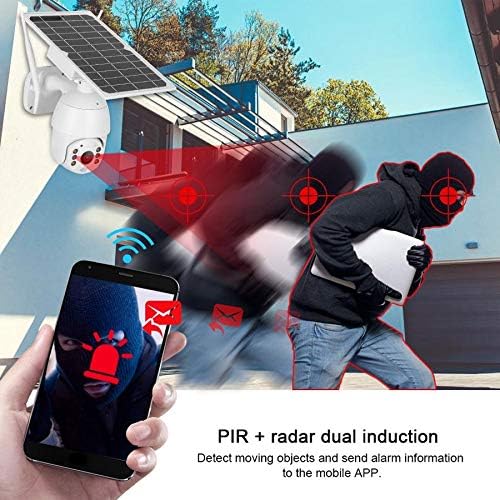
Image: An illustration depicting the PIR motion detection system, showing a person triggering an alert that is sent to a smartphone.
4. নাইট ভিশন
The camera automatically switches to night vision mode in low-light conditions. It supports both infrared (black and white) and full-color night vision using its floodlight LEDs.

Image: The Alptop camera with a light beam emanating from its lens, indicating its support for color night vision.
5. রেকর্ডিং এবং প্লেব্যাক
Recordings are stored on the inserted micro SD card or optionally in cloud storage (if subscribed). Access recorded footage through the "Playback" section in the UBox app. You can browse by date and time to review ঘটনা
রক্ষণাবেক্ষণ
- পরিষ্কার করা: নিয়মিতভাবে ক্যামেরার লেন্স এবং সোলার প্যানেল নরম, ডি দিয়ে মুছুন।amp পরিষ্কার ছবি এবং দক্ষ সৌর চার্জিং নিশ্চিত করার জন্য কাপড়। ঘষিয়া তুলিয়া ফেলিতে সক্ষম ক্লিনার এড়িয়ে চলুন।
- ব্যাটারি যত্ন: While solar-powered, ensure the camera receives adequate sunlight. If the battery level drops significantly, manually charge it via the USB port.
- ফার্মওয়্যার আপডেট: Check the UBox app periodically for firmware updates. Keeping the firmware updated ensures optimal performance and security.
সমস্যা সমাধান
| সমস্যা | সম্ভাব্য সমাধান |
|---|---|
| ক্যামেরা Wi-Fi এর সাথে সংযুক্ত হচ্ছে না | Ensure your Wi-Fi network is 2.4GHz (5GHz is not supported). Check Wi-Fi signal strength at the camera's location. Restart your router and the camera. Re-attempt pairing. |
| দরিদ্র চিত্রের গুণমান | Clean the camera lens. Ensure adequate lighting. Check your internet connection speed. |
| ব্যাটারি চার্জ হচ্ছে না | Ensure the solar panel is clean and receives direct sunlight for several hours daily. Check the USB charging cable connection. |
| ঘন ঘন মিথ্যা গতি সতর্কতা | Adjust the PIR motion detection sensitivity in the UBox app. Ensure the camera is not pointed at busy streets or areas with constant movement (e.g., tree branches swaying). |
| Two-way audio unclear | Ensure a strong Wi-Fi signal. Reduce background noise. Speak clearly and directly into your phone's microphone. |
স্পেসিফিকেশন
| বৈশিষ্ট্য | বিস্তারিত |
|---|---|
| মডেল নম্বর | ONLYO112 |
| ভিডিও রেজোলিউশন | ১০৮০পি (১৯২০x১০৮০) |
| প্যান/টিল্ট রেঞ্জ | অনুভূমিক 355°, উল্লম্ব 120° |
| ডিজিটাল জুম | 1.0-4.0X |
| নাইট ভিশন | Infrared & Color Night Vision |
| শক্তির উৎস | 15600mAh Rechargeable Battery (6x 2600mAh), Solar Powered |
| সংযোগ | ওয়াই-ফাই (শুধুমাত্র 2.4GHz) |
| স্টোরেজ | Micro SD Card (up to 64GB, not included), Cloud Storage (optional) |
| অডিও | দ্বিমুখী অডিও (বিল্ট-ইন মাইক এবং স্পিকার) |
| ওয়েদারপ্রুফ রেটিং | IP65 |
| পিআইআর সনাক্তকরণ দূরত্ব | 18 ফুট পর্যন্ত |
| মাত্রা (L x W x H) | 10 x 15 x 20 ইঞ্চি |
| আইটেম ওজন | 4.36 পাউন্ড (1.98 কেজি) |
ওয়্যারেন্টি এবং সমর্থন
For warranty information and technical support, please refer to the contact details provided with your product packaging or visit the official Alptop webসাইট। বর্ধিত কভারেজের জন্য সুরক্ষা পরিকল্পনা উপলব্ধ থাকতে পারে।
Ask a question about this manual
Ask about setup, troubleshooting, compatibility, parts, safety, or missing instructions. Manuals+ will review the question and use this page’s manual context to help answer it.