
Sinotimer TM618N-2
SINOTIMER TM618 -7 Days Programmable Weekly Timer Module
নির্দেশিকা ম্যানুয়াল
Model: TM618N-2
1. ওভারview
The SINOTIMER TM618 timer module is designed to automatically control the power supply to various electrical apparatus, such as streetlights, neon signs, billboards, and other appliances, based on a preset time schedule. This digital timer switch features a rechargeable internal battery to maintain program settings during power outages

চিত্র 1.1: সামনে view of the TM618 Timer Module.
2. মূল বৈশিষ্ট্য
- কম্প্যাক্ট এবং স্থান-সংরক্ষণ নকশা.
- Engineered with advanced digital timing technology.
- High functionality for precise time control.
- Built-in rechargeable battery for program retention.
- Multiple ON/OFF programs for weekly scheduling.
3. সেটআপ এবং ইনস্টলেশন
3.1. তারের ডায়াগ্রাম
Proper wiring is crucial for the safe and correct operation of the TM618 timer module. Refer to the diagram below for connection details. Ensure power is disconnected before performing any wiring.
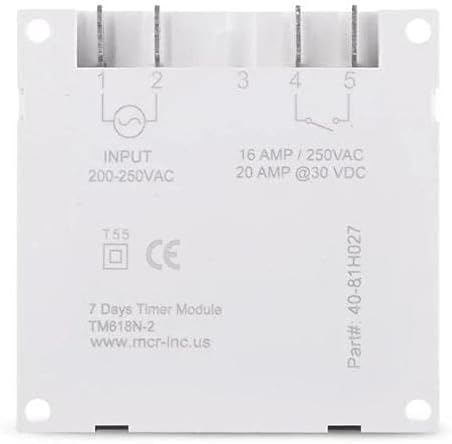
Figure 3.1: Wiring Terminals and Specifications.
- Input (200-250VAC): Connect your main power supply to terminals 1 and 2.
- Output (16 AMP / 250VAC, 20 AMP @30 VDC): Terminals 3, 4, and 5 are for the controlled output. Terminal 3 is common, Terminal 4 is normally open (NO), and Terminal 5 is normally closed (NC). Connect your load to the appropriate terminals based on your application (e.g., between 3 and 4 for normally off, turning on when timed).
3.2. Initial Power-Up and Battery
Upon initial power-up, the timer's internal rechargeable battery (40mAh) will begin charging. This battery saves your programmed settings during power interruptions. Allow the unit to be powered for at least 30 minutes for the battery to gain sufficient charge before programming or disconnecting power.

Figure 3.2: Internal 40mAh Rechargeable Battery.
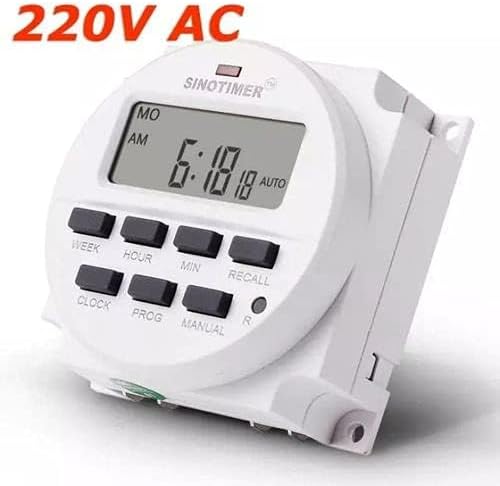
Figure 3.3: TM618 Operating Voltage (220V AC shown).
4. অপারেটিং নির্দেশাবলী
The TM618 timer allows for precise control with up to 16 ON/OFF programs per day or week. The buttons on the front panel are used for setting the time and programs.

Figure 4.1: Timer Module with Manual.
4.1. বর্তমান সময় নির্ধারণ করা
- চাপুন ঘড়ি বোতাম টিপুন এবং ধরে রাখুন।
- ধরে রাখার সময় ঘড়ি, টিপুন সপ্তাহ সপ্তাহের বর্তমান দিন সেট করতে।
- ধরে রাখার সময় ঘড়ি, টিপুন ঘন্টা বর্তমান ঘন্টা সেট করতে।
- ধরে রাখার সময় ঘড়ি, টিপুন MIN বর্তমান মিনিট সেট করতে।
- মুক্তি ঘড়ি বোতাম। সময় এখন সেট করা হয়েছে।
৫.১. প্রোগ্রামিং চালু/বন্ধের সময়
টাইমারটি ১৬টি পর্যন্ত চালু/বন্ধ প্রোগ্রাম সমর্থন করে। প্রতিটি প্রোগ্রামে একটি চালু সময় এবং একটি বন্ধ সময় থাকে।
- চাপুন প্রগ একবার বোতাম টিপুন। ডিসপ্লেতে "1 ON" দেখাবে।
- চাপুন সপ্তাহ to select the day(s) for this program (e.g., MO, TU, WE, TH, FR, SA, SU, or combinations like MO-FR, SA-SU, MO-SA, etc.).
- চাপুন ঘন্টা পছন্দসই চালু ঘন্টা সেট করতে।
- চাপুন MIN পছন্দসই অন মিনিট সেট করতে।
- চাপুন প্রগ আবার। ডিসপ্লেতে "1 OFF" দেখাবে।
- Repeat steps 2-4 to set the desired OFF day(s), hour, and minute for this program.
- চাপুন প্রগ to advance to the next program ("2 ON") or to exit programming mode if no more programs are needed.
- To clear a program, press স্মরণ করুন যখন viewing the specific ON or OFF program you wish to clear.
4.3। ম্যানুয়াল ওভাররাইড
চাপুন ম্যানুয়াল বিভিন্ন অপারেটিং মোডের মধ্য দিয়ে সাইকেল চালানোর জন্য বোতাম:
- অটো চালু: The timer is currently ON and will follow the programmed schedule.
- স্বয়ংক্রিয় বন্ধ: The timer is currently OFF and will follow the programmed schedule.
- চালু: The timer is forced ON, overriding any programs.
- বন্ধ করুন: The timer is forced OFF, overriding any programs.
4.4. Recall Function
দ স্মরণ করুন button (often marked 'R' or 'RESET') is used to clear specific program settings or to reset the timer. A small pinhole button (R) is typically used for a full reset, which clears all programs and resets the time.
5. রক্ষণাবেক্ষণ
১৪. ব্যাটারি কেয়ার
The TM618 features a built-in rechargeable battery. To ensure its longevity and proper function, keep the timer connected to power for regular charging. If the timer is stored for extended periods without power, the battery may discharge, requiring a full charge upon reconnection.
5.2. পরিষ্কার করা
Clean the exterior of the timer module with a soft, dry cloth. Do not use abrasive cleaners or solvents, as these can damage the plastic casing অথবা ডিসপ্লে। নিশ্চিত করুন যে ডিভাইসে কোনও তরল পদার্থ প্রবেশ করছে না।
6. সমস্যা সমাধান
- প্রদর্শন ফাঁকা: Check power connections. Ensure the unit has been powered for at least 30 minutes to charge the internal battery.
- যেসব প্রোগ্রাম কার্যকর হচ্ছে না: Verify that the current time is set correctly. Check that the timer is in "AUTO ON" or "AUTO OFF" mode, not forced ON/OFF. Review your programmed ON/OFF times for accuracy.
- Timer not responding to buttons: Perform a full reset using the small 'R' pinhole button. If issues persist, ensure proper power supply.
7. স্পেসিফিকেশন
| বৈশিষ্ট্য | মান |
|---|---|
| ব্র্যান্ডের নাম | সিনোটাইমার |
| মডেল নম্বর | TM618N-2 (Item model number: WN-5KCF-8SVQ) |
| ইনপুট ভলিউমtage | 200-250VAC |
| আউটপুট ক্ষমতা | 16 AMP / 250VAC, 20 AMP @30 ভিডিসি |
| প্রোগ্রামের সংখ্যা | 16টি চালু/বন্ধ প্রোগ্রাম |
| টাইমিং রেঞ্জ | ১ মিনিট থেকে ১৬৮ ঘন্টা (৭ দিন) |
| অভ্যন্তরীণ ব্যাটারি | 40mAh রিচার্জেবল |
| উপাদান | প্লাস্টিক |
| রঙ | সাদা |
| পণ্যের মাত্রা | 25 x 18 x 8 সেমি; 11 গ্রাম |
7.1. মাত্রা
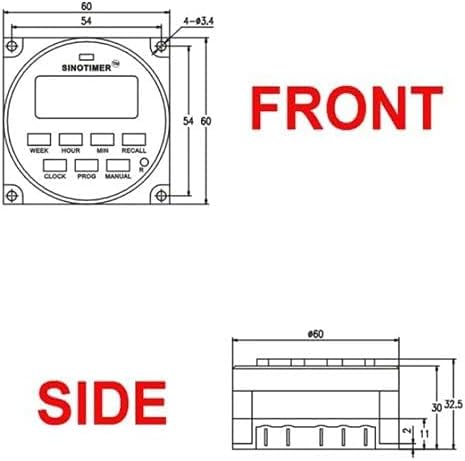
Figure 7.1: Front Dimensions.

Figure 7.2: Side Dimensions.
8. ওয়্যারেন্টি এবং সমর্থন
For information regarding product warranty, technical support, or service, please refer to the documentation provided with your purchase or contact your retailer. Keep your proof of purchase for any warranty claims.
Ask a question about this manual
Ask about setup, troubleshooting, compatibility, parts, safety, or missing instructions. Manuals+ will review the question and use this page’s manual context to help answer it.