
1. গুরুত্বপূর্ণ নিরাপত্তা তথ্য
Please read all safety instructions carefully before using this product. Failure to follow these instructions may result in injury or damage.
- বসানো: Avoid placing the camera in unstable locations or within reach of children or pets.
- শক্তি: Use only the provided AC adapter and power cable. Disconnect power before moving the device.
- পরিবেশ: Keep the camera away from high humidity, dust, and extreme temperatures. This product is not waterproof.
- রক্ষণাবেক্ষণ: Do not attempt to disassemble or repair the camera yourself. Contact customer support for any issues.

Image: General safety guidelines for camera usage.
2. প্যাকেজ বিষয়বস্তু
আপনার প্যাকেজে সমস্ত জিনিসপত্র অন্তর্ভুক্ত আছে কিনা তা নিশ্চিত করুন:
- Galayou G2 Camera Unit
- এসি অ্যাডাপ্টার
- পাওয়ার ক্যাবল
- মাউন্টিং কিট (স্ক্রু, অ্যাঙ্কর)
- জাপানি নির্দেশিকা ম্যানুয়াল

Image: The Galayou G2 camera and a smartphone displaying its live feed.
3. সেটআপ গাইড
3.1 প্রাথমিক সেটআপ
- পাওয়ার চালু: Connect the camera to power using the provided AC adapter and cable. The indicator light will turn red.
- অ্যাপ ডাউনলোড করুন: Download the dedicated 'blurams' app from the App Store (iOS) or Google Play Store (Android).
- অ্যাপ অনুমতি: Ensure Bluetooth and Location permissions are enabled for the 'blurams' app in your smartphone settings.
- ক্যামেরা রিসেট করুন: Press and hold the reset button on the camera until you hear a beep sound. The indicator light will flash red and blue alternately, indicating it's ready for network connection.
- অ্যাপে ডিভাইস যোগ করুন: Open the 'blurams' app, tap 'Add Device' or the '+' icon. Select your camera model (G2 or similar D1 model) and choose 'Wi-Fi connection via Bluetooth'.
- ওয়াই-ফাই সংযোগ: Enter your 2.4GHz Wi-Fi network name and password. The camera only supports 2.4GHz Wi-Fi.
- QR কোড স্ক্যান: The app will display a QR code. Hold your smartphone in front of the camera lens to scan the QR code. You will hear a beep sound from the camera upon successful scan.
- সংযোগ নিশ্চিতকরণ: The camera will announce 'Connection successful' and then 'Connecting to network'. Once connected, the indicator light will turn solid blue.
3.2 Video Guide: Bluetooth Wi-Fi Connection
Video: This video demonstrates the Bluetooth-assisted Wi-Fi connection method for the D1 camera, which is similar to the G2 model. It shows the steps from app permissions to successful network connection.
3.3 Video Guide: Camera Setup Method
Video: This video provides a general guide on how to set up a Skyworth pet camera, which can be used as a reference for the Galayou G2's setup process.
4. অপারেটিং নির্দেশাবলী
4.1 লাইভ View এবং প্যান/টিল্ট নিয়ন্ত্রণ
Once connected, you can access the live feed through the 'blurams' app. The camera offers a 355° horizontal rotation and 52° vertical rotation for comprehensive coverage.
- প্যান/কাত: Use the directional controls in the app to remotely adjust the camera's viewআইএন কোণ
- ডিজিটাল জুম: The camera supports 4x digital zoom to view বিস্তারিত

Image: The camera's pan and tilt capabilities, offering a wide field of view.
4.2 Video Quality and Night Vision
The G2 camera features 2K high-resolution video (1440p) and a 3-megapixel CMOS sensor for clear images. It also provides advanced night vision capabilities.
- 2K রেজোলিউশন: Enjoy clear and detailed video footage.
- নাইট ভিশন মোড: The camera supports three night vision modes: Smart Night Vision (auto-switches between color and black & white based on motion), Color Night Vision (always color), and Infrared Night Vision (always black & white).
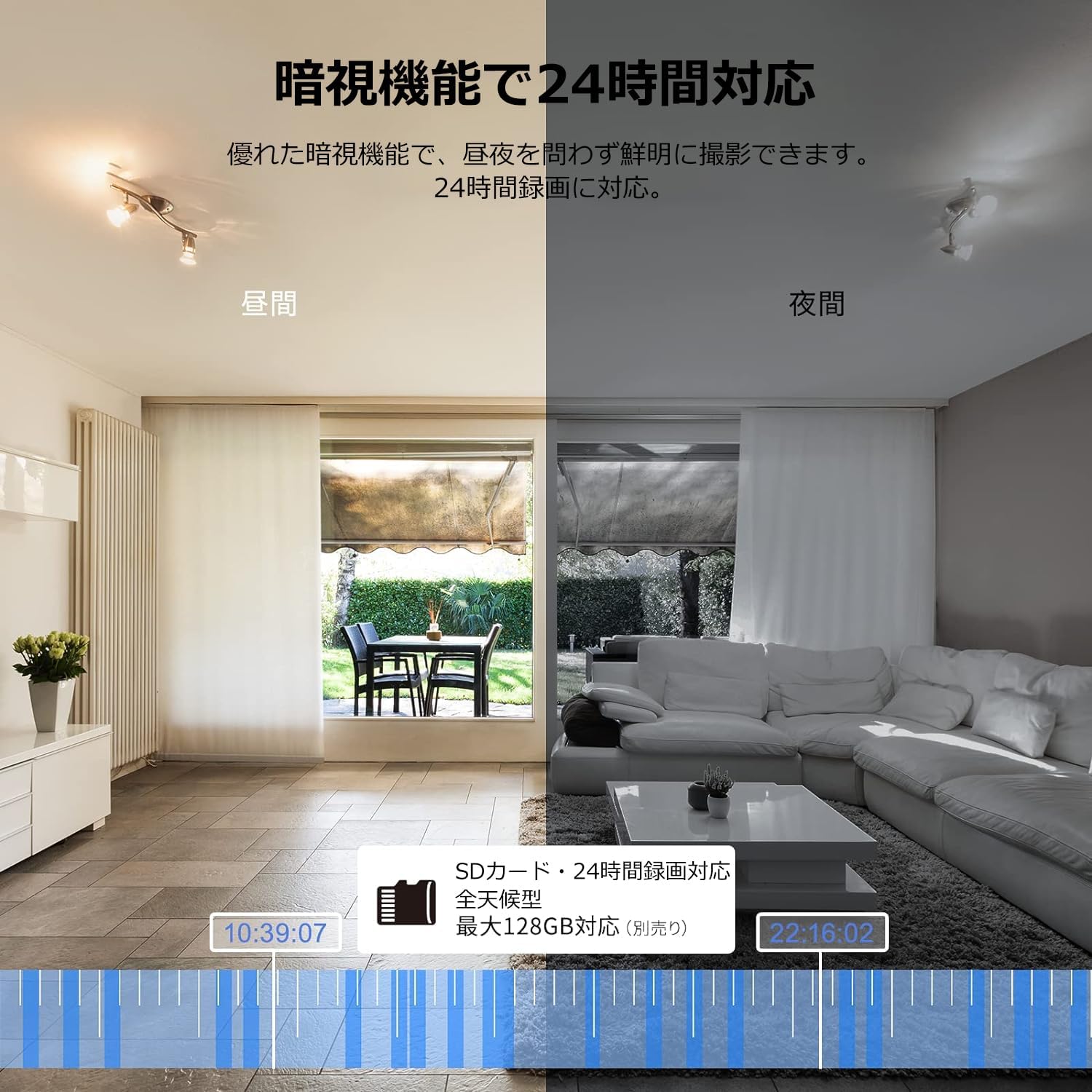
Image: Comparison of day and night vision, demonstrating the camera's ability to record clearly in low light.
৪.৪ দ্বিমুখী অডিও
Equipped with a microphone and speaker, the camera allows for real-time two-way communication.
- Speak and Listen: Talk to family members or pets through the app, and hear their responses.
- শব্দ কমানো: The two-way audio features noise reduction for clearer sound.

Image: The camera's two-way audio feature, allowing interaction with pets.
৫.৪ গতি সনাক্তকরণ এবং স্বয়ংক্রিয় ট্র্যাকিং
The camera can detect motion and automatically track subjects within its field of view.
- মোশন সতর্কতা: গতি শনাক্ত হলে আপনার স্মার্টফোনে তাৎক্ষণিক বিজ্ঞপ্তি পান।
- স্বয়ংক্রিয় ট্র্যাকিং: The camera will follow detected movement, keeping the subject in frame.
- মানব সনাক্তকরণ: Advanced AI can differentiate between humans and other moving objects, reducing false alarms.
- অ্যালার্ম ফাংশন: Trigger an alarm sound from the camera via the app to deter intruders.

Image: Motion detection and alarm features, showing alerts on a smartphone.
4.5 রেকর্ডিং এবং স্টোরেজ
The camera supports both local and cloud storage options for continuous recording.
- মাইক্রোএসডি কার্ড: Supports up to 128GB microSD cards (sold separately) for 24-hour continuous recording with automatic overwriting.
- ক্লাউড স্টোরেজ: Optional paid cloud storage service is available for extended recording and backup.
- ভিডিও কম্প্রেশন: Utilizes H.264 and H.265 compression formats for efficient storage.


Images: MicroSD card recording and cloud storage options.
৫.৫ গোপনীয়তা মোড
Activate privacy mode to physically cover the camera lens, ensuring your privacy when needed.
- One-Tap Activation: Easily turn off the lens via the app.
- Physical Cover: The camera physically rotates its lens downwards, blocking the view.

Image: Privacy mode icon.
৪.৬ আলেক্সা ইন্টিগ্রেশন
The Galayou G2 is Alexa-certified, allowing for voice control and viewing the camera feed on compatible Alexa devices.
- ভয়েস কমান্ড: ভয়েস কমান্ড ব্যবহার করুন view the camera feed on an Echo Show or other Alexa-enabled screen.

Image: Alexa integration with the Galayou G2 camera.
4.8 Multi-Camera Support & Sharing
The app supports adding multiple cameras and sharing access with family members.
- একাধিক ক্যামেরা: Monitor different areas of your home by adding several cameras to the app.
- পারিবারিক শেয়ারিং: Share camera access with up to 4 family members simultaneously.

Image: Family sharing and multi-camera viewing
4.9 Video Guide: Product Features
Video: This video showcases various features of a Skyworth pet camera, including its monitoring capabilities, which are comparable to the Galayou G2.
4.10 Video Guide: Blurams 300万画素 見守りカメラ
Video: This video highlights the features of a Blurams 3-megapixel monitoring camera, demonstrating functionalities similar to the Galayou G2.
4.11 Video Guide: JUFLSKY 300万画素 360°PTZ機 (Preview)
ভিডিও: একটি সংক্ষিপ্ত প্রাকদর্শনview ভিডিও শোasing a 300-megapixel 360° PTZ camera, similar in functionality to the G2.
5. সমস্যা সমাধান
- Wi-Fi এর সাথে সংযোগ করা যাচ্ছে না:
- আপনার ওয়াই-ফাই নেটওয়ার্ক 2.4GHz কিনা তা নিশ্চিত করুন। ক্যামেরাটি 5GHz নেটওয়ার্ক সমর্থন করে না।
- আপনার ওয়াই-ফাই পাসওয়ার্ড সঠিক কিনা তা পরীক্ষা করে দেখুন।
- ক্যামেরাটি আপনার ওয়াই-ফাই রাউটারের কাছাকাছি নিয়ে যান।
- Perform a factory reset on the camera and try the setup process again.
- No Live Feed:
- আপনার ইন্টারনেট সংযোগ পরীক্ষা করুন.
- Ensure the camera is powered on and the indicator light is solid blue.
- অ্যাপটি এবং/অথবা আপনার স্মার্টফোনটি পুনরায় চালু করুন।
- গতি সনাক্তকরণ কাজ করছে না:
- অ্যাপ সেটিংসে গতি সনাক্তকরণ সক্ষম আছে কিনা তা যাচাই করুন।
- গতি সনাক্তকরণ সংবেদনশীলতা সামঞ্জস্য করুন।
- নিশ্চিত করুন যে ক্যামেরার সামনে কোনও বাধা নেই। view.
- খারাপ ভিডিও গুণমান:
- Check your internet speed. A stable connection is required for optimal streaming.
- ক্যামেরার লেন্স পরিষ্কার আছে তা নিশ্চিত করুন।
- Adjust the video quality settings in the app (e.g., from SD to 2K).
6. স্পেসিফিকেশন
| বৈশিষ্ট্য | স্পেসিফিকেশন |
|---|---|
| মডেলের নাম | G2 |
| মাউন্ট টাইপ | Tabletop and Ceiling Mount |
| ভিডিও ক্যাপচার রেজোলিউশন | 1440p (2K) |
| রঙ | Automatic Tracking Camera |
| অন্তর্ভুক্ত উপাদান | Camera body, AC adapter, Japanese instruction manual, mounting set, power cable |
| বেতার যোগাযোগ প্রযুক্তি | ওয়াই-ফাই (শুধুমাত্র 2.4GHz) |
| কার্যকর ভিডিও রেজোলিউশন | 2 Megapixels (300万画素) |
| এর ক্ষেত্র View | 95 ডিগ্রী |
| নাইট ভিশন রেঞ্জ | 7 মিটার |
| ফ্রেম রেট | 15 fps |
| উপাদান | প্লাস্টিক |
| পণ্যের মাত্রা (LxWxH) | 7.2 x 7.2 x 10.9 সেমি |
| জল প্রতিরোধের স্তর | জলরোধী নয় |
| আলোর উৎস | ইনফ্রারেড |
| প্রস্তাবিত ব্যবহার | ইনডোর সিকিউরিটি |
| ইনডোর/আউটডোর ব্যবহার | ইনডোর |
| সামঞ্জস্যপূর্ণ ডিভাইস | Smartphone, Tablet, Desktop, Laptop |
| শক্তির উৎস | কর্ডেড ইলেকট্রিক |
| কন্ট্রোলার টাইপ | অ্যাপ |
7. ওয়্যারেন্টি এবং সমর্থন
The Galayou G2 camera comes with a manufacturer's warranty and customer support.
- ওয়ারেন্টি: ১৫ বছরের প্রস্তুতকারকের ওয়ারেন্টি।
- প্রযুক্তিগত সহায়তা: For any issues or questions, please contact GALAYOU customer support through the app or visit the official GALAYOU store on Amazon.