
1. ভূমিকা
Thank you for choosing the Aigo AC SE 120 Water Cooler. This All-in-One (AIO) liquid cooling system is designed to provide efficient thermal management for your CPU, ensuring stable performance and extended component lifespan. This manual provides detailed instructions for installation, operation, maintenance, and troubleshooting.
Please read this manual thoroughly before installation and use to ensure proper setup and to prevent any damage to your system.
2. নিরাপত্তা তথ্য
- যেকোনো যন্ত্রাংশ ইনস্টল বা রক্ষণাবেক্ষণ করার আগে সর্বদা আপনার কম্পিউটার থেকে বিদ্যুৎ সংযোগ বিচ্ছিন্ন করুন।
- ক্ষতি এড়াতে সাবধানে যন্ত্রাংশ পরিচালনা করুন।
- সংবেদনশীল উপাদানগুলিতে ইলেক্ট্রোস্ট্যাটিক ডিসচার্জ (ESD) ক্ষতি রোধ করতে একটি অ্যান্টি-স্ট্যাটিক রিস্ট স্ট্র্যাপ পরুন।
- Do not open the sealed liquid cooling loop. Tampering with the unit may cause leaks and void your warranty.
- চলমান যন্ত্রাংশের (যেমন, ফ্যানের ব্লেড) সাথে হস্তক্ষেপ এড়াতে নিশ্চিত করুন যে সমস্ত তারগুলি সঠিকভাবে সংযুক্ত এবং রুট করা হয়েছে।
- শিশুদের নাগালের বাইরে রাখুন।
3. প্যাকেজ বিষয়বস্তু
ইনস্টলেশন শুরু করার আগে যাচাই করুন যে সমস্ত উপাদান উপস্থিত আছে এবং ভালো অবস্থায় আছে।
- Aigo AC SE 120 Water Cooler Unit (Pump, Radiator, Fan pre-installed)
- Mounting Hardware for Intel Sockets (LGA 2066/ 2011-v3 / 2011 / 1700 / 1366 / 1200 / 115X)
- Mounting Hardware for AMD Sockets (FM1 / FM2 / FM2+ / AM2 / AM2+ / AM3 / AM3+ / AM4)
- থার্মাল পেস্ট (পূর্বে প্রয়োগ করা বা নলের মধ্যে)
- ব্যবহারকারীর ম্যানুয়াল

Image: Aigo AC SE 120 Water Cooler unit with its fan, radiator, pump, and various mounting brackets and screws for different CPU sockets.
4. স্পেসিফিকেশন
| Socket Compatibility (Intel) | LGA 2066/ 2011-v3 / 2011 / 1700 / 1366 / 1200 / 115X |
| সকেট সামঞ্জস্য (AMD) | FM1 / FM2 / FM2+ / AM2 / AM2+ / AM3 / AM3+ / AM4 |
| জল ব্লক মাত্রা | 71 x 66.5 x 45 মিমি |
| রেডিয়েটর মাত্রা | 154 x 120 x 27 মিমি |
| ফ্যান মাত্রা | 120 x 120 x 25 মিমি |
| পাম্প গতি | 3200 ± 10% RPM |
| ফ্যানের গতি | 800 ~ 1800 RPM |
| বায়ুপ্রবাহ | 64.05 সিএফএম |
| টিডিপি (তাপীয় নকশা শক্তি) | 165W |
| নয়েজ লেভেল | 30 dBA ± 10% |
| স্ট্যাটিক প্রেসার | 1.85 mmH2O |
| বিয়ারিং টাইপ | সিরামিক |
| রেট ভলিউমtage | 12V |
| কুলিং পদ্ধতি | তরল (জল) |
| সামঞ্জস্যপূর্ণ ডিভাইস | ডেস্কটপ |
5. সেটআপ এবং ইনস্টলেশন
This section outlines the general steps for installing your Aigo AC SE 120 Water Cooler. Specific steps may vary slightly depending on your motherboard and PC case. Always refer to your motherboard and case manuals for detailed instructions.
5.1 Prepare the CPU Socket
- ইন্টেল সকেট: Attach the correct Intel backplate to the rear of your motherboard. Secure the standoffs through the motherboard holes from the front.
- এএমডি সকেট: The cooler typically uses the existing AMD backplate. Remove the plastic retention clips from the stock AMD cooler mount, leaving the backplate in place. Install the appropriate AMD standoffs.
- Ensure the CPU is correctly seated in its socket.
- Clean the CPU surface with isopropyl alcohol to remove any old thermal paste or residue.
- Apply a thin, even layer of thermal paste to the center of the CPU's integrated heat spreader (IHS). If thermal paste is pre-applied to the water block, skip this step.
5.2 Install the Radiator and Fan
- Determine the optimal mounting location for the 120mm radiator in your PC case. Common locations include the rear exhaust or top exhaust.
- Mount the 120mm fan to the radiator using the provided screws. Ensure the fan is oriented to push or pull air in the desired direction (e.g., exhaust air out of the case).
- Secure the radiator assembly to your PC case using the appropriate screws.

ছবি: সাইড view of the Aigo AC SE 120 Water Cooler, showing the radiator with a white fan attached, and the pump/water block unit.
5.3 Mount the Water Block
- Attach the correct mounting brackets to the water block/pump unit.
- Carefully place the water block onto the CPU, aligning the mounting holes with the standoffs.
- প্রদত্ত থাম্ব স্ক্রু বা নাট দিয়ে ওয়াটার ব্লকটি সুরক্ষিত করুন, তির্যক প্যাটার্নে শক্ত করে শক্ত করুন যতক্ষণ না এটি ঠিক হয়ে যায়। অতিরিক্ত টাইট করবেন না।
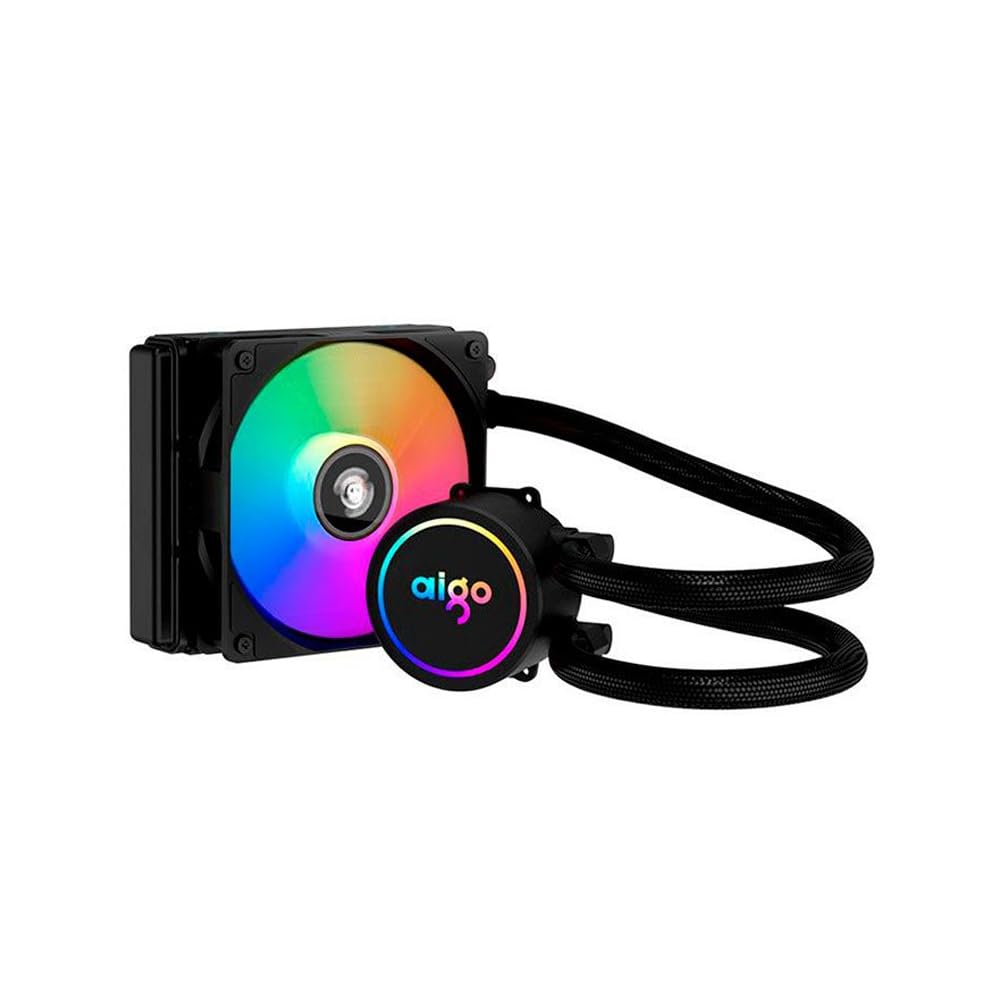
Image: The Aigo AC SE 120 Water Cooler showing the pump unit with an illuminated Aigo logo and a rainbow-colored fan on the radiator.
5.4 তারগুলি সংযুক্ত করুন
- Connect the pump power cable to a dedicated AIO_PUMP or CPU_FAN header on your motherboard. If your motherboard has neither, use a SYS_FAN header and ensure it is set to run at full speed in the BIOS.
- Connect the fan power cable to the CPU_FAN header on your motherboard. If your motherboard has multiple fan headers, consult your motherboard manual for the recommended CPU fan header.
- If your cooler has RGB lighting, connect the RGB cable to a compatible RGB header on your motherboard (e.g., 3-pin ARGB or 4-pin RGB, depending on the cooler's connector type).
- Route all cables neatly to avoid obstructing airflow or interfering with other components.
6. অপারেটিং নির্দেশাবলী
Once installed, the Aigo AC SE 120 Water Cooler operates automatically based on your motherboard's fan control settings.
- প্রাথমিক পাওয়ার অন: After installation, power on your computer. The pump and fan should start operating.
- BIOS/UEFI সেটিংস: Access your motherboard's BIOS/UEFI settings to ensure the CPU_FAN and AIO_PUMP headers are configured correctly. It is recommended to set the pump header to run at full speed (100%) for optimal cooling performance. Fan speeds can be adjusted based on temperature curves for a balance of cooling and noise.
- আরজিবি আলো: If connected to an RGB header, the lighting effects can typically be controlled via your motherboard's RGB software (e.g., ASUS Aura Sync, MSI Mystic Light, Gigabyte RGB Fusion, ASRock Polychrome Sync).
- পর্যবেক্ষণ: Use system monitoring software to check CPU temperatures and ensure the cooler is functioning effectively.

ছবি: উপরে থেকে নিচে view of the Aigo AC SE 120 Water Cooler, highlighting the illuminated Aigo logo on the pump and the rainbow lighting of the fan.
7. রক্ষণাবেক্ষণ
Regular maintenance helps ensure optimal performance and longevity of your water cooler.
- ধুলো পরিষ্কার: ধুলো জমা রোধ করতে রেডিয়েটরের পাখনা এবং ফ্যানের ব্লেডগুলি পর্যায়ক্রমে পরিষ্কার করুন, যা বায়ুপ্রবাহকে বাধাগ্রস্ত করতে পারে এবং শীতলকরণের দক্ষতা হ্রাস করতে পারে। সংকুচিত বাতাস বা নরম ব্রাশ ব্যবহার করুন।
- ফ্যান পরিদর্শন: Check the fan for any signs of wear, damage, or excessive noise. Replace if necessary.
- পায়ের পাতার মোজাবিশেষ পরিদর্শন: Visually inspect the hoses for any kinks, cracks, or signs of leakage. While AIOs are sealed, regular checks are recommended.
- তাপীয় পেস্ট: The thermal paste typically lasts for several years. If you notice a significant increase in CPU temperatures over time, consider reapplying fresh thermal paste. This requires carefully removing the water block, cleaning both surfaces, and applying new paste.
8. সমস্যা সমাধান
If you encounter issues with your Aigo AC SE 120 Water Cooler, refer to the following common problems and solutions:
| সমস্যা | সম্ভাব্য কারণ | সমাধান |
|---|---|---|
| উচ্চ CPU তাপমাত্রা |
|
|
| পাখা ঘুরছে না |
|
|
| পাম্প চলছে না / অস্বাভাবিক শব্দ |
|
|
| আরজিবি লাইটিং কাজ করছে না |
|
|
9. ওয়্যারেন্টি এবং সমর্থন
The Aigo AC SE 120 Water Cooler comes with a 12 মাসের ওয়ারেন্টি ক্রয়ের তারিখ থেকে। এই ওয়ারেন্টিটি স্বাভাবিক ব্যবহারের পরিস্থিতিতে উৎপাদন ত্রুটি এবং ত্রুটিগুলি কভার করে।
ওয়ারেন্টি কভার করে না:
- Damage caused by improper installation, misuse, abuse, or neglect.
- অননুমোদিত পরিবর্তন বা মেরামত দ্বারা সৃষ্ট ক্ষতি.
- প্রাকৃতিক দুর্যোগ বা দুর্ঘটনার কারণে ক্ষয়ক্ষতি।
For technical support, warranty claims, or further assistance, please contact your retailer or the Aigo customer service department. Please have your proof of purchase and product model number (ACSE120-BK) ready when contacting support.