
symcode USA-6709DA-Green
Symcode Wireless Bluetooth Barcode Scanner User Manual
Model: USA-6709DA-Green
1. ভূমিকা
This user manual provides comprehensive instructions for the Symcode Wireless Bluetooth Barcode Scanner, Model USA-6709DA-Green. This device is designed for accurate and efficient data capture, supporting various 1D and 2D barcode types. It offers versatile connectivity options including Bluetooth, 2.4G wireless, and USB wired connections, making it suitable for a wide range of business applications.

Image 1: Symcode Wireless Bluetooth Barcode Scanner and accessories.
2. প্যাকেজ বিষয়বস্তু
আপনার প্যাকেজে সমস্ত আইটেম আছে কিনা তা যাচাই করুন:
- Symcode Barcode Scanner (Model: USA-6706DA-Green)
- ইউএসবি চার্জিং কেবল
- 2.4G ইউএসবি ডঙ্গল
- ব্যবহারকারীর ম্যানুয়াল

Image 2: Components included with the Symcode Barcode Scanner.
3. পণ্য বৈশিষ্ট্য
- উন্নত স্ক্যানিং প্রযুক্তি: CMOS optical imaging for quick and precise scanning of 1D and 2D barcodes (QR, DataMatrix, PDF417, Aztec, Hanxin, etc.) even on damaged or poorly printed labels.
- ট্রিপল কানেক্টিভিটি মোড: Supports Bluetooth, 2.4G wireless, and USB wired connections for maximum flexibility.
- বর্ধিত বেতার পরিসীমা: Up to 200m in open environments and 30m indoors with the 2.4G USB dongle.
- দীর্ঘ ব্যাটারি জীবন: 2000mAh battery provides up to 30 hours of continuous scanning, with a full recharge in approximately 2 hours.
- বহুমুখী কনফিগারেশন: Features include hands-free intelligent sensor mode, trigger scan mode, vibration/buzzer settings, data storage/instant upload modes, multiple keyboard languages, and customizable prefix/suffix options.
- উচ্চতর স্থায়িত্ব: Constructed with strong ABS material, designed to withstand drops of up to 2.4 meters (8 ft) and features an integrated dustproof housing (IP67 rated).
4. সেটআপ এবং সংযোগ
The scanner offers three primary connection methods:
4.1. 2.4G ওয়্যারলেস সংযোগ
- আপনার কম্পিউটারে একটি উপলব্ধ USB পোর্টে 2.4G USB ডঙ্গলটি প্লাগ করুন।
- স্ক্যানারটি চালু করুন। এটি স্বয়ংক্রিয়ভাবে ডঙ্গলের সাথে যুক্ত হবে।
- A successful connection is indicated by a specific beep sound and LED indicator.
4.2. ব্লুটুথ সংযোগ
- আপনার ডিভাইসে (স্মার্টফোন, ট্যাবলেট, কম্পিউটার) ব্লুটুথ সক্ষম আছে কিনা তা নিশ্চিত করুন।
- Scan the Bluetooth pairing barcode (usually found in the user manual or on a setup card).
- On your device, search for Bluetooth devices and select "Symcode Scanner" (or similar name).
- জোড়া লাগানো নিশ্চিত করুন।
৫.১. ইউএসবি তারযুক্ত সংযোগ
- প্রদত্ত USB কেবল ব্যবহার করে স্ক্যানারটিকে আপনার কম্পিউটারে সংযুক্ত করুন৷
- স্ক্যানারটি একটি তারযুক্ত ডিভাইস হিসেবে কাজ করবে এবং একই সাথে চার্জও হবে।

Image 3: Connectivity options for the Symcode Barcode Scanner.

Image 4: Operating system compatibility.
5. অপারেটিং নির্দেশাবলী
১. বেসিক স্ক্যানিং অপারেশন
To scan a barcode, point the scanner's window at the barcode and press the trigger button. A successful scan will be indicated by a beep and/or vibration, and the data will be transmitted to your connected device.
5.2. ডেটা আপলোড মোড
স্ক্যানারটি দুটি ডেটা আপলোড মোড সমর্থন করে:
- তাত্ক্ষণিক আপলোড মোড: Data is transmitted to the connected device immediately after each scan. This is the default mode.
- অফলাইন স্টোরেজ মোড: Scanned data is stored in the scanner's internal memory (up to 10,000 codes). To upload stored data, scan the specific setup code for 'Upload Data' found in your detailed user manual.

Image 5: Instant Upload Mode vs. Offline Storage Mode.
5.3. Decoding Capabilities
The scanner can decode a wide array of barcode types, including:
- 1 ডি বারকোড: UPC/EAN, Code 39, Code 128, Codabar, Interleaved 2 of 5, Code 93, MSI, Code 11, RSS variants, etc.
- 2 ডি বারকোড: QR Code, Data Matrix, PDF417, Aztec, Hanxin.
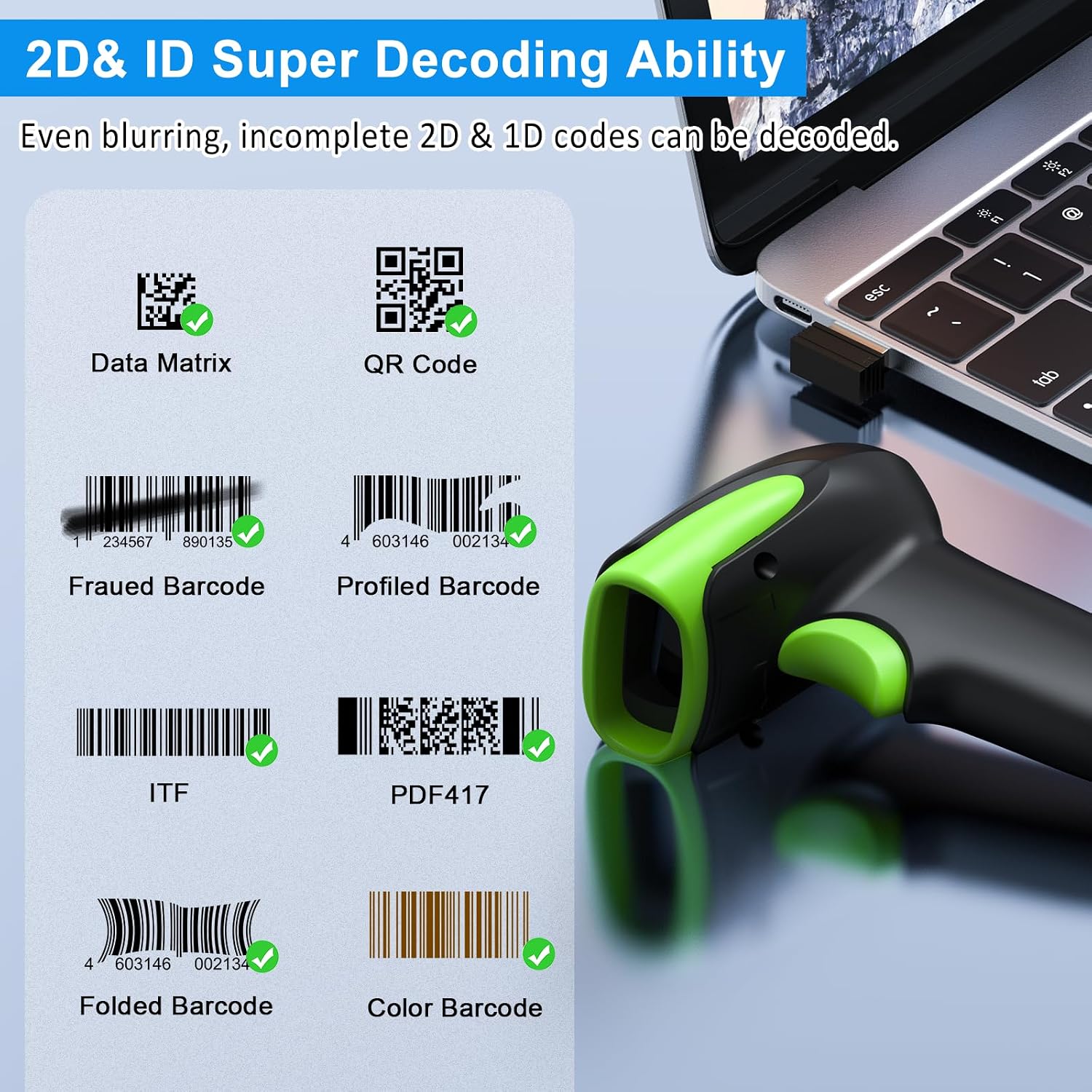
ছবি ১.২: প্রাক্তনamples of decodable 1D and 2D barcodes.
6. রক্ষণাবেক্ষণ
To ensure optimal performance and longevity of your scanner:
- পরিষ্কার করা: স্ক্যানারের বাইরের অংশ পরিষ্কার করার জন্য একটি নরম, শুকনো কাপড় ব্যবহার করুন। স্ক্যানিং উইন্ডোর জন্য, স্ক্র্যাচ এড়াতে লেন্স পরিষ্কারের কাপড় ব্যবহার করুন। ঘষিয়া তুলিয়া ফেলিতে সক্ষম ক্লিনার বা দ্রাবক ব্যবহার করবেন না।
- চার্জিং: Recharge the battery using the provided USB cable. Avoid overcharging or completely draining the battery for extended periods.
- সঞ্চয়স্থান: স্ক্যানারটি সরাসরি সূর্যালোক এবং চরম তাপমাত্রা থেকে দূরে একটি শীতল, শুষ্ক জায়গায় সংরক্ষণ করুন।
- স্থায়িত্ব: While rugged, avoid intentional drops or impacts. The scanner is designed to withstand accidental drops up to 2.4 meters.

Image 7: The scanner's rugged design and drop resistance.
7. সমস্যা সমাধান
আপনার স্ক্যানারে যদি কোনও সমস্যা দেখা দেয়, তাহলে অনুগ্রহ করে নিম্নলিখিত সাধারণ সমস্যা এবং সমাধানগুলি দেখুন:
- স্ক্যানার সংযোগ করছে না:
- স্ক্যানারটি চার্জ করা আছে কিনা তা নিশ্চিত করুন।
- Verify the correct connection mode (Bluetooth, 2.4G, USB) is selected and properly set up.
- For 2.4G, ensure the dongle is securely plugged in. For Bluetooth, ensure your device's Bluetooth is on and the scanner is paired.
- স্ক্যানার এবং হোস্ট ডিভাইস উভয়ই পুনরায় চালু করার চেষ্টা করুন।
- স্ক্যানার বারকোড পড়ছে না:
- Ensure the barcode is not excessively damaged, smudged, or poorly printed.
- বারকোডের সাথে স্ক্যানারের দূরত্ব এবং কোণ পরীক্ষা করুন।
- বারকোডের ধরণটি স্ক্যানার দ্বারা সমর্থিত কিনা তা যাচাই করুন।
- স্ক্যানিং উইন্ডোটি নোংরা হলে পরিষ্কার করুন।
- Data not transmitting:
- নিশ্চিত করুন যে স্ক্যানারটি আপনার ডিভাইসের সাথে সফলভাবে সংযুক্ত হয়েছে।
- Check if the scanner is in 'Offline Storage Mode' and needs to be manually uploaded.
- Ensure the application on your device is ready to receive input.
For further assistance, please refer to the comprehensive troubleshooting section in the full user manual or contact Symcode customer support.
8. স্পেসিফিকেশন
| বৈশিষ্ট্য | স্পেসিফিকেশন |
|---|---|
| মডেল নম্বর | USA-6709DA-Green |
| ইনপুট ভলিউমtage | DC5V±0.25v |
| Current (Work/Instantaneous) | 25 এমএ / 95 এমএ |
| ডিকোডিং গতি | 100 বার / সেকেন্ড |
| ওয়্যারলেস রেঞ্জ (2.4G) | Up to 200m (open air), 30m (indoors) |
| চার্জ করার সময় | প্রায় 2.5 ঘন্টা |
| ব্যাটারি লাইফ | Up to 30 Hours (continuous scanning) |
| ব্যাটারির ধরন | 1 লিথিয়াম পলিমার ব্যাটারি (অন্তর্ভুক্ত) |
| সংযোগ | Bluetooth 6.1, Wireless 2.4G, USB Cable |
| সামঞ্জস্যপূর্ণ ডিভাইস | Desktop, Laptop, Smartphone, POS systems |
| অপারেটিং সিস্টেম | উইন্ডোজ ১১/১০/৮/৭/এক্সপি, ম্যাক ওএস, আইওএস, অ্যান্ড্রয়েড, লিনাক্স |
| আইটেম ওজন | 10.2 আউন্স |
| প্যাকেজের মাত্রা | 6.89 x 4.49 x 3.31 ইঞ্চি |

Image 8: Wireless transmission range.
9. ওয়্যারেন্টি এবং সমর্থন
This Symcode product is manufactured by USA Scanner. For any product inquiries, technical support, or warranty claims, please contact USA Scanner directly. Refer to the contact information provided in your product packaging or visit the official Symcode brand store on Amazon for support resources.
ভিজিট করুন Symcode Store আরও তথ্যের জন্য
Ask a question about this manual
Ask about setup, troubleshooting, compatibility, parts, safety, or missing instructions. Manuals+ will review the question and use this page’s manual context to help answer it.