
1. ভূমিকা
This manual provides detailed instructions for the setup, operation, and maintenance of your Lemnoi S72 4G Cellular Outdoor Security Camera. This solar-powered camera offers 2K resolution, PTZ functionality, two-way audio, and motion detection, operating independently via a 4G cellular network without the need for Wi-Fi. Its IP66 waterproof design ensures reliable performance in various outdoor environments.
2. প্যাকেজ বিষয়বস্তু
নীচে তালিকাভুক্ত সমস্ত আইটেম আপনার প্যাকেজে অন্তর্ভুক্ত আছে কিনা তা নিশ্চিত করুন:
- Lemnoi S72 4G Cellular Outdoor Security Camera
- Solar Panel with mounting bracket
- ইউএসবি চার্জিং কেবল
- মাউন্টিং স্ক্রু এবং ওয়াল প্লাগ
- Pre-installed SIM Card (with initial data)
- 32GB মাইক্রো এসডি কার্ড
- ব্যবহারকারীর ম্যানুয়াল

3. পণ্য শেষview
The Lemnoi S72 camera is designed for robust outdoor surveillance, offering advanced features for remote monitoring.
3.1 মূল বৈশিষ্ট্য
- 4G সেলুলার সংযোগ: Operates on a 4G network, eliminating the need for Wi-Fi.
- সৌর চালিত: Integrated 6W solar panel and 10400mAh battery for continuous operation.
- 2K আল্ট্রা এইচডি রেজোলিউশন: স্পষ্ট ভিডিও ফু প্রদান করেtage.
- রঙিন রাতের দৃষ্টি: Offers clear, full-color night vision up to 20 meters.
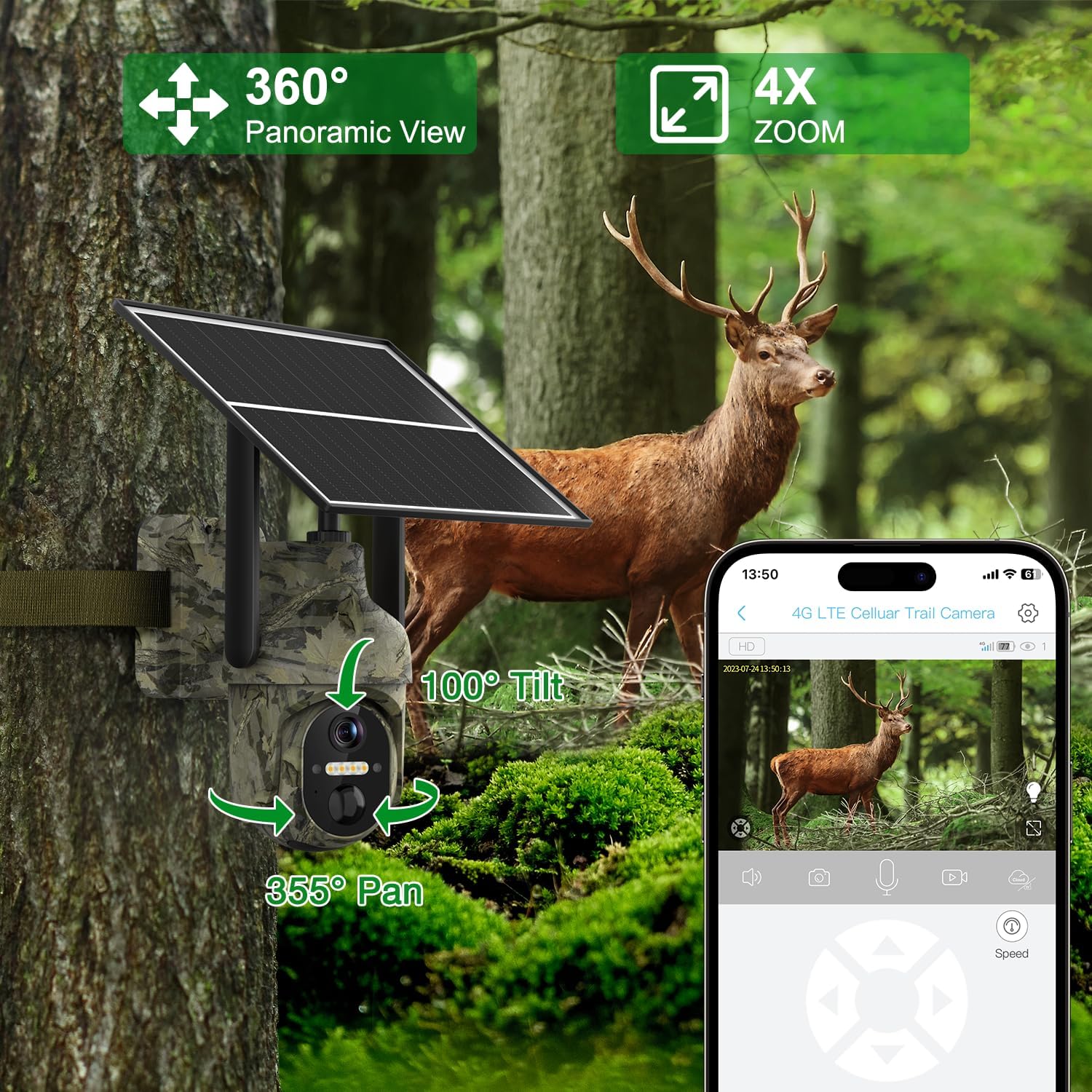
- PTZ কার্যকারিতা: 355° horizontal pan and 100° vertical tilt for comprehensive coverage.
- স্মার্ট মোশন সনাক্তকরণ: AI algorithms distinguish between people, animals, and vehicles, sending instant alerts.
- দ্বিমুখী অডিও: Built-in speaker and microphone for remote communication.
- Dual Storage: Supports Micro SD card (up to 128GB) and cloud storage.
- IP66 জলরোধী: Durable design for all-weather outdoor use.

4. সেটআপ
৩.২ প্রাথমিক ক্যামেরা প্রস্তুতি
- সিম কার্ড সন্নিবেশ: The camera comes with a pre-installed SIM card. If you wish to use your own local carrier's SIM card, carefully remove the pre-installed card and insert your activated SIM card. Ensure the PIN code on your SIM card is disabled before insertion.
- মাইক্রো এসডি কার্ড সন্নিবেশ: The camera includes a 32GB Micro SD card. Insert it into the designated slot. The camera supports up to 128GB.
- পাওয়ার চালু: Locate the power switch, usually near the SIM/SD card slots, and turn the camera ON. Wait for the indicator light to turn blue, signifying it's ready for connection.

৪.২ অ্যাপ ইনস্টলেশন এবং সংযোগ
Download the UBox app from your smartphone's app store (iOS or Android). Follow these steps to connect your camera:
- Install the UBox app on your smartphone.
- Allow all necessary permissions when opening the app for the first time.
- একটি অ্যাকাউন্ট নিবন্ধন করুন এবং লগ ইন করুন।
- Tap "Add a Device" and then "Setup 4G Device".
- Follow the on-screen prompts to scan the QR code located on your camera.
- Once successfully added, the camera will appear in your device list.
4.3 ভৌত ইনস্টলেশন
Choose a suitable location for your camera and solar panel. Ensure the solar panel receives ample সর্বোত্তম চার্জিংয়ের জন্য সরাসরি সূর্যালোক।
- ক্যামেরা মাউন্ট করুন: Use the provided mounting bracket and screws to securely attach the camera to a wall or other stable surface.
- সোলার প্যানেল মাউন্ট করুন: Install the solar panel in a location that maximizes sun exposure. The long cable allows flexibility in placement relative to the camera.
- সোলার প্যানেল সংযুক্ত করুন: Plug the solar panel's USB cable into the camera's charging port. Ensure the rubber stopper is properly sealed to maintain weatherproofing.

5. অপারেশন
5.1 লাইভ View এবং PTZ নিয়ন্ত্রণ
Open the UBox app and select your camera from the device list to access the live feed. Use the on-screen controls to pan (355° horizontally) and tilt (100° vertically) the camera to adjust the viewing angle. You can also use the digital zoom feature.

৬.২ গতি সনাক্তকরণ এবং সতর্কতা
The camera features advanced AI motion detection. When motion is detected, the camera will record footage and send instant alerts to your smartphone. You can customize alert settings, including specific time periods for receiving notifications.
- AI Algorithms: Distinguishes between people, animals, and vehicles to minimize false alarms.
- তাত্ক্ষণিক সতর্কতা: Receive real-time notifications on your mobile app.
- Custom Alert Time: Set specific schedules for motion detection and alerts.


৪.৪ দ্বিমুখী অডিও
Utilize the two-way audio feature to communicate through the camera. Tap the microphone icon in the UBox app to speak, and listen through the camera's built-in speaker. This is useful for interacting with visitors or deterring unwanted guests.

5.4 নাইট ভিশন
The camera automatically switches to night vision in low-light conditions. It supports both infrared (black and white) and color night vision (spotlight mode) for clear visibility up to 20 meters.
৩.৫ স্টোরেজ বিকল্প
রেকর্ড করা footage can be stored in two ways:
- মাইক্রো এসডি কার্ড: All recordings are saved locally on the inserted Micro SD card. You can playback recorded footage directly from the card.
- ক্লাউড স্টোরেজ: The camera offers cloud storage for viewing stored videos and offline footage. A 30-day trial is typically included, with subscription options for extended usage.

6. রক্ষণাবেক্ষণ
- পরিষ্কার করা: নিয়মিত ক্যামেরার লেন্স এবং সোলার প্যানেল নরম, ডি দিয়ে পরিষ্কার করুন।amp cloth to ensure optimal performance and charging efficiency.
- ব্যাটারি যত্ন: Ensure the solar panel is positioned to receive maximum sunlight daily to keep the internal battery charged. Avoid prolonged periods without sunlight to prevent battery depletion.
- ফার্মওয়্যার আপডেট: Check the UBox app periodically for firmware updates to ensure your camera has the latest features and security enhancements.
7. সমস্যা সমাধান
If you encounter issues with your Lemnoi S72 camera, refer to the common questions and answers below:
- Q1: Can I use Wi-Fi without a data plan?
A1: No, this 3G/4G LTE surveillance camera is designed for off-grid and remote areas without Wi-Fi coverage. It functions anywhere with 3G/4G coverage using the included SIM card. - Q2: The 4G cellular phone surveillance camera SIM card is included in the package?
A2: Yes, the package comes with a SIM card that includes 300MB of initial traffic for free use. Additional usage requires a paid data plan. - প্রশ্ন 3: আমি পারি view the live stream via Wi-Fi or is a 4G cellular network required for live streaming?
A3: The 4G cellular security camera uses the inserted SIM card to connect to the 4G network. Other accessible configurations using the mobile phone can be obtained through the Ubox application using cellular 4G/5G or Wi-Fi. - Q4: The included SIM card does not work?
A4: First, insert the SIM card into the phone, disable the PIN code, and then insert it into the camera to check if it works properly. If it still doesn't work, try configuring the PIN code manually. - Q5: How do I know if I can use my SIM card?
A5: To ensure your own SIM card can be used normally, enter the PIN code as indicated when turning on the phone; otherwise, the SIM card may be blocked by the PIN code and cannot be used.

8. স্পেসিফিকেশন
| বৈশিষ্ট্য | বিস্তারিত |
|---|---|
| মডেল | S72 |
| সংযোগ প্রযুক্তি | 4G সেলুলার |
| শক্তির উৎস | Solar Powered (6W solar panel, 10400mAh battery) |
| ভিডিও ক্যাপচার রেজোলিউশন | 2K Ultra HD (1080p effective) |
| Viewকোণ | 130 ডিগ্রী |
| PTZ কার্যকারিতা | 355° Horizontal Pan, 100° Vertical Tilt |
| নাইট ভিশন রেঞ্জ | Up to 20 meters (Color Night Vision) |
| গতি সনাক্তকরণ | AI Humanoid, Animal, Vehicle Detection |
| অডিও | দ্বিমুখী অডিও |
| স্টোরেজ | মাইক্রো এসডি (১২৮ গিগাবাইট পর্যন্ত), ক্লাউড স্টোরেজ |
| জল প্রতিরোধের স্তর | IP66 জলরোধী |
| অপারেটিং তাপমাত্রা | -30°C থেকে 60°C |
| উপাদান | প্লাস্টিক |
9. ওয়্যারেন্টি এবং সমর্থন
Your Lemnoi S72 4G Cellular Outdoor Security Camera is covered by a manufacturer's warranty. Please refer to the product packaging or contact Lemnoi customer support for specific warranty terms and conditions.
For technical assistance, troubleshooting, or any inquiries, please contact Lemnoi customer support through the contact information provided in your product packaging or on the official Lemnoi webসাইট