
1. পণ্য শেষview
The SVITOO P108 is a 12-inch Android tablet designed for versatile use, from entertainment to productivity. It features a 2K Full HD display, an Octa-Core processor, ample RAM and storage, and a long-lasting battery.

Image 1.1: The SVITOO P108 tablet showcasing its 2K display, dual-band Wi-Fi, Bluetooth 5.0, GPS, 30GB RAM (6+24), 128GB ROM, 8800mAh battery, T7250 processor, Android 16, and 13MP rear / 8MP front cameras.
প্যাকেজ বিষয়বস্তু:
- SVITOO P108 Tablet x 1
ডিভাইস লেআউট:

Image 1.2: A detailed diagram illustrating the location of the volume buttons, power button, front camera, flashlight, rear camera, 3.5mm headphone jack, TF card slot, Type-C port, and microphone on the SVITOO P108 tablet.
- ভলিউম বোতাম: অডিও আউটপুট লেভেল সামঞ্জস্য করুন।
- পাওয়ার বোতাম: Turn the device on/off, or put it to sleep/wake it up.
- সামনের ক্যামেরা: ভিডিও কল এবং সেলফির জন্য।
- পিছনের ক্যামেরা: ছবি এবং ভিডিও তোলার জন্য।
- টর্চলাইট: Provides illumination for the rear camera.
- 3.5 মিমি হেডফোন জ্যাক: তারযুক্ত হেডফোন সংযুক্ত করুন।
- টিএফ কার্ড স্লট: প্রসারণযোগ্য স্টোরেজের জন্য একটি মাইক্রোএসডি কার্ড ঢোকান।
- টাইপ-সি পোর্ট: চার্জিং এবং ডেটা স্থানান্তরের জন্য।
- মাইক্রোফোন: কল বা রেকর্ডিংয়ের সময় অডিও ইনপুটের জন্য।
- লাউড স্পীকার: অডিও আউটপুট জন্য.
2. প্রাথমিক সেটআপ
৪.১ ট্যাবলেট চার্জ করা
Before first use, fully charge your tablet. Connect the provided USB Type-C cable to the tablet's Type-C port and the other end to a compatible power adapter. The battery indicator on the screen will show charging status.
2.2 পাওয়ারিং অন/অফ
- পাওয়ার অন করতে: Press and hold the Power button until the SVITOO logo appears.
- পাওয়ার অফ করতে: Press and hold the Power button until the power options appear on the screen, then select "Power Off".
- নতুন করে শুরু: পাওয়ার অপশনগুলি উপস্থিত না হওয়া পর্যন্ত পাওয়ার বোতাম টিপুন এবং ধরে রাখুন, তারপর "রিস্টার্ট" নির্বাচন করুন।
2.3 প্রাথমিক কনফিগারেশন
Upon first power-on, follow the on-screen prompts to set up your tablet. This includes selecting your language, connecting to a Wi-Fi network, setting up your Google account, and configuring basic security settings.
৪.২ একটি মাইক্রোএসডি কার্ড ঢোকানো
To expand storage, insert a microSD card into the TF Card Slot. Ensure the tablet is powered off before inserting or removing the card. Gently push the card until it clicks into place.
৫. ট্যাবলেট পরিচালনা করা
২.১ অ্যান্ড্রয়েড ইন্টারফেস নেভিগেট করা
The tablet runs on Android 15, offering a user-friendly interface. Swipe up from the bottom to access the app drawer, swipe down from the top for notifications and quick settings, and use the navigation buttons (back, home, recent apps) at the bottom of the screen.
3.2 প্রদর্শন বৈশিষ্ট্য
The 12-inch 2K Full HD display (2000x1200 resolution) provides a clear and vibrant viewing experience. The screen has a 5:3 aspect ratio and 380 nits brightness.
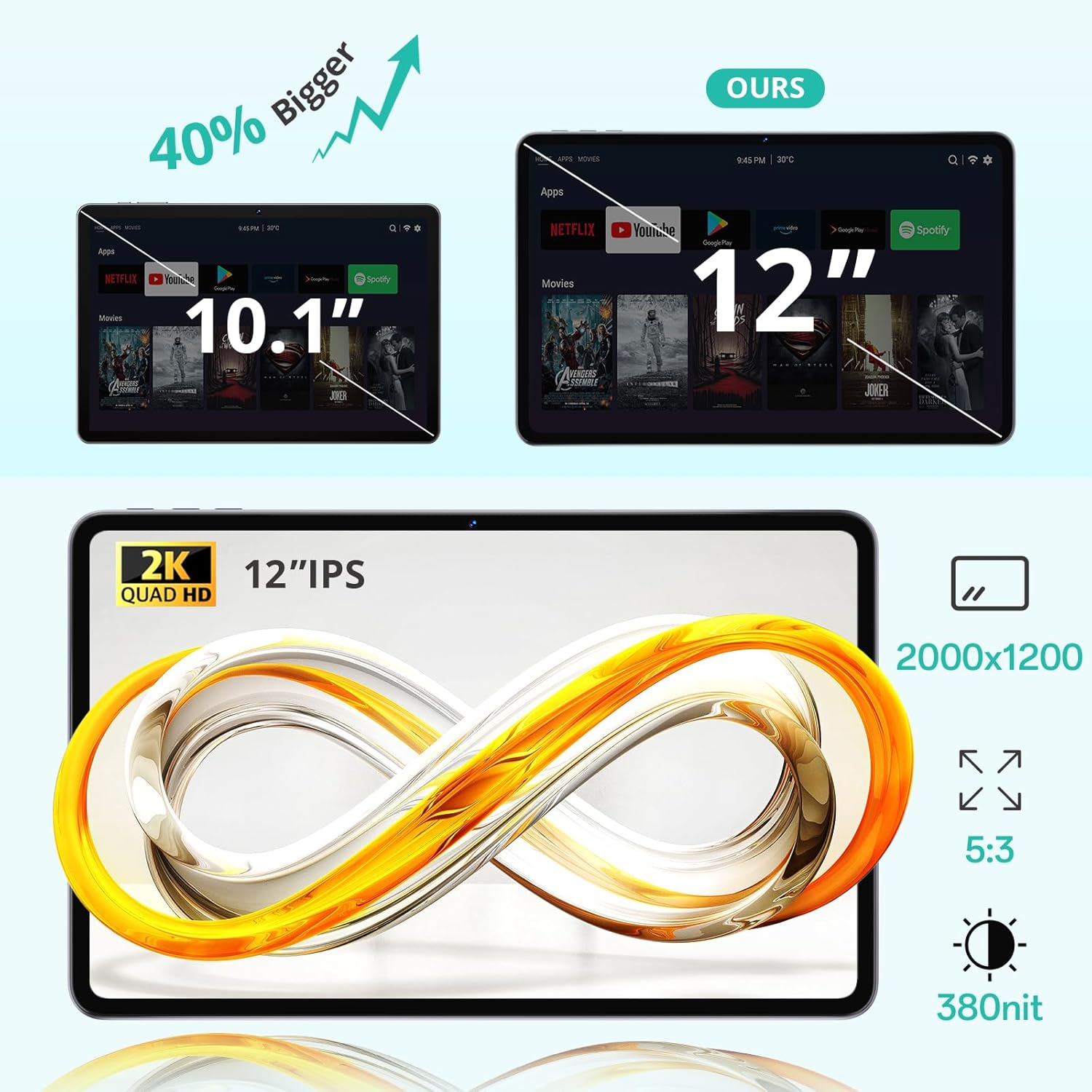
Image 3.1: The 12-inch display of the SVITOO P108 tablet, highlighting its 2K Quad HD resolution of 2000x1200, 5:3 aspect ratio, and 380 nit brightness, shown alongside a size comparison to a 10.1-inch tablet.
৪.৭ ওয়াইডভাইন L1 সাপোর্ট
The tablet supports Widevine L1, enabling high-definition streaming from popular services like Netflix, YouTube, and Prime Video. This ensures a premium viewing experience with crisp visuals.

Image 3.2: The SVITOO P108 tablet displaying a high-definition image, indicating Widevine L1 support for streaming content from platforms such as Disney+, Netflix, YouTube, and Prime Video.
৩.৩ স্প্লিট-স্ক্রিনের মাধ্যমে মাল্টিটাস্কিং
Utilize the split-screen feature to run two applications simultaneously. This enhances productivity, allowing you to watch videos while chatting or browse the web while taking notes.

Image 3.3: Step-by-step guide on how to activate split-screen mode on the tablet, showing how to tap the recent apps button, select an app, and choose 'Split screen' to open a second app alongside it.
৫.৪ পঠন মোড
The tablet offers a dedicated reading mode that reduces blue light and optimizes brightness for a more comfortable and eye-friendly reading experience.

Image 3.4: The tablet displaying text in reading mode, emphasizing features like reduced blue light, optimized brightness, and overall eye-friendliness.
3.6 Parental Controls and Child-Friendly Interface
The tablet includes features for parental controls, allowing parents to manage content, screen time, and ensure a safe browsing environment for children. A child-friendly interface is also available for educational content.

Image 3.5: The tablet displaying a child-friendly interface with educational content and parental control options, indicating features like child-safe browsing and screen time management.
4. রক্ষণাবেক্ষণ এবং যত্ন
৬.১ ট্যাবলেট পরিষ্কার করা
ট্যাবলেটের স্ক্রিন এবং বডি পরিষ্কার করার জন্য একটি নরম, লিন্ট-মুক্ত কাপড় ব্যবহার করুন। একগুঁয়ে দাগের জন্য, সামান্য ঘষুন।ampপানি বা স্ক্রিন পরিষ্কারের দ্রবণ দিয়ে কাপড়টি মুছুন। কঠোর রাসায়নিক বা ঘষিয়া তুলিয়া ফেলিতে সক্ষম পদার্থ ব্যবহার করা এড়িয়ে চলুন।
4.2 ব্যাটারি যত্ন
The tablet is equipped with an 8000 mAh lithium-ion battery. To prolong battery life:
- চরম তাপমাত্রা এড়িয়ে চলুন।
- ঘন ঘন ব্যাটারি সম্পূর্ণরূপে শেষ হতে দেবেন না।
- আসল চার্জার অথবা একটি প্রত্যয়িত সামঞ্জস্যপূর্ণ চার্জার ব্যবহার করুন।

Image 4.1: The tablet highlighting its 8800mAh battery, with icons indicating usage times for video, music, web browsing, and standby.
4.3 সফ্টওয়্যার আপডেট
Regularly check for and install software updates to ensure optimal performance, security, and access to the latest features. Go to সেটিংস > সিস্টেম > সিস্টেম আপডেট আপডেট চেক করতে।
5. সমস্যা সমাধান
৭.১ ট্যাবলেট চালু হচ্ছে না
- ব্যাটারি চার্জ করা আছে কিনা তা নিশ্চিত করুন। চার্জারটি সংযুক্ত করুন এবং আবার চালু করার চেষ্টা করার আগে কয়েক মিনিট অপেক্ষা করুন।
- জোর করে রিস্টার্ট করতে পাওয়ার বোতামটি ১০-১৫ সেকেন্ডের জন্য টিপুন এবং ধরে রাখুন।
৫.২ ধীর কর্মক্ষমতা
- অপ্রয়োজনীয় ব্যাকগ্রাউন্ড অ্যাপ্লিকেশন বন্ধ করুন।
- Clear cache for frequently used apps (Settings > Apps > [App Name] > Storage > Clear Cache).
- পর্যাপ্ত সঞ্চয় স্থান আছে কিনা তা নিশ্চিত করুন।
- ট্যাবলেটটি পুনরায় চালু করুন।
৬.৩ ওয়াই-ফাই সংযোগ সমস্যা
- দ্রুত সেটিংসে Wi-Fi বন্ধ এবং চালু করুন।
- আপনার ওয়াই-ফাই রাউটারটি পুনরায় চালু করুন।
- নেটওয়ার্ক ভুলে যান এবং পুনরায় সংযোগ করুন (সেটিংস > নেটওয়ার্ক এবং ইন্টারনেট > ওয়াই-ফাই > [নেটওয়ার্ক নাম] > ভুলে যান)।
৭.৪ স্ক্রিন আনরেসপন্সিভ
- ১০-১৫ সেকেন্ডের জন্য পাওয়ার বোতামটি ধরে রেখে জোর করে পুনরায় চালু করুন।
- Ensure the screen is clean and free of moisture.
6. স্পেসিফিকেশন
| বৈশিষ্ট্য | বিস্তারিত |
|---|---|
| মডেলের নাম | P108 |
| ডিসপ্লে সাইজ | 12 ইঞ্চি |
| সর্বোচ্চ স্ক্রিন রেজোলিউশন | 2000 x 1200 পিক্সেল |
| অপারেটিং সিস্টেম | অ্যান্ড্রয়েড 15 |
| প্রসেসর | ইউনিসক টি৬১০ অক্টা-কোর (১.৮ গিগাহার্টজ) |
| RAM | 6 GB (24 GB পর্যন্ত প্রসারিত) |
| স্টোরেজ | 128 GB (expandable via microSD up to 1TB) |
| ব্যাটারির ক্ষমতা | 8000 mAh |
| ব্যাটারি লাইফ | Up to 8 hours (general use) |
| রিয়ার ক্যামেরা | 13 এমপি |
| সামনের ক্যামেরা | 5 এমপি |
| সংযোগ | Wi-Fi (2.4G/5G, 802.11ac/b/g/n), Bluetooth 5.0, GPS |
| বন্দর | 1x USB Type-C, 1x 3.5mm Audio Jack, 1x TF Card Slot |
| মাত্রা | 28.23 x 17.84 x 0.98 সেমি |
| ওজন | 940 গ্রাম |
| বিশেষ বৈশিষ্ট্য | Widevine L1, GPS |
7. ওয়্যারেন্টি এবং সমর্থন
7.1 ওয়ারেন্টি তথ্য
The SVITOO P108 tablet comes with a এক বছরের প্রস্তুতকারকের ওয়ারেন্টি। এই ওয়ারেন্টিটি সাধারণ ব্যবহারের সময় উপকরণ এবং কারিগরি ত্রুটিগুলিকে কভার করে। ওয়ারেন্টি দাবির জন্য দয়া করে আপনার ক্রয়ের প্রমাণপত্রটি সংরক্ষণ করুন।
7.2 গ্রাহক সহায়তা
For technical assistance, troubleshooting, or warranty inquiries, please contact SVITOO customer service. Support is available 24 hours a day, 7 days a week. Please refer to the contact information provided with your purchase or on the official SVITOO webসাইট