
1. পণ্য শেষview
The SCYTHE Big Shuriken 4 is a compact, low-profile CPU cooler designed for systems with limited space, such as Mini-ITX builds and HTPCs. It features a highly efficient heatsink with multiple heat pipes and a slim fan to provide effective cooling while maintaining a small footprint.
মূল বৈশিষ্ট্য অন্তর্ভুক্ত:
- Intel LGA 1851 and AMD AM5 support.
- Compact dimensions: 67mm high, 4.7" x 4.8" x 2.6" (fan size).
- Designed for compatibility with Mini-ITX PCs.
- Equipped with 6 heat pipes for enhanced heat dissipation.

Image: The SCYTHE Big Shuriken 4 CPU Cooler, showcasing its compact design with the fan mounted on top of the heatsink.
2. নিরাপত্তা তথ্য
Please read and understand all safety instructions before installing or operating the CPU cooler. Failure to do so may result in personal injury or damage to your equipment.
- বৈদ্যুতিক নিরাপত্তা: যেকোনো উপাদান ইনস্টল বা অপসারণের আগে সর্বদা আপনার কম্পিউটার থেকে বিদ্যুৎ সংযোগ বিচ্ছিন্ন করুন।
- ধারালো প্রান্ত: The heatsink fins can be sharp. Handle with care to avoid cuts.
- তাপীয় পেস্ট: Avoid direct contact with skin and eyes. If contact occurs, rinse thoroughly with water. Keep out of reach of children.
- স্থিতিশীল বিদুৎ: উপাদানগুলি ব্যবহার করার আগে, মাটিতে আটকে থাকা ধাতব বস্তু স্পর্শ করে আপনার শরীর থেকে যেকোনো স্থির বিদ্যুৎ নিঃসরণ করুন।
- বায়ুচলাচল: Ensure adequate airflow within your PC case for optimal cooling performance and system stability.
3. প্যাকেজ বিষয়বস্তু
Verify that all items listed below are present in your package. If any items are missing or damaged, please contact SCYTHE customer support.
- SCYTHE Big Shuriken 4 CPU Cooler (Heatsink and Fan pre-assembled)
- Mounting Hardware Kit (for Intel LGA 1851/1700/1200/115X and AMD AM5/AM4 sockets)
- তাপীয় গ্রীস
- ইনস্টলেশন ম্যানুয়াল
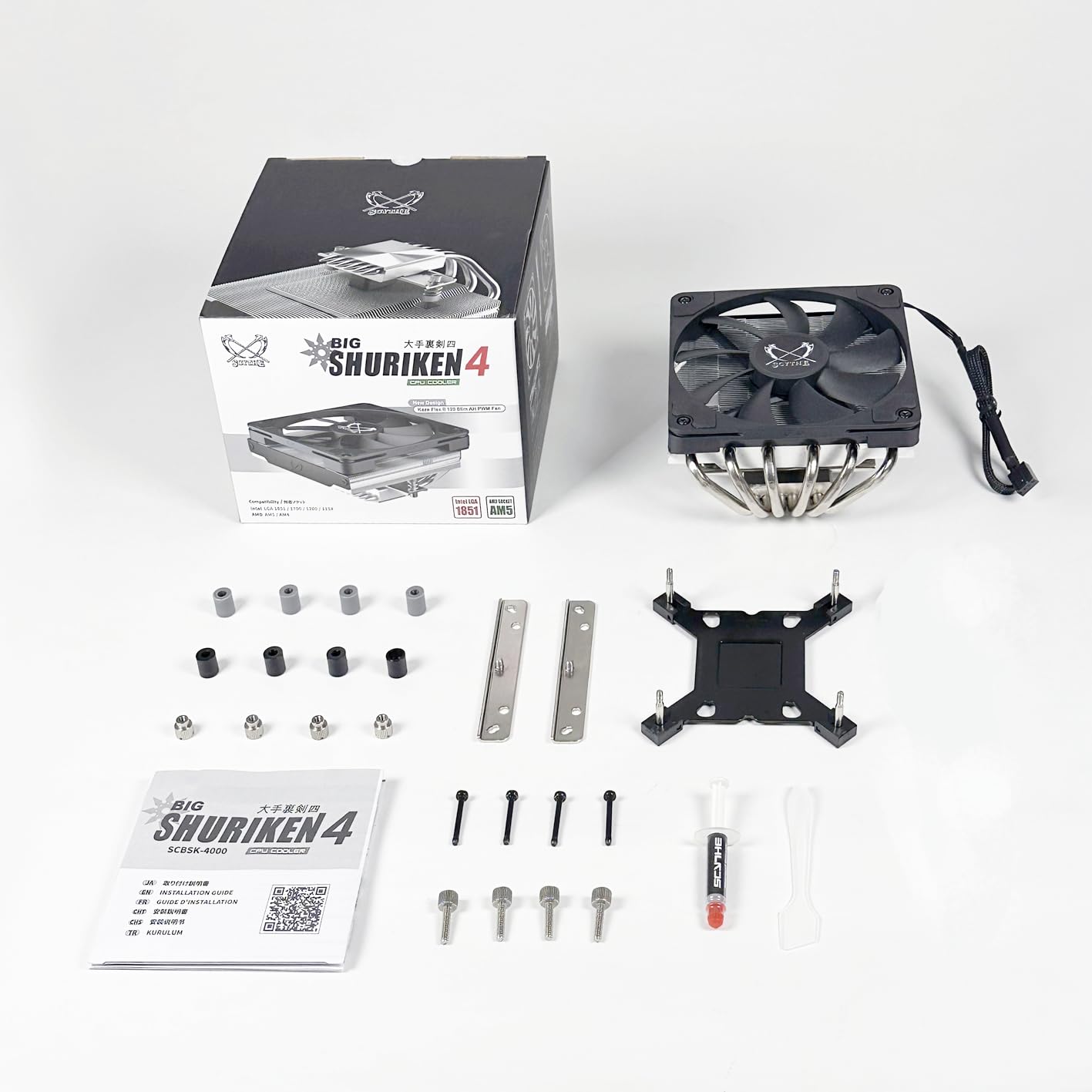
Image: All components included with the SCYTHE Big Shuriken 4 CPU Cooler, laid out for inspection. This includes the cooler itself, mounting brackets, screws, thermal paste, and the instruction manual.
4. সেটআপ এবং ইনস্টলেশন
Follow these steps carefully to install your SCYTHE Big Shuriken 4 CPU Cooler. Refer to your motherboard's manual for specific details regarding CPU socket and cooler mounting points.
4.1. প্রস্তুতি
- নিশ্চিত করুন যে আপনার কম্পিউটারটি বন্ধ আছে এবং ওয়াল আউটলেট থেকে প্লাগ করা আছে।
- Open your PC case to access the motherboard and CPU socket.
- If replacing an existing cooler, carefully remove it and clean any old thermal paste from the CPU and cooler base using isopropyl alcohol and a lint-free cloth.
- Identify your CPU socket type (e.g., Intel LGA 1851/1700/1200/115X or AMD AM5/AM4) and select the appropriate mounting hardware from the kit.
৫. থার্মাল পেস্ট প্রয়োগ করা
Apply a small amount of thermal paste (included) to the center of the CPU's integrated heat spreader (IHS). A pea-sized dot or a thin line is usually sufficient. The pressure from the cooler will spread it evenly.
4.3. Mounting the Cooler
- Attach the correct backplate (if required for your socket) to the rear of the motherboard.
- Secure the appropriate mounting brackets to the cooler's base or directly to the motherboard around the CPU socket, as per the detailed instructions in the included manual.
- Carefully place the Big Shuriken 4 cooler onto the CPU, aligning the mounting holes.
- Secure the cooler by tightening the screws in a diagonal pattern (e.g., top-left, bottom-right, top-right, bottom-left) to ensure even pressure. Do not overtighten.
- কুলার থেকে ৪-পিন PWM ফ্যান কেবলটি আপনার মাদারবোর্ডের CPU_FAN হেডারের সাথে সংযুক্ত করুন।

Image: The SCYTHE Big Shuriken 4 CPU Cooler installed on a compact Mini-ITX motherboard, demonstrating its low-profile ফিট

Image: The SCYTHE Big Shuriken 4 CPU Cooler installed inside a PC case, showing how it fits within a system's internal layout.
5. অপারেটিং নির্দেশাবলী
Once installed, the SCYTHE Big Shuriken 4 CPU Cooler operates automatically. The fan speed is controlled by your motherboard's BIOS/UEFI settings or through operating system software, based on the CPU temperature.
- BIOS/UEFI সেটিংস: Most motherboards allow you to configure fan curves, which adjust fan speed based on CPU temperature. Consult your motherboard manual for instructions on accessing and adjusting these settings.
- সফ্টওয়্যার নিয়ন্ত্রণ: Some motherboard manufacturers provide utility software that allows for fan speed control directly from your operating system.
- পর্যবেক্ষণ: Use system monitoring software to keep an eye on your CPU temperatures to ensure optimal cooling performance.
6. রক্ষণাবেক্ষণ
নিয়মিত রক্ষণাবেক্ষণ আপনার CPU কুলারের দীর্ঘায়ু এবং সর্বোত্তম কর্মক্ষমতা নিশ্চিত করতে সাহায্য করে।
- ধুলো অপসারণ: Periodically (e.g., every 3-6 months), power off and unplug your computer. Use compressed air to blow dust out of the heatsink fins and fan blades. Hold the fan blades gently to prevent them from spinning rapidly during cleaning, which can damage the fan motor.
- তাপীয় পেস্ট: The thermal paste typically lasts for several years. If you notice a significant increase in CPU temperatures over time, consider re-applying fresh thermal paste. This requires removing the cooler, cleaning the old paste, and applying new paste.
- ফ্যান পরিদর্শন: Check the fan for any signs of wear, unusual noise, or wobble. If the fan is failing, it may need to be replaced.
7. সমস্যা সমাধান
আপনার CPU কুলার নিয়ে যদি কোনও সমস্যার সম্মুখীন হন, তাহলে নিম্নলিখিত সাধারণ সমস্যা এবং সমাধানগুলি দেখুন:
| সমস্যা | সম্ভাব্য কারণ | সমাধান |
|---|---|---|
| উচ্চ CPU তাপমাত্রা | কুলার মাউন্টিংয়ের অনুপযুক্ত ব্যবস্থা, অপর্যাপ্ত তাপীয় পেস্ট, অতিরিক্ত ধুলো, কেস-এর বাতাস চলাচলের ব্যবস্থা দুর্বল। | Re-seat the cooler, re-apply thermal paste, clean heatsink/fan, improve case ventilation. |
| পাখা ঘুরছে না | Fan cable disconnected, faulty fan header, fan failure. | Check fan cable connection to CPU_FAN header, try another fan header, replace fan if faulty. |
| Loud Fan Noise | Fan hitting cables, dust buildup, fan bearing issue, high fan speed settings. | Ensure no obstructions, clean fan, adjust fan curve in BIOS/software. |
8. স্পেসিফিকেশন
Detailed technical specifications for the SCYTHE Big Shuriken 4 CPU Cooler:
| বৈশিষ্ট্য | স্পেসিফিকেশন |
|---|---|
| পণ্যের মাত্রা | ১১.৮"লি x ৭.৯"ওয়াট x ৭.৯"এইচ (৩০০মিমি x ২০০মিমি x ২০০মিমি) |
| আইটেম মডেল নম্বর | SCBSK-4000 |
| প্রস্তুতকারক | স্কাইটি |
| পাওয়ার সংযোজক প্রকার | 4- পিন PWM |
| ভলিউমtage | 12 ভোল্ট (AC) |
| ওয়াটtage | 1.92 ওয়াট |
| কুলিং পদ্ধতি | ফোর্সড এয়ার |
| সামঞ্জস্যপূর্ণ ডিভাইস | Desktop, Laptop (compatible with specific CPU sockets) |
| নয়েজ লেভেল | ৩৭.৫ ডিবি (সর্বোচ্চ) |
| উপাদান | অ্যালুমিনিয়াম (হিটসিঙ্ক) |
| সর্বাধিক ঘূর্ণন গতি | 1900 RPM |
9. ওয়্যারেন্টি এবং সমর্থন
SCYTHE products are manufactured to high-quality standards. For warranty information and technical support, please refer to the official SCYTHE webসাইটে যান অথবা সরাসরি তাদের গ্রাহক পরিষেবার সাথে যোগাযোগ করুন।
ওয়ারেন্টি দাবির জন্য অনুগ্রহ করে আপনার ক্রয়ের প্রমাণ রাখুন।
For further assistance, visit the official SCYTHE store: SCYTHE Store on Amazon