


INTOIOT YM7908 On-board Noise Sensor Module

পণ্য তথ্য
- YM7908 using the standard RS485 bus MODBUS-RTU protocol,easy access to PLC,DCS and other instruments or systems for monitoring noise state quantities.The internal use of high -precision sensing core and related devices to ensure high reliability and excellent long-term stability,can be customized RS232,RS485,CAN,4-20mA,DC0~5V\10V,ZIGBEE,Lora,WIFI,GPRS and other output methods.
- Shanghai hitdo Industrial Co., Ltd INTOIOT ব্র্যান্ড বিভাগ
প্রযুক্তিগত পরামিতি
| প্রযুক্তিগত পরামিতি | পরামিতি মান |
| গোলমাল পরিসীমা | 30~130dB |
| গোলমাল নির্ভুলতা | ±3% |
| কমিউনিকেশন ইন্টারফেস | আরএস২৩২ |
| ডিফল্ট বড রেট | 9600 8 n 1 |
| শক্তি | DC6~24V 1A |
| চলমান তাপমাত্রা | -30~80℃ |
| কাজের আর্দ্রতা | 5% RH~90% RH |
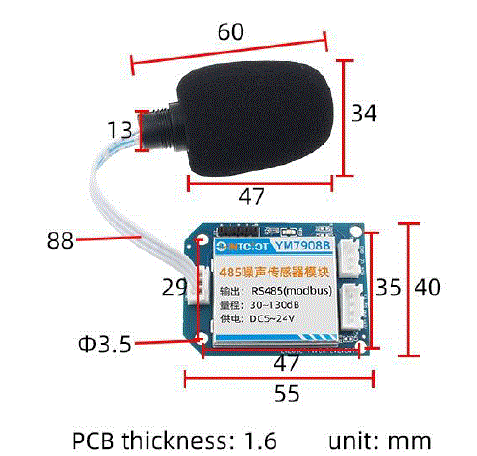
পণ্যের আকার
তারের নির্দেশাবলী
ভাঙা তারের ক্ষেত্রে, চিত্রে দেখানো তারগুলিকে তারে দিন। যদি পণ্যের নিজেই কোন লিড না থাকে, তাহলে মূল রঙটি রেফারেন্সের জন্য।
কিভাবে ব্যবহার করবেন?
It is used for the detection and measurement of various noises such as environmental noise, workplace noise, building construction noise, traffic noise and social life noise.
পণ্য তালিকা
The number of noise sensor modules is 1. The actual delivery is subject to the user’s selection.
- The number of noise sensor modules is 1
- (The actual delivery is subject to the user’s selection)
যোগাযোগ প্রোটোকল
The product uses the RS485 MODBUS-RTU standard protocol format, and all operation or reply commands are in hexadecimal data. When the device leaves the factory, the default device address is 1, and the default baud rate is: for modules and non-recording instruments: 9600, 8, n, 1 (for the recorder series products, the default is: 115200, 8, n, 1).
Read data (Function code 0x03)
অনুসন্ধান কাঠামো (হেক্সাডেসিমেলে)।ample of sending: To query 1 piece of data of device No. 1, the host computer sends the command: 01 03 00 00 00 01 84 0A .
| ঠিকানা | ফাংশন কোড | শুরুর ঠিকানা | ডেটা দৈর্ঘ্য | চেকসাম |
| 01 | 03 | 00 00 | 00 01 | 84 0A |
For a correct inquiry frame, the device will respond with data: 01 03 02 02 18 B9 2E , and the response format is:
| ঠিকানা | ফাংশন কোড | দৈর্ঘ্য | ডেটা 1 | চেকসাম |
| 01 | 03 | 02 | 02 18 | বি৯ ২ই |
ডেটা বর্ণনা: কমান্ডের ডেটা হেক্সাডেসিমেলে। ডেটা 1 কে ex হিসাবে নেওয়া হচ্ছেample, 02 18 converted to decimal value is 536. Assuming the data magnification factor is 100, then the true value is 536/100 = 5.36, and the others can be deduced by analogy.
সাধারণ ডেটা ঠিকানা টেবিল
| কনফিগারেশন
ঠিকানা |
ঠিকানা নিবন্ধন করুন | নিবন্ধন করুন
বর্ণনা |
ডেটা টাইপ | মান পরিসীমা |
| 40001 | 00 00 | গোলমাল | শুধুমাত্র পড়া | 0~65535 |
| 40101 | 00 64 | কোড এর নকশা | শুধুমাত্র পঠনযোগ্য | 0~59999 |
| 40102 | 00 65 | এর মোট সংখ্যা
পরিমাপ বিন্দু |
শুধুমাত্র পঠনযোগ্য | 1~1600 |
| 40103 | 00 66 | ডিভাইসের ঠিকানা | পড়ুন/লিখুন | 1~249 |
| 40104 | 00 67 | বড রেট | পড়ুন/লিখুন | 0~6 |
| 40105 | 00 68 | যোগাযোগ
মোড |
পড়ুন/লিখুন | 1 প্রশ্ন |
| 40106 | 00 69 | প্রোটোকল টাইপ | পড়ুন/লিখুন | ১টি মডবাস-আরটিইউ |
ডিভাইস ঠিকানা পড়ুন এবং পরিবর্তন করুন
Read or query the device address
যদি আপনি বর্তমান ডিভাইসের ঠিকানা না জানেন এবং বাসে শুধুমাত্র একটি ডিভাইস থাকে, তাহলে আপনি FA 03 00 66 00 01 71 9E কমান্ডের মাধ্যমে ডিভাইসের ঠিকানাটি জিজ্ঞাসা করতে পারেন।
| ডিভাইসের ঠিকানা | ফাংশন কোড | শুরুর ঠিকানা | ডেটা দৈর্ঘ্য | চেকসাম |
| FA | 03 | 00 66 | 00 01 | 71 9E |
- FA, which is 250, is the universal address. When you don’t know the address, you can use 250 to obtain the real device address. 00 66 is the register of the device address.
- সঠিক কোয়েরি কমান্ডের জন্য, ডিভাইসটি সাড়া দেবে। উদাহরণস্বরূপample, the response data is: 01 03 02 00 01 79 84. The format analysis is shown in the following table:
| ডিভাইসের ঠিকানা | ফাংশন কোড | শুরুর ঠিকানা | ঠিকানা আইডি | চেকসাম |
| 01 | 03 | 02 | 00 01 | 79 84 |
প্রতিক্রিয়া ডেটাতে, প্রথম বাইট 01 বর্তমান ডিভাইসের আসল ঠিকানা উপস্থাপন করে।
Change the device address
প্রাক্তন জন্যample, if the current device address is 1 and you want to change it to 02, the command is: 01 0600 66 00 02 E8 14 .
| ডিভাইসের ঠিকানা | ফাংশন কোড | ঠিকানা নিবন্ধন করুন | লক্ষ্য ঠিকানা | চেকসাম |
| 01 | 06 | 00 66 | 00 02 | E8 14 |
After the change is successful, the device will return the information: 02 06 00 66 00 02 E8 27. The format analysis is shown in the following table:
| ডিভাইসের ঠিকানা | ফাংশন কোড | ঠিকানা নিবন্ধন করুন | লক্ষ্য ঠিকানা | চেকসাম |
| 02 | 06 | 00 66 | 00 02 | E8 27 |
In the response data, after the modification is successful, the first byte is the new device address. Generally, after the device address is changed, it takes effect immediately. At this time, users need to modify the query commands in their own software accordingly.
বড রেট পড়ুন এবং পরিবর্তন করুন
বড রেট পড়ুন
The default factory baud rate of the device is 9600. If you need to change it, you can perform the change operation according to the following table and the corresponding communication protocol. For example, to read the baud rate ID of the current device, the command is: 01 03 00 67 00 01 35 D5 . The format analysis is as follows.
| ডিভাইসের ঠিকানা | ফাংশন কোড | শুরুর ঠিকানা | ডেটা দৈর্ঘ্য | চেকসাম |
| 01 | 03 | 00 67 | 00 01 | 35 D5 |
- Read the baud rate code of the current device. Baud rate codes: 1 for 2400; 2 for 4800; 3 for 9600; 4 for 19200; 5 for 38400; 6 for 115200.
- সঠিক কোয়েরি কমান্ডের জন্য, ডিভাইসটি সাড়া দেবে। উদাহরণস্বরূপample, the response data is: 01 03 02 00 03 F8 45. The format analysis is shown in the following table:
| ডিভাইসের ঠিকানা | ফাংশন কোড | ডেটা দৈর্ঘ্য | বাউড রেট কোড | চেকসাম |
| 01 | 03 | 02 | 00 03 | F8 45 |
According to the baud rate code, 03 represents 9600, which means the current baud rate of the device is 9600.
বড রেট পরিবর্তন করুন
প্রাক্তন জন্যample, to change the baud rate from 9600 to 38400, that is, change the code from 3 to 5, the command is: 01 06 00 67 00 05 F8 16 .
| ডিভাইসের ঠিকানা | ফাংশন কোড | ঠিকানা নিবন্ধন করুন | লক্ষ্য বড রেট | চেকসাম |
| 01 | 06 | 00 67 | 00 05 | F8 16 |
Change the baud rate from 9600 to 38400, that is, change the code from 3 to 5. The new baud rate will take effect immediately. At this time, the device will stop responding, and the query command for the device’s baud rate needs to be modified accordingly.
Read and modify the correction value (valid for some products)
Read the correction value
When there is an error between the data and the reference standard, we can reduce the display error by adjusting the “correction value”. The adjustable range of the correction difference is plus or minus 1000, that is, the value range is 0 – 1000 or 64535 – 65535. For example, when the displayed value is 100 less than the actual value, we can correct it by adding 100. The command is: 01 03 00 6B 00 01 F5 D6 . In the command, 100 is the hexadecimal value 0x64. If you need to decrease the value, you can set a negative value. For example, – 100 corresponds to the hexadecimal value FF 9C. The calculation method is 100 – 65535 = 65435, and then convert it to hexadecimal, which is 0x FF 9C. The device correction value starts from 00 6B. We take the first parameter as an example for illustration. When there are multiple parameters, the methods for reading and modifying the correction value are the same.
| ডিভাইসের ঠিকানা | ফাংশন কোড | শুরুর ঠিকানা | ডেটা দৈর্ঘ্য | চেকসাম |
| 01 | 03 | 00 6B | 00 01 | F5 D6 |
সঠিক কোয়েরি কমান্ডের জন্য, ডিভাইসটি সাড়া দেবে। উদাহরণস্বরূপample, the response data is: 01 03 02 00 64 B9 AF. The format analysis is shown in the following table:
| ডিভাইসের ঠিকানা | ফাংশন কোড | ডেটা দৈর্ঘ্য | সংশোধন মান | চেকসাম |
| 01 | 03 | 02 | 00 64 | B9 AF |
In the response data, the first byte 01 represents the real address of the current device, and 00 6B is the register for the correction value of the first state variable. If the device has multiple parameters, the operation methods for other parameters are the same. Generally, temperature and humidity sensors have this parameter, while light sensors usually do not.
সংশোধন মান পরিবর্তন করুন
প্রাক্তন জন্যample, if the current state variable value is too small and we want to increase its real – value by 1, the command to correct the current value by adding 100 is: 01 06 00 6B 00 64 F9 FD .
| ডিভাইসের ঠিকানা | ফাংশন কোড | ঠিকানা নিবন্ধন করুন | লক্ষ্য ঠিকানা | চেকসাম |
| 01 | 06 | 00 6B | 00 64 | F9 FD |
অপারেশন সফল হওয়ার পর, ডিভাইসটি তথ্য ফেরত দেবে: 01 06 00 6B 00 64 F9 FD। পরিবর্তন সফল হওয়ার পর, প্যারামিটারটি অবিলম্বে কার্যকর হয়।
দাবিত্যাগ
এই দস্তাবেজটি পণ্য সম্পর্কে সমস্ত তথ্য সরবরাহ করে, মেধা সম্পত্তির কোনও লাইসেন্স দেয় না, প্রকাশ করে না বা বোঝায় না, এবং কোনও বৌদ্ধিক সম্পত্তি অধিকার প্রদানের অন্য কোনও উপায়কে নিষিদ্ধ করে, যেমন এই পণ্যের বিক্রয় শর্তাবলীর বিবৃতি, অন্যান্য সমস্যা কোন দায়বদ্ধতা অনুমান করা হয় না. তদ্ব্যতীত, আমাদের কোম্পানি এই পণ্যের বিক্রয় এবং ব্যবহার সম্পর্কিত কোনো ওয়ারেন্টি, প্রকাশ বা উহ্য দেয় না, যার মধ্যে পণ্যটির নির্দিষ্ট ব্যবহারের জন্য উপযুক্ততা, বিপণনযোগ্যতা বা কোনো পেটেন্ট, কপিরাইট বা অন্যান্য বুদ্ধিবৃত্তিক সম্পত্তি অধিকার ইত্যাদির লঙ্ঘনের দায় অন্তর্ভুক্ত। পণ্যের স্পেসিফিকেশন এবং পণ্যের বিবরণ বিনা নোটিশে পরিবর্তন করা যেতে পারে।
আমাদের সাথে যোগাযোগ করুন
- কোম্পানি: সাংহাই সনবেস্ট ইন্ডাস্ট্রিয়াল কোং লিমিটেড ইনটোআইওটি ব্র্যান্ড বিভাগ
- ঠিকানা: বিল্ডিং 8, নং 215 উত্তর পূর্ব রাস্তা, বাওশান জেলা, সাংহাই, চীন
- Web: http://www.intoiot.cn
- Web: http://www.intoiot.com
- স্কাইপ: soobuu
- ইমেইল: sale@sonbest.com
- টেলিফোন: 86-021-51083595 / 66862055/66862075/66861077
FAQ
What is the default baud rate for the YM7908 module?
The default baud rate for modules is 9600, while for the recorder series products, it is 115200.
দলিল/সম্পদ
 |
INTOIOT YM7908 On-board Noise Sensor Module [পিডিএফ] ব্যবহারকারী ম্যানুয়াল YM7908 On-board Noise Sensor Module, YM7908, On-board Noise Sensor Module, Noise Sensor Module, Sensor Module |