ভূমিকা
This manual provides essential instructions for the safe and efficient operation, maintenance, and care of your Quest 35200 Stainless Steel Cordless Electric Coffee Percolator. Please read all instructions carefully before first use and retain this manual for future reference.

Image: The Quest 35200 Stainless Steel Cordless Electric Coffee Percolator, featuring a polished stainless steel body, black handle, and a black base with a power button.
গুরুত্বপূর্ণ নিরাপত্তা নির্দেশাবলী
বৈদ্যুতিক যন্ত্রপাতি ব্যবহার করার সময়, নিম্নলিখিতগুলি সহ আগুন, বৈদ্যুতিক শক এবং/অথবা ব্যক্তিদের আঘাতের ঝুঁকি কমাতে মৌলিক সুরক্ষা সতর্কতাগুলি সর্বদা অনুসরণ করা উচিত:
- সমস্ত নির্দেশাবলী পড়ুন.
- গরম পৃষ্ঠ স্পর্শ করবেন না। হ্যান্ডেল বা নব ব্যবহার করুন।
- To protect against fire, electric shock, and injury to persons, do not immerse cord, plugs, or the percolator base in water or other liquid.
- শিশুদের দ্বারা বা কাছাকাছি কোনো যন্ত্রপাতি ব্যবহার করা হলে ঘনিষ্ঠ তত্ত্বাবধান প্রয়োজন।
- ব্যবহার না করার সময় এবং পরিষ্কার করার আগে আউটলেট থেকে আনপ্লাগ করুন। যন্ত্রাংশ লাগানোর বা খুলে ফেলার আগে এবং যন্ত্র পরিষ্কার করার আগে ঠান্ডা হতে দিন।
- ক্ষতিগ্রস্থ কর্ড বা প্লাগ দিয়ে, বা যন্ত্রের ত্রুটি বা কোন উপায়ে ক্ষতিগ্রস্থ হওয়ার পরে কোনও যন্ত্র পরিচালনা করবেন না। পরীক্ষা, মেরামত, বা সামঞ্জস্যের জন্য নিকটতম অনুমোদিত পরিষেবা সুবিধায় যন্ত্র ফিরিয়ে দিন।
- অ্যাপ্লায়েন্স প্রস্তুতকারকের দ্বারা সুপারিশকৃত আনুষঙ্গিক সংযুক্তিগুলির ব্যবহারের ফলে আগুন, বৈদ্যুতিক শক বা ব্যক্তিদের আঘাত হতে পারে।
- বাইরে ব্যবহার করবেন না।
- কর্ডকে টেবিল বা কাউন্টারের প্রান্তে ঝুলতে দেবেন না বা গরম পৃষ্ঠকে স্পর্শ করবেন না।
- গরম গ্যাস বা বৈদ্যুতিক বার্নার বা উত্তপ্ত চুলায় বা কাছাকাছি রাখবেন না।
- সর্বদা প্রথমে অ্যাপ্লায়েন্সের সাথে প্লাগ সংযুক্ত করুন, তারপর ওয়াল আউটলেটে কর্ড প্লাগ করুন। সংযোগ বিচ্ছিন্ন করতে, যেকোনো নিয়ন্ত্রণকে "বন্ধ" করে দিন, তারপর ওয়াল আউটলেট থেকে প্লাগ সরান৷
- উদ্দেশ্য ব্যবহার ছাড়া অন্য জন্য যন্ত্র ব্যবহার করবেন না.
- মদ্যপান চক্রের সময় ঢাকনা সরানো হলে স্ক্যাল্ডিং ঘটতে পারে।
- এই যন্ত্রটি শুধুমাত্র পরিবারের ব্যবহারের জন্য।
পণ্য ওভারview এবং বৈশিষ্ট্য
The Quest 35200 Electric Coffee Percolator is designed for convenient coffee brewing. Key features include:
- কর্ডলেস ডিজাইন: Allows for easy pouring and serving.
- স্টেইনলেস স্টীল নির্মাণ: টেকসই এবং পরিষ্কার করা সহজ।
- অন্তর্নির্মিত ফিল্টার: Eliminates the need for disposable paper filters.
- ১.৭ লিটার ধারণক্ষমতা: Brews multiple cups of coffee.
- 1100W শক্তি: Ensures quick brewing.
- উষ্ণ কার্যকারিতা রাখুন: Maintains coffee temperature for 30-45 minutes.
- অটো শট অফ: নিরাপত্তা এবং শক্তি দক্ষতা বৃদ্ধি করে।
- 360° Detachable Base: For flexible placement and easy lifting.
- শক্তি সূচক হালকা: অপারেশনাল অবস্থা নির্দেশ করে।
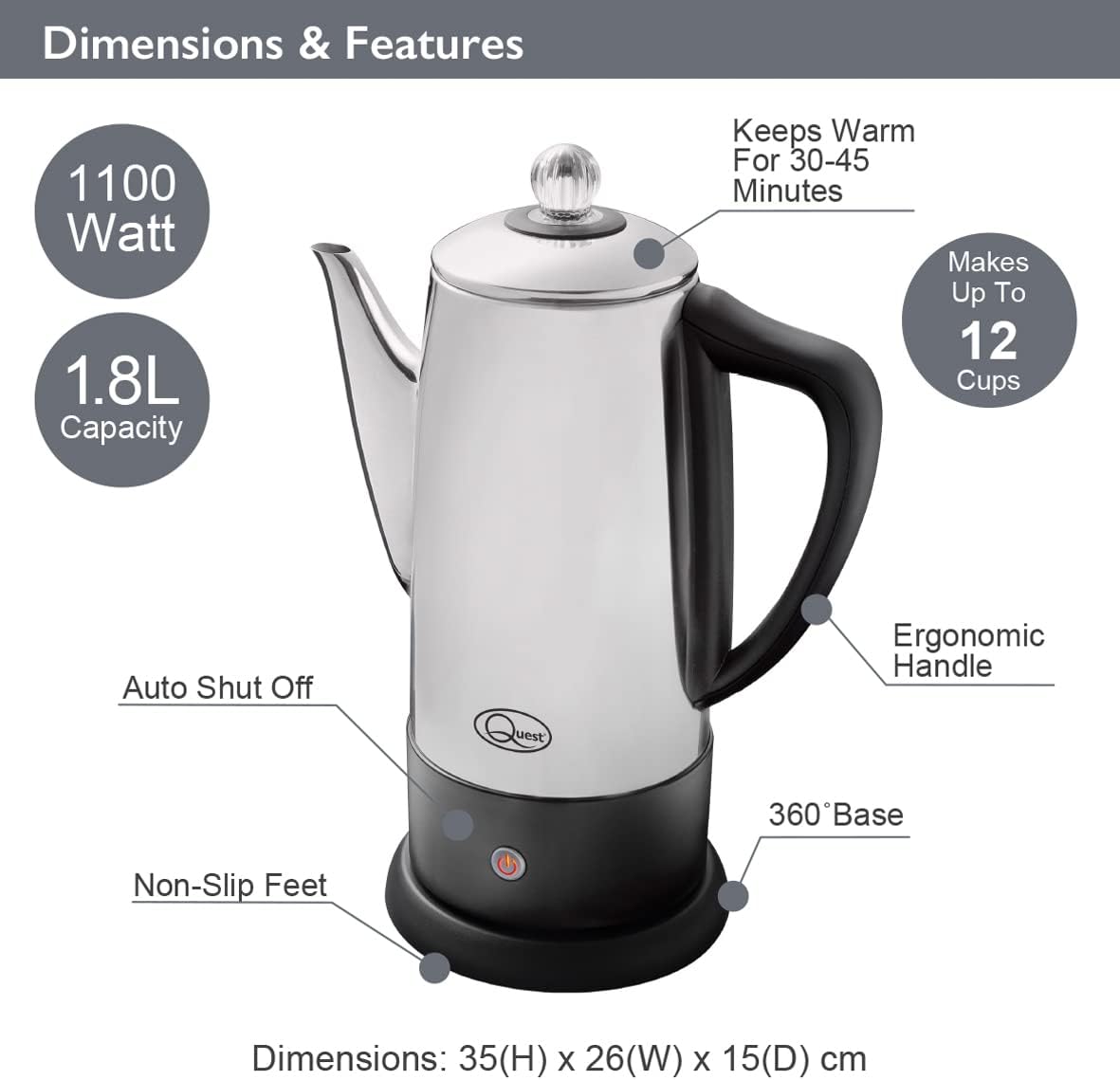
Image: Diagram illustrating the Quest 35200 percolator with callouts for its features: 1100 Watt power, 1.8L capacity (note: product title states 1.5L, using 1.8L from image), auto shut-off, non-slip feet, 360° base, ergonomic handle, keeps warm for 30-45 minutes, and makes up to 12 cups. Dimensions are 35(H) x 26(W) x 15(D) cm.

Image: A collage of four close-up views of the percolator: the interior with water level markings up to 12 cups, the removable filter basket filled with ground coffee, the illuminated power indicator light on the base, and the transparent lid knob.
সেটআপ
- আনপ্যাক করুন: Carefully remove all packaging materials and inspect the percolator for any damage.
- প্রাথমিক পরিচ্ছন্নতা: Before first use, wash the interior of the percolator, the filter basket, and the stem in warm, soapy water. Rinse thoroughly and dry. Wipe the exterior with a damp কাপড়
- বসানো: Place the percolator base on a stable, flat, heat-resistant surface, away from the edge of the counter.
- পাওয়ার সংযোগ: নিশ্চিত করুন যে পাওয়ার কর্ডটি সহজেই অ্যাক্সেসযোগ্য এবং বাধাগ্রস্ত নয়।
অপারেটিং নির্দেশাবলী
Follow these steps to brew coffee with your Quest 35200 percolator:
- জল যোগ করুন: Fill the percolator with cold, fresh water to your desired level, observing the internal markings. Do not exceed the maximum fill line.
- Insert Stem and Basket: Place the percolator stem into the center well of the percolator. Then, place the filter basket onto the stem.
- কফি গ্রাউন্ড যোগ করুন: Add your preferred amount of coarse-ground coffee into the filter basket. Do not use fine-ground coffee as it may seep through the filter.
- নিরাপদ ঢাকনা: Place the lid firmly on the percolator.
- বিদ্যুৎ সংযোগ করুন: Place the percolator onto its 360° detachable power base. Plug the power cord into a suitable electrical outlet.
- মদ্যপান শুরু করুন: Press the power button on the base. The indicator light will illuminate, signifying that brewing has begun.
- Percolation Cycle: The water will heat and begin to percolate through the coffee grounds. The brewing process typically takes several minutes, depending on the amount of water.
- উষ্ণ রাখুন: Once the brewing cycle is complete, the percolator will automatically switch to a keep-warm mode, indicated by the power light changing color or remaining illuminated. This function keeps coffee warm for approximately 30-45 minutes.
- পরিবেশন: Carefully remove the percolator from its base and pour coffee into cups. Be cautious of hot surfaces and steam.
- সংযোগ বিচ্ছিন্ন করুন: After serving, unplug the percolator from the wall outlet.

Image: A visual guide showing four steps for using the percolator: 1. Adding cold water to the pot. 2. Adding ground coffee to the filter basket. 3. Pressing the power switch on the base. 4. Pouring the brewed coffee into a cup.

Image: A diagram highlighting the percolator's keep warm functionality, stating it keeps coffee warm for up to 45 minutes, has a 1.8L capacity, and makes up to 12 cups.

ছবি: একটি ক্লোজ-আপ view of the percolator's 360° detachable base, showing the central electrical connector.
রক্ষণাবেক্ষণ এবং পরিচ্ছন্নতা
Regular cleaning ensures optimal performance and longevity of your percolator.
- সর্বদা আনপ্লাগ করুন: Before cleaning, ensure the percolator is unplugged from the power outlet and has cooled down completely.
- বিচ্ছিন্ন করা: Remove the lid, filter basket, and stem.
- ধোয়ার উপাদান: Wash the lid, filter basket, and stem in warm, soapy water. Rinse thoroughly and dry.
- পরিষ্কার অভ্যন্তর: Wash the interior of the percolator with warm, soapy water and a soft sponge or brush. Rinse thoroughly to remove all soap residue.
- পরিষ্কার বাহ্যিক: Wipe the exterior of the percolator with a damp cloth. Do not use abrasive cleaners or scouring pads, as these can damage the stainless steel finish.
- ভিত্তি পরিষ্কার: বিজ্ঞাপন দিয়ে পাওয়ার বেস মুছুনamp cloth. Never immerse the power base in water or any other liquid.
- শুকানো: Ensure all parts are completely dry before reassembling or storing the percolator.
- বর্ণনা: Over time, mineral deposits may build up. To descale, fill the percolator with a mixture of equal parts water and white vinegar. Bring to a boil and let it sit for an hour before emptying and rinsing thoroughly. Repeat if necessary.
- ডিশওয়াশারের নিরাপত্তা: The percolator is না ডিশওয়াশার নিরাপদ। সমস্ত উপাদান হাত দিয়ে ধুয়ে নিন।
সমস্যা সমাধান
আপনার পারকোলেটর নিয়ে যদি কোনও সমস্যা দেখা দেয়, তাহলে নিম্নলিখিত সাধারণ সমস্যা এবং সমাধানগুলি দেখুন:
| সমস্যা | সম্ভাব্য কারণ | সমাধান |
|---|---|---|
| Percolator does not turn on. | Not plugged in; power button not pressed; no power at outlet. | Ensure unit is plugged in and power button is pressed. Check outlet with another appliance. |
| কফি খুব দুর্বল। | Not enough coffee grounds; coffee grounds too coarse; water level too high. | Increase coffee grounds. Use medium-coarse grounds. Reduce water level. |
| কফি খুব শক্তিশালী। | Too many coffee grounds; coffee grounds too fine; water level too low. | Reduce coffee grounds. Use coarser grounds. Increase water level. |
| Coffee grounds in brewed coffee. | Coffee grounds too fine; filter basket not seated correctly. | Use coarser grounds. Ensure filter basket is properly seated on the stem. |
| Percolator leaks. | Overfilled; lid not seated correctly. | Do not fill above the maximum line. Ensure lid is firmly and correctly placed. |
এই সমাধানগুলি চেষ্টা করার পরেও যদি সমস্যাটি থেকে যায়, তাহলে অনুগ্রহ করে গ্রাহক সহায়তার সাথে যোগাযোগ করুন।
স্পেসিফিকেশন
| বৈশিষ্ট্য | বিস্তারিত |
|---|---|
| মডেল নম্বর | 35200 |
| ব্র্যান্ড | অনুসন্ধান |
| রঙ | সিলভার |
| ক্ষমতা | ১.৭ লিটার (প্রায় ৮ কাপ) |
| শক্তি | 1100W |
| ভলিউমtage | 240V |
| বিশেষ বৈশিষ্ট্য | Cordless, Built-in Filter, Keep Warm Function |
| মাত্রা (L x W x H) | 13.19 x 9.25 x 6.1 ইঞ্চি (33.5 x 23.5 x 15.5 সেমি) |
| আইটেম ওজন | 2.2 পাউন্ড (1 কেজি) |
| ডিশওয়াশার নিরাপদ | না |
ওয়্যারেন্টি এবং সমর্থন
ওয়ারেন্টি তথ্য এবং গ্রাহক সহায়তার জন্য, অনুগ্রহ করে ক্রয়ের সময় প্রদত্ত ডকুমেন্টেশন দেখুন অথবা আপনার খুচরা বিক্রেতার সাথে যোগাযোগ করুন। যেকোনো ওয়ারেন্টি দাবির জন্য আপনার ক্রয়ের প্রমাণপত্র রাখুন।


