1. ভূমিকা
This manual provides detailed instructions for the installation, operation, and maintenance of your Hikvision DS-7732NI-K4/16P 32-Channel PoE Network Video Recorder (NVR). This NVR supports up to 32 channels, with 16 Power over Ethernet (PoE) ports, 4K (8-Megapixel) resolution recording, USB backup, and ONVIF compatibility. Please read this manual thoroughly before use to ensure proper functionality and safety.
2. নিরাপত্তা তথ্য
- Ensure the NVR is placed on a stable, level surface to prevent accidental falls.
- ডিভাইসটিকে জল বা আর্দ্রতার সাথে প্রকাশ করবেন না।
- শুধুমাত্র ডিভাইসের সাথে সরবরাহ করা পাওয়ার অ্যাডাপ্টার ব্যবহার করুন।
- অতিরিক্ত উত্তাপ রোধ করতে বায়ুচলাচল খোলার ব্লক এড়িয়ে চলুন।
- যোগ্য কর্মীদের সমস্ত পরিষেবার উল্লেখ করুন।
3. প্যাকেজ বিষয়বস্তু
প্যাকেজে সমস্ত আইটেম উপস্থিত আছে কিনা তা যাচাই করুন:
- Hikvision DS-7732NI-K4/16P NVR Unit
- পাওয়ার অ্যাডাপ্টার এবং পাওয়ার কর্ড
- ইউএসবি মাউস
- HDMI কেবল
- ইথারনেট কেবল
- রিমোট কন্ট্রোলার
- দ্রুত শুরু নির্দেশিকা / নির্দেশিকা ম্যানুয়াল
- HDD Mounting Screws (if applicable)
ভিডিও 1: Unboxing the 16-Channel POE NVR Network Video Recorder. This video demonstrates the contents of the product package, including the NVR unit, power supply, USB mouse, Ethernet cable, HDMI cable, remote controller, and instruction manual.
4. সেটআপ
৩.১ শারীরিক সংযোগ
- মনিটর সংযুক্ত করুন: Connect a monitor to the NVR using either the HDMI or VGA port.
- মাউস সংযুক্ত করুন: Plug the USB mouse into one of the USB ports on the NVR.
- নেটওয়ার্ক সংযোগ: Connect the NVR to your network router using an Ethernet cable.
- ক্যামেরা সংযোগ: Connect your PoE IP cameras to the available PoE ports on the NVR. For third-party cameras, ensure they are ONVIF compatible.
- পাওয়ার চালু: পাওয়ার অ্যাডাপ্টারটি NVR-এর সাথে সংযুক্ত করুন এবং তারপর এটিকে একটি পাওয়ার আউটলেটে প্লাগ করুন। NVR স্বয়ংক্রিয়ভাবে চালু হবে।
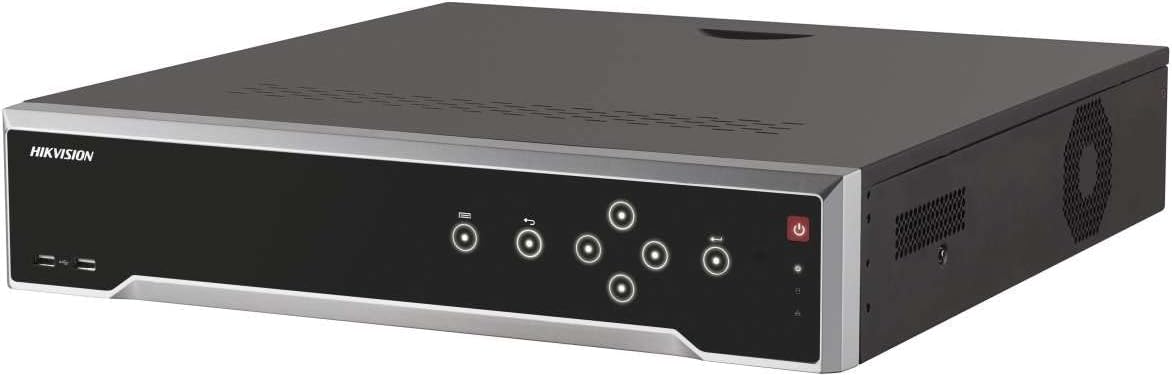
ছবি 1: সামনে view of the Hikvision DS-7732NI-K4/16P NVR unit, showing the power button, status indicators, and USB ports.
4.2 Initial Configuration (Adding a Third-Party Camera)
- Ensure the camera is physically connected to the NVR via an Ethernet cable and the connection is secure.
- On the NVR's display screen, once an image is shown, click the "Add Camera" icon (small circle with a plus sign) on the bottom bar.
- In the Protocol section at the top left, select "ONVIF."
- Click "Search." Once the connected device appears on the screen, select it and click "Add all."
- After completing the setup, click "Go back." You should now see the newly added camera's live feed on the display.
ভিডিও 2: Guide on connecting a third-party single camera to the NVR's new user interface. This video illustrates the steps for physical connection and software configuration to integrate an ONVIF-compatible camera.
5. অপারেটিং নির্দেশাবলী
5.1 রেকর্ডিং
The NVR automatically records footage from connected cameras to the installed hard drive. It supports 4K (8-Megapixel) resolution for high-quality video capture. Ensure a compatible hard drive (up to 24TB) is installed for continuous recording.
5.2 প্লেব্যাক
অ্যাক্সেস রেকর্ড করা footage through the NVR's user interface. Use the mouse to navigate the timeline and select specific dates and times for playback. The system allows for fast-forward, rewind, and frame-by-frame review.
5.3 USB Backup
To back up important footage, insert a USB storage device into one of the NVR's USB ports. Navigate to the backup menu in the system settings, select the desired footage, and initiate the backup process. Ensure the USB device has sufficient storage capacity.
5.4 ONVIF Compatibility
The NVR is compatible with ONVIF (Open Network Video Interface Forum) standard cameras, allowing for integration with a wide range of third-party IP cameras. This ensures flexibility in expanding your surveillance system.
6. রক্ষণাবেক্ষণ
- Regularly check for firmware updates to ensure optimal performance and security.
- Keep the NVR and cameras clean, free from dust and debris.
- Ensure adequate ventilation around the NVR to prevent overheating.
- পর্যায়ক্রমে পুনরায়view রেকর্ড করা footage and system logs for any anomalies.
7. সমস্যা সমাধান
7.1 No Video Signal from Camera
- Check all cable connections (Ethernet, power) to the camera and NVR.
- Verify the camera is powered on and its status indicator is active.
- Ensure the camera's IP address and network settings are correctly configured and compatible with the NVR.
- If it's a third-party camera, confirm ONVIF compatibility and proper integration steps (refer to Section 4.2).
7.2 NVR Not Recording
- Check if a hard drive is installed and properly recognized by the NVR.
- Verify recording schedules and settings in the NVR's configuration menu.
- Ensure the hard drive has sufficient free space.
8. স্পেসিফিকেশন
| বৈশিষ্ট্য | বিস্তারিত |
|---|---|
| মডেল নম্বর | DS-7732NI-K4/16P |
| চ্যানেল | 32-Channel (16-Channel PoE) |
| সর্বোচ্চ রেজোলিউশন | 4K (8-Megapixels) |
| সর্বোচ্চ HDD ক্ষমতা | Up to 24TB (HDD Not Included) |
| সংযোগ | Ethernet, HDMI, USB, VGA |
| সামঞ্জস্যপূর্ণ ডিভাইস | IP Cameras (ONVIF compatible) |
| পণ্যের মাত্রা | 19.69 x 19.69 x 11.02 ইঞ্চি |
| আইটেম ওজন | 11.02 পাউন্ড |
9. ওয়্যারেন্টি এবং সমর্থন
This Hikvision product comes with a two-year warranty against factory defects. For technical support or warranty claims, please contact your authorized Hikvision dealer or visit the official Hikvision support webসাইট


