1. ভূমিকা
This manual provides detailed instructions for the setup, operation, and maintenance of your Denon AVR-S740H Audio/Video Receiver. The AVR-S740H is designed to deliver immersive home theater experiences with advanced audio and video technologies, including Dolby Atmos, DTS:X, 4K video upscaling, and HEOS multi-room streaming. Please read this manual thoroughly to ensure proper use and to maximize your enjoyment of the product.

চিত্র 1: সামনে view of the Denon AVR-S740H Audio/Video Receiver.
2. সেটআপ
৪.১ প্যাকিং এবং প্রাথমিক পরিদর্শন
Carefully remove the receiver and all accessories from the packaging. Verify that all components listed below are present and undamaged.
২.১ বাক্সে কী আছে
- Denon AVR-S740H Receiver
- রিমোট কন্ট্রোলার
- দ্রুত শুরু নির্দেশিকা
- পাওয়ার কর্ড
- Audyssey Setup Microphone
- এফএম/এএম অ্যান্টেনা
2.2 Connecting Your System
The Denon AVR-S740H features multiple input and output options for various audio and video devices. Ensure the receiver is powered off and unplugged before making any connections.
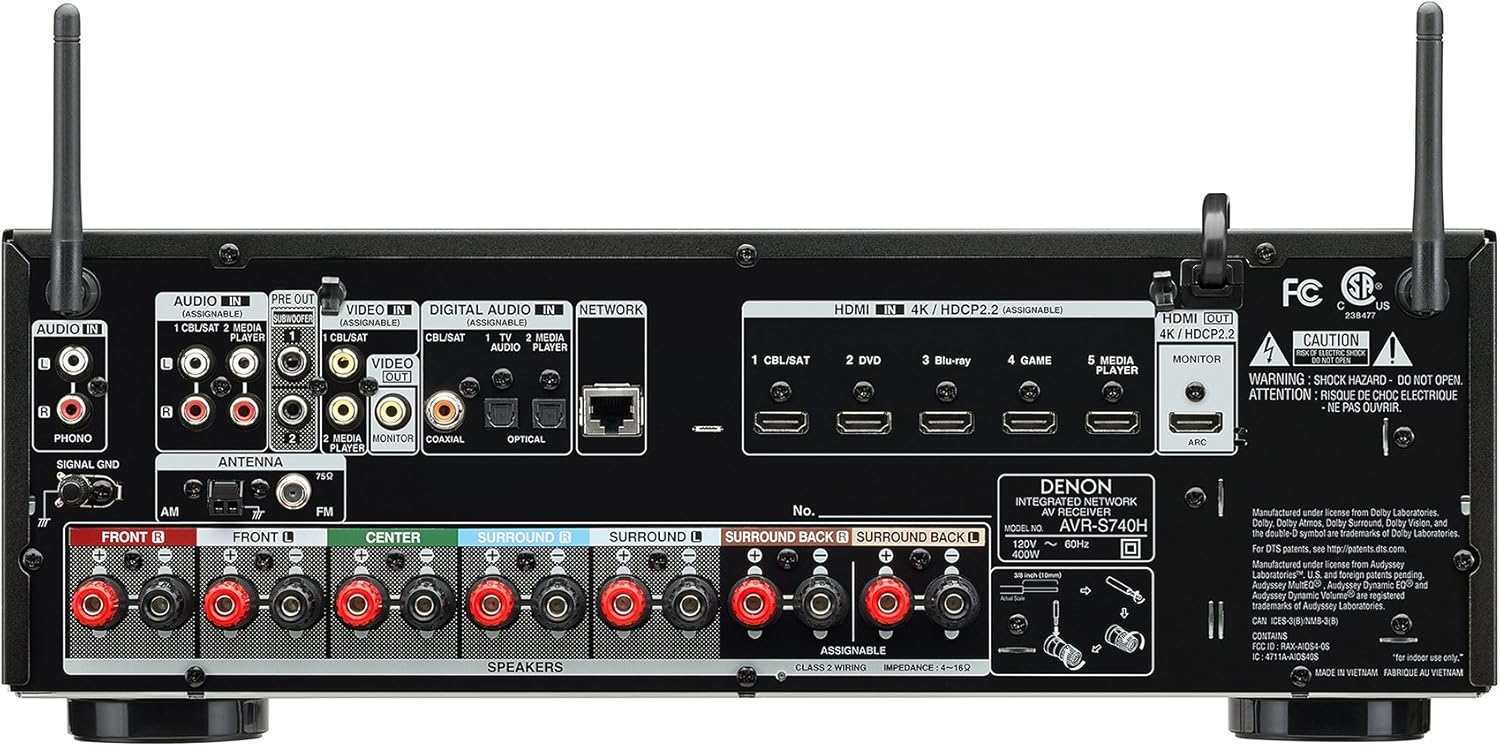
Figure 2: Rear panel connections of the Denon AVR-S740H, showing HDMI, audio, and speaker terminals.
2.2.1 স্পিকার সংযোগ
The receiver supports up to a 7.2 channel surround sound configuration. Connect your speakers to the corresponding terminals on the rear panel. Ensure correct polarity (positive to positive and negative to negative) for optimal sound quality and to prevent damage.
- সামনের বক্তা: Connect to FRONT L and FRONT R terminals.
- কেন্দ্রের স্পিকার: সেন্টার টার্মিনালে সংযোগ করুন।
- চারপাশে স্পিকার: Connect to SURROUND L and SURROUND R terminals.
- Surround Back/Height Speakers: Connect to SURROUND BACK L and SURROUND BACK R terminals for a 7.1 setup, or use as height speakers for Dolby Atmos/DTS:X configurations.
- সাবউফার: Connect to the SUBWOOFER PRE OUT terminals using LFE cables.
2.2.2 HDMI Connections
Connect your video sources (e.g., Blu-ray player, game console, streaming device) to the HDMI IN ports. Connect your TV to the HDMI OUT (MONITOR) port, preferably the one labeled "ARC" (Audio Return Channel) if your TV supports this feature.
The receiver's advanced HDMI video section supports top-tier 4K picture quality, including HLG (Hybrid Log Gamma), HDR (High Dynamic Range), BT.2020, Wide Color Gamut, and 4:4:4 Pure Color sub-sampling, ensuring highly detailed and vibrant visuals.
2.2.3 Network and Other Connections
For network features and streaming, connect an Ethernet cable to the NETWORK port or use the built-in Wi-Fi. Additional audio inputs (optical, coaxial, analog) are available for other devices. A convenient front panel USB port allows for direct playback of high-resolution audio files.
2.3 Initial Setup Assistant
The Denon Setup Assistant provides clear, simple instructions on your TV screen to guide you through the connection and configuration process. This includes speaker setup, specific EQ settings, and optimizing your surround sound system for your room's acoustics.
ভিডিও ১: একটি ওভারview of the Denon S-Series AV Receiver, demonstrating its features including the setup assistant, audio optimization, and various connectivity options. This video highlights the ease of setup and immersive audio capabilities.
2.3.1 Audyssey Audio Optimization
The Audyssey Suite EQ calibration system measures all speakers in your home theater during setup and dynamically optimizes them for all listening levels. This ensures accurate room calibration and tuning, providing balanced and high-quality sound tailored to your listening environment.
3. অপারেশন
3.1 মৌলিক নিয়ন্ত্রণ
The front panel of the receiver includes essential controls such as Source Select, Master Volume, and Quick Select buttons. The included remote controller provides comprehensive control over all functions and settings.

চিত্র 3: সামনে view of the Denon AVR-S740H with its remote control and Wi-Fi/Bluetooth antenna.
3.1.1 Quick Select Buttons
Four Quick Select buttons on the front panel and remote allow you to store and quickly switch between your preferred audio settings for different sources like Television, Blu-Ray, and more. This feature simplifies switching between frequently used configurations.
৫.১ অডিও প্লেব্যাক
The AVR-S740H supports various audio formats and playback methods to enhance your listening experience:
- ইমারসিভ সারাউন্ড সাউন্ড: Experience Dolby Atmos, DTS:X, and DTS Virtual:X for captivating three-dimensional audio that places you in the center of the action.
- উচ্চ-রেজোলিউশন অডিও: Play MP3, WAV, FLAC, ALAC, and DSD (2.8/5.6MHz) files directly via the front panel USB input, preserving the original sound quality.
- ভিনাইল প্লেব্যাক: Connect your turntable to the dedicated phono input for accurate and high-fidelity vinyl playback.
3.3 মিউজিক স্ট্রিমিং
Stream your favorite music services seamlessly using the built-in HEOS technology, Wi-Fi, AirPlay 2, or Bluetooth. Supported services include Spotify, Pandora, Tidal, Amazon Music, and many others.
3.3.1 HEOS Multi-Room Digital Streaming
HEOS technology allows you to create a multi-room audio system, enabling you to choose what music to play in each connected room without interruptions. This delivers Hi-Fi audio sound throughout your home with flexible control.
3.4 Voice Control with Amazon Alexa
The Denon AVR-S740H is compatible with Amazon Alexa, providing effortless voice control over various receiver functions. You can adjust volume, change tracks, switch inputs, and more using simple voice commands.
Example আদেশ: "Alexa, switch input to Blu-ray."
4. রক্ষণাবেক্ষণ
To ensure optimal performance and longevity of your Denon AVR-S740H, follow these maintenance guidelines:
- পরিষ্কার করা: Use a soft, dry cloth to clean the exterior surfaces. Avoid abrasive cleaners, solvents, or chemical sprays, as these can damage the finish.
- বায়ুচলাচল: Ensure adequate ventilation around the receiver to prevent overheating. Do not block ventilation openings on the top, sides, or rear of the unit. Maintain at least 10 cm (4 inches) of clear space above the unit.
- শক্তি: Disconnect the power cord from the wall outlet if the unit will not be used for an extended period, such as during vacations or long absences.
- পরিবেশগত অবস্থা: Avoid exposing the receiver to extreme temperatures, humidity, or direct sunlight. Keep it away from sources of heat and moisture.
5. সমস্যা সমাধান
If you encounter issues with your Denon AVR-S740H, refer to the following common troubleshooting steps. Many problems can be resolved by checking basic connections and settings.
- ক্ষমতা নেই: Check the power cord connection to both the receiver and the wall outlet. Ensure the power button is pressed and the unit is not in standby mode. Test the wall outlet with another device.
- কোন শব্দ নেই: Verify all speaker connections, ensuring correct polarity. Confirm the correct input source is selected. Check the volume level and ensure the mute function is not activated. If speakers were recently moved or added, run the Audyssey setup again.
- কোন ভিডিও নেই: Confirm all HDMI connections between the source device, receiver, and TV. Ensure the correct input is selected on both the receiver and your television. Try bypassing the receiver by connecting the source directly to the TV to isolate the issue.
- নেটওয়ার্ক সংযোগ সমস্যা: Check your router and internet connection. Ensure the receiver's Wi-Fi or Ethernet connection is active and properly configured. Restart your router and the receiver.
- রিমোট কন্ট্রোল কাজ করছে না: Replace batteries in the remote control. Ensure there are no obstructions between the remote and the receiver's IR sensor.
For more detailed troubleshooting guides and solutions to specific error messages, consult the full user manual available on the Denon support webসাইট
6. স্পেসিফিকেশন
| বৈশিষ্ট্য | বিস্তারিত |
|---|---|
| পণ্যের মাত্রা | 13.35 x 17.09 x 5.94 ইঞ্চি |
| আইটেম ওজন | 16.54 পাউন্ড |
| আইটেম মডেল নম্বর | AVRS740H সম্পর্কে |
| ব্র্যান্ড | ডেনন |
| সংযোগ প্রযুক্তি | Bluetooth, Ethernet, USB, Wireless |
| কন্ট্রোলার টাইপ | অ্যামাজন অ্যালেক্সা, ভেরা |
| বিশেষ বৈশিষ্ট্য | Equalizer, Pandora, Spotify, Tidal |
| সামঞ্জস্যপূর্ণ ডিভাইস | স্পিকার |
| মোট HDMI পোর্ট | 7 |
| সংযোগকারী প্রকার | ইউএসবি |
| অডিও আউটপুট মোড | স্টেরিও, সারাউন্ড |
| সাউন্ড সাউন্ড চ্যানেল কনফিগারেশন | 5.2, 7.1 |
| ভিডিও এনকোডিং | H.264, H.265/HEVC, VP9 |
| ব্যাটারি | 2টি AAA ব্যাটারি প্রয়োজন (অন্তর্ভুক্ত) |
7. ওয়ারেন্টি তথ্য
Denon products are manufactured to the highest quality standards. For specific warranty details, including coverage period and terms, please refer to the warranty card included with your product. Alternatively, visit the official Denon website for the most up-to-date warranty information. It is important to retain your proof of purchase for any warranty claims.
8. গ্রাহক সহায়তা
For further assistance, technical support, or service inquiries regarding your Denon AVR-S740H, please contact Denon customer support. You can typically find contact information (phone numbers, email addresses, or online chat) through their official website or in the product documentation. Online resources, frequently asked questions (FAQs), and firmware updates are also often available on the Denon support portal to help you resolve issues and enhance your product experience.


