1. ভূমিকা
This manual provides detailed instructions for the installation, operation, and maintenance of your Aerocool Streak Mid-Tower ATX PC Gaming Case. Designed for both new and experienced PC builders, the Streak case offers a compact design with a polished aluminum front panel, vibrant RGB lighting, and a full tempered glass side panel to showcase your components. It supports various cooling configurations to ensure optimal performance for your system.
2. নিরাপত্তা তথ্য
Please read and understand all safety instructions before installing or operating the PC case. Failure to do so may result in personal injury or damage to the product.
- Always disconnect the power supply from the wall outlet before performing any installation or maintenance.
- Be aware of sharp edges inside the case. Handle components with care to avoid cuts.
- ছোট ছোট অংশ এবং স্ক্রু শিশুদের থেকে দূরে রাখুন।
- বৈদ্যুতিক শক প্রতিরোধ করার জন্য সঠিক গ্রাউন্ডিং নিশ্চিত করুন।
- কেসটি জল বা অতিরিক্ত আর্দ্রতার সংস্পর্শে আনবেন না।
3. প্যাকেজ বিষয়বস্তু
প্যাকেজে সমস্ত আইটেম উপস্থিত আছে কিনা তা যাচাই করুন:
- Aerocool Streak Mid-Tower ATX PC Gaming Case
- Accessory box (screws, standoffs, cable ties, etc.)
- ব্যবহারকারী ম্যানুয়াল (এই দস্তাবেজ)
4. Case Components Overview
Familiarize yourself with the various parts of your Aerocool Streak case.

চিত্র 4.1: কোণযুক্ত view of the Aerocool Streak PC case, showcasing the RGB front panel and tempered glass side panel.

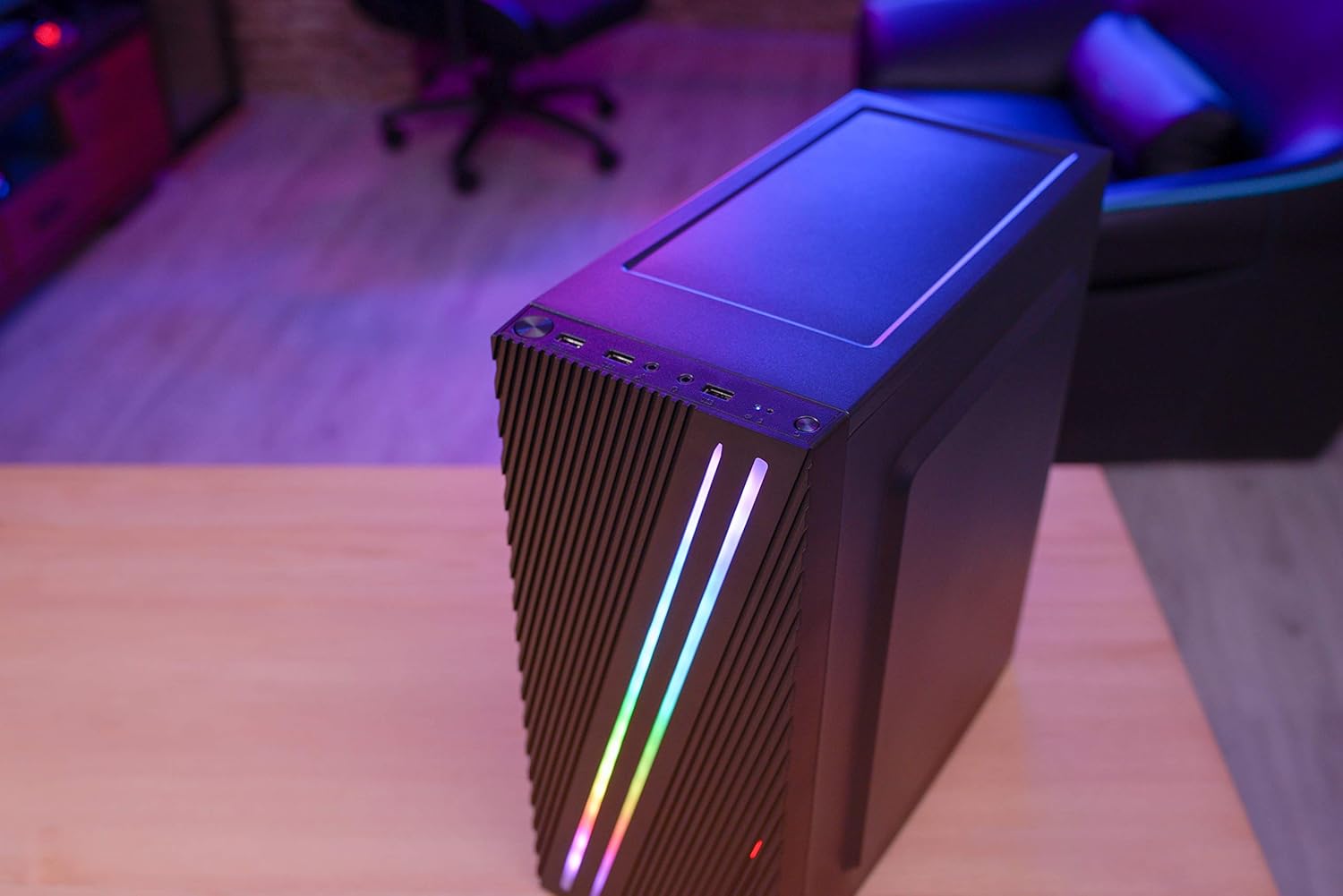
চিত্র 4.2: উপরে-নিচে কোণযুক্ত view of the Aerocool Streak PC case, highlighting the top panel and front I/O ports.
৪.২ সামনের I/O পোর্টগুলি
The front I/O panel provides convenient access to essential connections.
চিত্র 4.3: Close-up of the front I/O panel, showing the power button, LED control button, USB 3.0 port, two USB 2.0 ports, and HD audio/microphone jacks.
- পাওয়ার বোতাম: সিস্টেমটি চালু/বন্ধ করতে।
- LED কন্ট্রোল বোতাম: To cycle through RGB lighting modes.
- USB 3.0 পোর্ট (x1): উচ্চ-গতির ডেটা স্থানান্তরের জন্য।
- USB 2.0 পোর্ট (x2): স্ট্যান্ডার্ড USB ডিভাইসের জন্য।
- HD Audio & Mic Jacks: হেডফোন এবং মাইক্রোফোন সংযোগের জন্য।
4.2 Interior Layout
The interior is designed for efficient component installation and cable management.

চিত্র 4.4: অভ্যন্তরীণ view of the Aerocool Streak PC case, showing the motherboard tray, drive bays, and cable routing cutouts.
5. সেটআপ এবং ইনস্টলেশন
Follow these steps to assemble your PC components within the Aerocool Streak case.
5.1 প্রস্তুতি
- কেসটি খুলে ফেলুন এবং সমস্ত প্যাকেজিং উপকরণ সরিয়ে ফেলুন।
- কেসটি একটি স্থিতিশীল, সমতল পৃষ্ঠে রাখুন।
- Gather necessary tools: Phillips head screwdriver, cable ties (included in accessory box).
- Remove the tempered glass side panel by unscrewing the four thumb screws.
২.৩ মাদারবোর্ড ইনস্টলেশন
The Aerocool Streak supports ATX, Micro-ATX, and Mini-ITX motherboards.

চিত্র 5.1: Diagram illustrating the compatible motherboard sizes (Mini-ITX, Micro-ATX, ATX) within the case.
- Install the necessary motherboard standoffs into the motherboard tray according to your motherboard's form factor.
- Place your motherboard carefully onto the standoffs, aligning the screw holes.
- প্রদত্ত স্ক্রু দিয়ে মাদারবোর্ডটি সুরক্ষিত করুন।
5.3 পাওয়ার সাপ্লাই ইউনিট (PSU) ইনস্টলেশন
The case features a bottom-mount PSU design.
- কেসের নীচের পিছনের দিকের নির্ধারিত বগিতে PSU স্লাইড করুন।
- Secure the PSU to the case rear with screws.
৪.৫ স্টোরেজ ড্রাইভ ইনস্টলেশন
Install your 2.5" SSDs and 3.5" HDDs.
- ২.৫" এসএসডি: Mount SSDs to the designated 2.5" drive trays or mounting points on the motherboard tray.
- ৩.৫" হার্ডডিস্ক: Install HDDs into the drive cage located beneath the PSU shroud.
5.5 Expansion Card Installation (Graphics Card, etc.)
The case supports high-end graphics cards up to 335mm in length.
- কেসের পিছন থেকে প্রয়োজনীয় PCIe স্লট কভারগুলি সরিয়ে ফেলুন।
- Insert your expansion card into the corresponding PCIe slot on the motherboard.
- একটি স্ক্রু দিয়ে কার্ডটি সুরক্ষিত করুন।
৪.৪ কুলিং সিস্টেম ইনস্টলেশন
The Aerocool Streak supports both air and liquid cooling solutions.

চিত্র 5.2: Diagram showing air cooling options, including front 120mm fans (optional) and a rear 80mm fan (included).

চিত্র 5.3: Diagram illustrating liquid cooling support, specifically a 240mm radiator at the front (optional).
- এয়ার কুলিং: The case supports up to two 120mm fans at the front (optional) and includes one 80mm fan at the rear.
- তরল শীতলকরণ: A 240mm radiator can be installed at the front of the case (optional).
- Install fans or radiators into their respective mounting points and secure them with screws.
5.7 তারের ব্যবস্থাপনা
Utilize the cable routing cutouts and tie-down points behind the motherboard tray to organize cables for improved airflow and aesthetics.
- Route all power and data cables through the designated cutouts.
- Use cable ties to bundle and secure cables neatly.
6. অপারেটিং নির্দেশাবলী
৫.১ আপনার সিস্টেম চালু করা
- Ensure all components are correctly installed and all cables are securely connected.
- Connect the power cable to your PSU and then to a wall outlet.
- PSU-এর পাওয়ার সুইচটি 'চালু' অবস্থানে ঘুরিয়ে দিন।
- আপনার সিস্টেম চালু করতে কেসের সামনের I/O প্যানেলের পাওয়ার বোতাম টিপুন।
৪.৩ আরজিবি লাইটিং কন্ট্রোল
The Aerocool Streak features 18 distinct RGB lighting modes on its front panel.

চিত্র 6.1: The Aerocool Streak PC case with its vibrant RGB lighting illuminated on the front panel.
- চাপুন LED কন্ট্রোল বোতাম on the front I/O panel to cycle through the 18 available lighting modes.
- These modes include 11 RGB flow modes and 7 static color modes.
7. রক্ষণাবেক্ষণ
নিয়মিত রক্ষণাবেক্ষণ আপনার পিসি কেস এবং উপাদানগুলির দীর্ঘায়ু এবং সর্বোত্তম কর্মক্ষমতা নিশ্চিত করতে সাহায্য করে।
৫.১ কেস পরিষ্কার করা
- বাহ্যিক: একটি নরম ব্যবহার করুন, ঘamp বাইরের পৃষ্ঠতল মুছতে কাপড়। ঘষিয়া তুলিয়া ফেলিতে সক্ষম ক্লিনার এড়িয়ে চলুন।
- অভ্যন্তরীণ: Periodically use compressed air to remove dust buildup from inside the case, especially around fans and heatsinks.
৫.২ ডাস্ট ফিল্টার রক্ষণাবেক্ষণ
The case may include removable dust filters to prevent dust ingress. Clean these filters regularly.
- Locate and carefully remove any dust filters (e.g., top, bottom, front).
- Clean the filters with water and mild soap, or use compressed air.
- ফিল্টারগুলি পুনরায় ইনস্টল করার আগে নিশ্চিত করুন যে সেগুলি সম্পূর্ণ শুকিয়ে গেছে।
8. সমস্যা সমাধান
If you encounter issues with your Aerocool Streak case, refer to the following common problems and solutions.
- সিস্টেম চালু হচ্ছে না:
- Check all power connections, including the PSU to the wall, PSU switch, and motherboard power cables.
- নিশ্চিত করুন যে সামনের প্যানেলের পাওয়ার সুইচ কেবলটি মাদারবোর্ডের সাথে সঠিকভাবে সংযুক্ত আছে।
- RGB lighting is not working:
- Verify that the RGB lighting cables are properly connected to the power supply or motherboard RGB header.
- Press the LED control button to cycle through modes, as it might be on a static black mode.
- Poor airflow/overheating:
- Ensure all case fans are spinning correctly.
- যেকোনো ধুলো ফিল্টার এবং অভ্যন্তরীণ উপাদান পরিষ্কার করুন।
- Verify proper fan orientation for optimal airflow (intake/exhaust).
9. স্পেসিফিকেশন
| বৈশিষ্ট্য | স্পেসিফিকেশন |
|---|---|
| মডেলের নাম | স্ট্রিক |
| মডেল নম্বর | ACCM-PV19012.11 |
| কেস টাইপ | মিড-টাওয়ার |
| মাদারবোর্ড সামঞ্জস্য | এটিএক্স, মাইক্রো এটিএক্স, মিনি আইটিএক্স |
| উপাদান | Tempered Glass (side panel) |
| রঙ | কালো |
| সামনের আই / ও বন্দরসমূহ | 1x USB 3.0, 2x USB 2.0, HD Audio, Mic, LED Control Button, Power Button |
| আরজিবি লাইটিং | 18 Lighting Modes (11 flow, 7 static) |
| CPU কুলার ক্লিয়ারেন্স | 151 মিমি পর্যন্ত |
| গ্রাফিক্স কার্ডের দৈর্ঘ্য | 335 মিমি পর্যন্ত |
| পিএসইউ মাউন্টিং | নীচের মাউন্ট |
| কুলিং পদ্ধতি | বাতাস, জল |
| অন্তর্ভুক্ত ফ্যান | ১x ১২০ মিমি রিয়ার ফ্যান |
| Optional Fan Support | সামনে: 2x 120mm |
| রেডিয়েটর সমর্থন | Front: 1x 240mm (optional) |
10. ওয়্যারেন্টি এবং সমর্থন
The Aerocool Streak PC Gaming Case comes with a 2-year warranty on parts. For technical support, warranty claims, or further assistance, please contact your retailer or the official Aerocool support channels. Keep your proof of purchase for warranty validation.


