ভূমিকা
This manual provides comprehensive instructions for the operation and maintenance of your Olympus Pearlcorder Microcassette Recorder S711. Please read this manual thoroughly before using the device to ensure proper function and longevity.
The Olympus Pearlcorder S711 is designed for portable audio recording, featuring a voice-activated system and various playback controls.
প্যাকেজ বিষয়বস্তু
- Olympus Pearlcorder Microcassette Recorder S711
- 60-minute Microcassette
- 2 AA ব্যাটারি
সেটআপ
1. ব্যাটারি ইনস্টলেশন
- Locate the battery compartment cover on the back of the recorder.
- তীর দ্বারা নির্দেশিত দিক থেকে কভারটি স্লাইড করুন।
- Insert two AA batteries, ensuring the correct polarity (+/-) as marked inside the compartment.
- ব্যাটারি কম্পার্টমেন্ট কভার নিরাপদে বন্ধ করুন.
2. Microcassette Insertion
- Press the Eject button to open the cassette compartment.
- Insert a microcassette with the tape side facing forward and the open edge facing the recorder's head.
- Gently close the cassette compartment until it clicks into place.
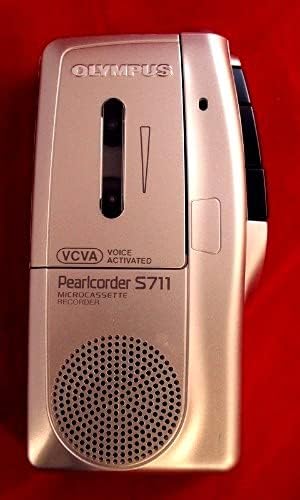
ছবি: সামনের দিকে view of the Olympus Pearlcorder S711 Microcassette Recorder, showing the speaker grille, "Pearlcorder S711" branding, and "VCVA Voice Activated" indicator.
অপারেটিং নির্দেশাবলী
রেকর্ডিং
- স্ট্যান্ডার্ড রেকর্ডিং: চাপুন রেকর্ড button. The recording indicator will illuminate. Speak clearly into the built-in microphone. To stop recording, press the স্টপ বোতাম
- Voice Control Actuator (VCVA): To enable hands-free recording, slide the ভিসিভিএ switch to the ON position. The recorder will automatically start recording when sound is detected and pause when silence occurs. Adjust the microphone sensitivity selector as needed for optimal voice activation.
- Microphone Sensitivity Selector: Use this switch to adjust the microphone's sensitivity. A higher sensitivity setting is suitable for recording distant sounds or quiet voices, while a lower setting is better for close-range recording or noisy environments.
প্লেব্যাক
- বেসিক প্লেব্যাক: চাপুন খেলা button. Adjust the volume control to your desired level. To stop playback, press the স্টপ বোতাম
- Fast Play: প্লেব্যাক চলাকালীন, টিপুন এবং ধরে রাখুন FAST PLAY button to increase playback speed. Release to return to normal speed.
- ক্যু/রিview: প্লেব্যাক চলাকালীন, টিপুন এবং ধরে রাখুন CUE button to fast-forward through the tape with audible sound. Press and hold the REVIEW button to rewind through the tape with audible sound.
- কুইক রিview: This feature allows you to quickly jump back a few seconds during playback. Consult the device's specific button layout for this function.
অন্যান্য ফাংশন
- Dual Tape Speeds: The recorder supports two tape speeds. Select the desired speed using the টেপের গতি switch. A slower speed allows for longer recording time on a single microcassette, while a faster speed offers better audio fidelity.
- Tape Counter: The tape counter displays the tape position. Use it to locate specific sections of your recordings. Reset the counter to zero by pressing the রিসেট বোতাম
- মাইক্রোফোন জ্যাক: Connect an external microphone (not included) to the MIC jack for enhanced recording quality or specific recording situations.
- মাথায় বাঁধিয়া ব্যবহার্য বেতারযন্ত্র জ্যাক: Connect headphones (not included) to the কান or হেডফোন প্লেব্যাকের সময় ব্যক্তিগতভাবে শোনার জন্য জ্যাক।
রক্ষণাবেক্ষণ
- ইউনিট পরিষ্কার করা: Wipe the exterior of the recorder with a soft, dry cloth. Do not use liquid cleaners or abrasive materials.
- মাথা পরিষ্কার করা: Periodically clean the recording/playback head and pinch roller using a cotton swab lightly dampened with isopropyl alcohol. Ensure the unit is powered off and batteries are removed before cleaning.
- ব্যাটারি যত্ন: যদি ইউনিটটি দীর্ঘ সময়ের জন্য ব্যবহার না করা হয়, তাহলে ফুটো রোধ করার জন্য ব্যাটারিগুলি সরিয়ে ফেলুন।
- Cassette Storage: Store microcassettes away from direct sunlight, high temperatures, and strong magnetic fields to preserve recording quality.
সমস্যা সমাধান
| সমস্যা | সম্ভাব্য কারণ | সমাধান |
|---|---|---|
| ক্ষমতা নেই | মৃত বা ভুলভাবে ঢোকানো ব্যাটারি। | ব্যাটারি প্রতিস্থাপন করুন অথবা সঠিক পোলারিটি সহ পুনরায় ঢোকান। |
| Poor recording quality | Microphone sensitivity too low/high; dirty recording head; faulty microcassette. | Adjust microphone sensitivity; clean recording head; try a new microcassette. |
| Tape does not move | Cassette not inserted correctly; tape jammed. | Re-insert cassette; gently check for tape jams. Do not force. |
| VCVA not activating | VCVA switch off; microphone sensitivity too low. | Ensure VCVA switch is ON; increase microphone sensitivity. |
স্পেসিফিকেশন
- ব্র্যান্ড: অলিম্পাস
- মডেল: Pearlcorder S711
- পণ্যের মাত্রা: 9.5 x 3.5 x 2 ইঞ্চি
- আইটেম ওজন: 9.6 আউন্স
- ডিজিটাল রেকর্ডিং সময়: 60 minutes (with included microcassette)
- হেডফোন জ্যাক: 3.5 মিলিমিটার
- মাইক্রোফোন ফর্ম ফ্যাক্টর: অন্তর্নির্মিত
- Microphone Operation Mode: মনো
- শক্তি উৎস: 2 AA ব্যাটারি
ওয়্যারেন্টি এবং সমর্থন
For warranty information and technical support, please refer to the official Olympus webসাইটে যান অথবা তাদের গ্রাহক পরিষেবা বিভাগের সাথে যোগাযোগ করুন। ওয়ারেন্টি দাবির জন্য ক্রয়ের প্রমাণ হিসাবে আপনার ক্রয়ের রসিদটি রাখুন।
আরও সহায়তার জন্য, আপনি এখানে যেতে পারেন Olympus Store on Amazon.


