1. গুরুত্বপূর্ণ নিরাপত্তা নির্দেশাবলী
যন্ত্রটি ব্যবহারের আগে সমস্ত নির্দেশাবলী সাবধানে পড়ুন। ভবিষ্যতের রেফারেন্সের জন্য এই ম্যানুয়ালটি রাখুন।
সাধারণ নিরাপত্তা
- দরজা খোলা রেখে এই ওভেন চালানোর চেষ্টা করবেন না কারণ এর ফলে মাইক্রোওয়েভ শক্তির ক্ষতিকারক প্রভাব পড়তে পারে।
- ওভেনের সামনের মুখ এবং দরজার মধ্যে কোনো বস্তু রাখবেন না বা সিলিং পৃষ্ঠে মাটি বা পরিষ্কারের অবশিষ্টাংশ জমা হতে দেবেন না।
- ক্ষতিগ্রস্ত হলে ওভেনটি চালাবেন না। বিশেষ করে গুরুত্বপূর্ণ যে ওভেনের দরজাটি সঠিকভাবে বন্ধ থাকে এবং এতে নিম্নলিখিত জিনিসগুলির কোনও ক্ষতি না হয়: (১) দরজা (বাঁকানো), (২) কব্জা এবং ল্যাচ (ভাঙা বা আলগা), (৩) দরজার সিল এবং সিলিং পৃষ্ঠতল।
- সঠিকভাবে যোগ্যতাসম্পন্ন পরিষেবা কর্মী ছাড়া অন্য কারো দ্বারা ওভেনটি সামঞ্জস্য বা মেরামত করা উচিত নয়।
- এই সরঞ্জাম শুধুমাত্র পরিবারের ব্যবহারের জন্য উদ্দেশ্যে করা হয়.
- এই যন্ত্রটিতে ক্ষয়কারী রাসায়নিক বা বাষ্প ব্যবহার করবেন না।
- এই সরঞ্জাম বাইরে সংরক্ষণ করবেন না. জলের কাছাকাছি এই পণ্যটি ব্যবহার করবেন না।
- কর্ড বা প্লাগ জলে ডুবাবেন না।
- কর্ডটি উত্তপ্ত পৃষ্ঠ থেকে দূরে রাখুন।
- টেবিল বা কাউন্টারের প্রান্তে কর্ড ঝুলতে দেবেন না।
- চুলার গহ্বরে আগুনের ঝুঁকি কমাতে:
- খাবার বেশি রান্না করবেন না।
- ওভেনে ব্যাগ রাখার আগে কাগজ বা প্লাস্টিকের ব্যাগ থেকে তারের টুইস্ট-টাই সরান।
- যদি ওভেনের ভিতরের উপকরণগুলি জ্বলতে থাকে, ওভেনের দরজা বন্ধ রাখুন, ওভেন বন্ধ করুন এবং পাওয়ার কর্ডটি সংযোগ বিচ্ছিন্ন করুন বা ফিউজ বা সার্কিট ব্রেকার প্যানেলে পাওয়ার বন্ধ করুন।
বৈদ্যুতিক নিরাপত্তা
- পাওয়ার সাপ্লাই ভলিউমের সাথে মেলে তা নিশ্চিত করুনtage যন্ত্রের রেটিং লেবেলে উল্লেখ করা আছে।
- সর্বদা একটি গ্রাউন্ডেড আউটলেট মধ্যে যন্ত্র প্লাগ.
- একেবারে প্রয়োজন না হলে এক্সটেনশন কর্ড ব্যবহার করবেন না এবং নিশ্চিত করুন যে যন্ত্রের বিদ্যুৎ ব্যবহারের জন্য সেগুলি রেট করা আছে।
- ব্যবহার না করা এবং পরিষ্কার করার আগে আউটলেট থেকে অ্যাপ্লিকেশনটি আনপ্লাগ করুন।
2. পণ্য শেষview
Familiarize yourself with the components and control panel of your SHARP YC-PS204AE-S microwave oven.
উপাদান
- ওভেন গহ্বর: The interior space where food is cooked.
- টার্নটেবিল: একটি কাচের ট্রে যা ঘুরিয়ে সমানভাবে রান্না করা যায়।
- টার্নটেবিল রিং: টার্নটেবল সমর্থন করে।
- দরজা: একটি নিরাপত্তা ইন্টারলক সিস্টেম দিয়ে সজ্জিত।
- কন্ট্রোল প্যানেল: Contains the display, buttons, and dial for operation.
- LED অভ্যন্তরীণ আলো: অপারেশনের সময় ওভেনের গহ্বর আলোকিত করে।
কন্ট্রোল প্যানেল এবং ডিসপ্লে
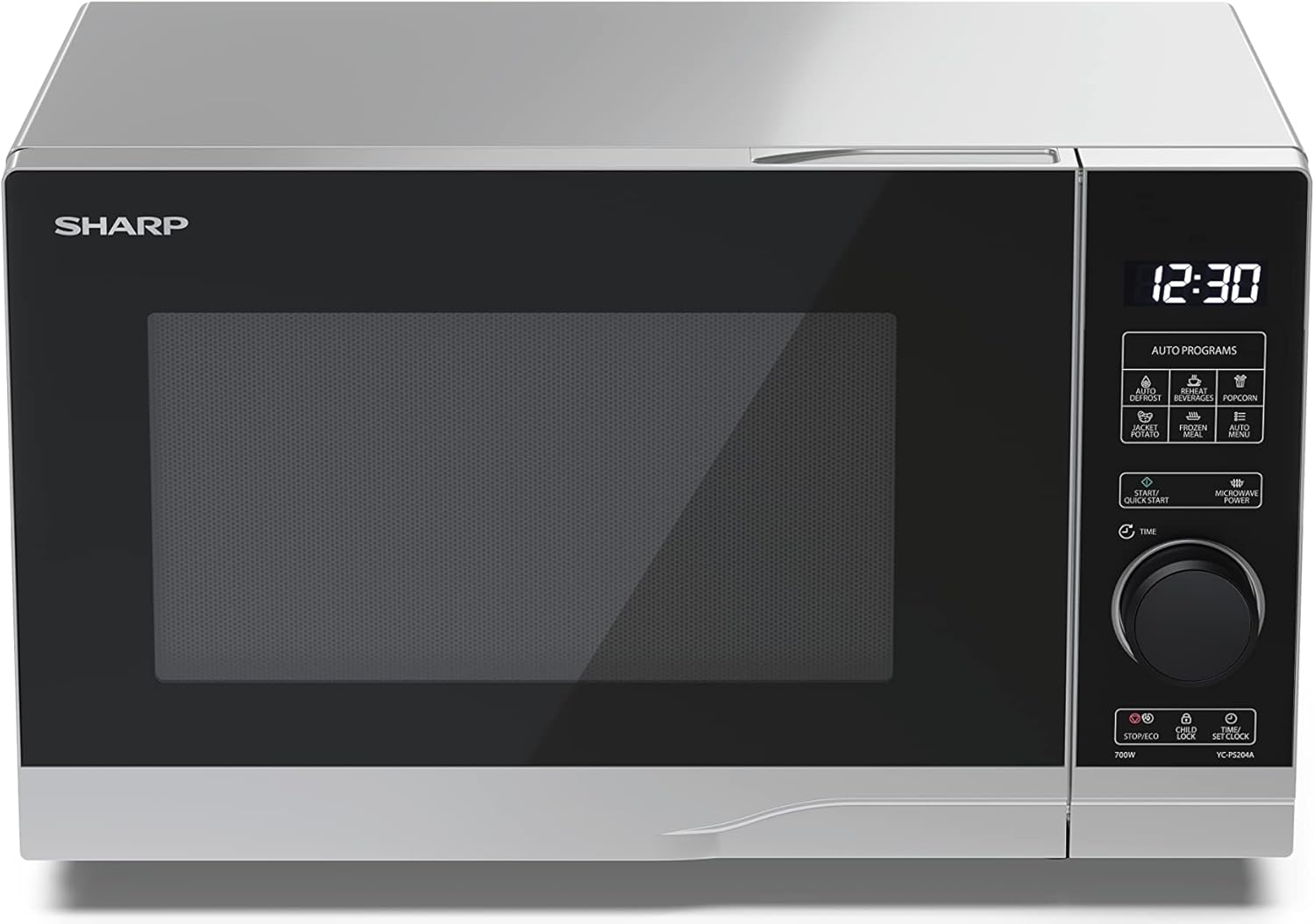
ছবি: সামনে view of the Sharp YC-PS204AE-S microwave oven, highlighting the semi-digital control panel on the right side. The display shows "88:88" and various auto program icons are visible above the main dial.
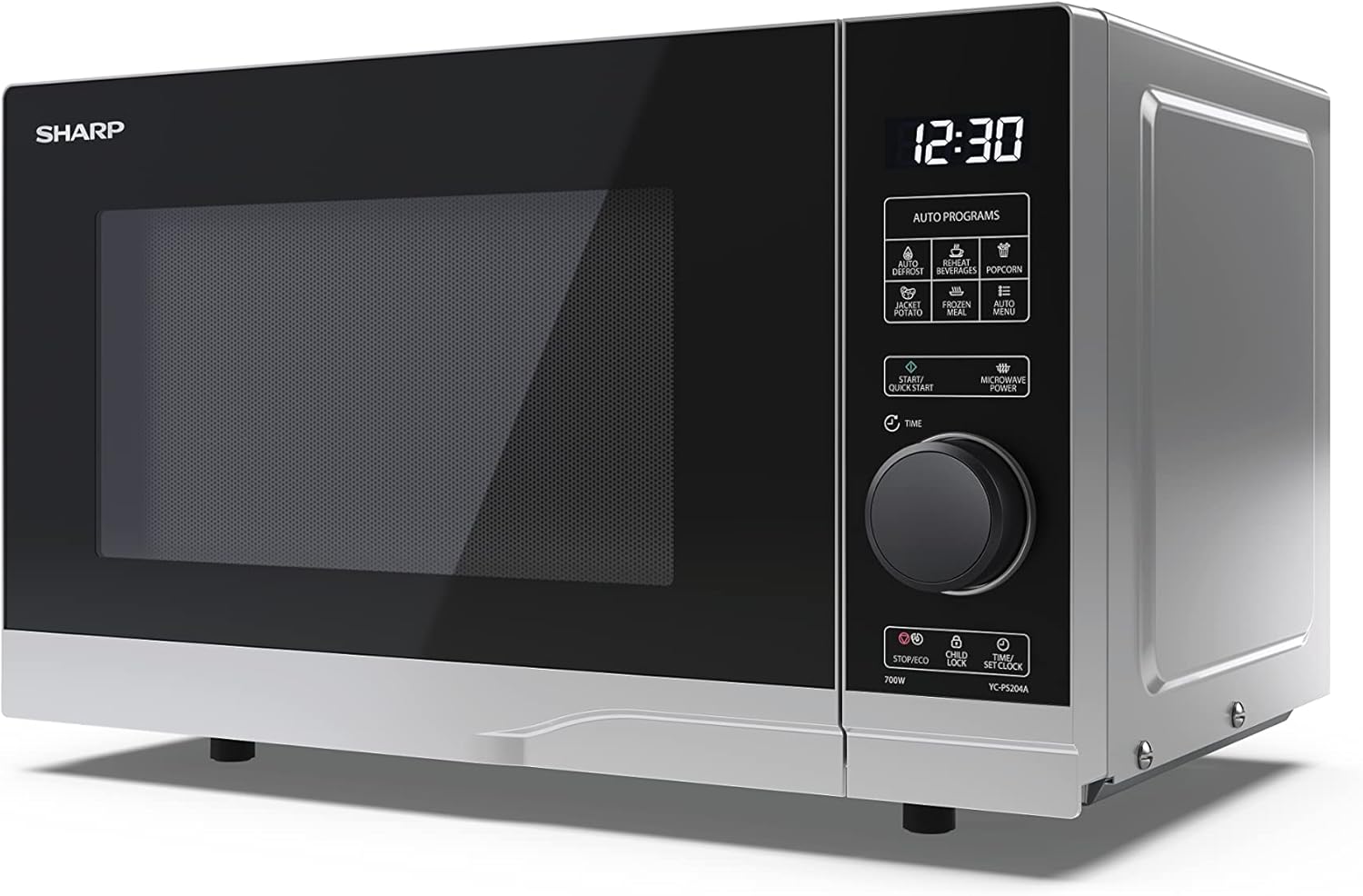
ছবি: কোণাকৃতির সামনের অংশ view of the Sharp YC-PS204AE-S microwave, showing the sleek silver and black design. The control panel is clearly visible with its digital display and rotary knob.
The control panel features a digital display, a rotary dial for setting time and power, and several touch buttons for various functions and automatic programs.
- প্রদর্শন: সময়, রান্নার সেটিংস এবং প্রোগ্রাম সূচক দেখায়।
- রোটারি ডায়াল: Used to set cooking time, weight, and adjust clock.
- অটো প্রোগ্রাম: Icons for Defrost, Reheat, Popcorn, Jacket Potato, Frozen Meal, Beverages, and Auto Menu.
- Start/Quick Start Button: Initiates cooking or starts quick cooking.
- Microwave Power Button: Selects power levels.
- Stop/Eco Button: Stops cooking or activates ECO mode.
- চাইল্ড লক বোতাম: চাইল্ড লক সক্রিয়/নিষ্ক্রিয় করে।
- Time/Set Clock Button: Sets the clock or adjusts time.
3. সেটআপ
আনপ্যাকিং
- শক্ত কাগজ থেকে মাইক্রোওয়েভ ওভেন এবং সমস্ত প্যাকিং উপকরণ সাবধানে সরিয়ে ফেলুন।
- ওভেনে কোন ক্ষতি হয়েছে কিনা, যেমন গর্ত বা ভুলভাবে সারিবদ্ধ দরজা, তা পরীক্ষা করে দেখুন। ক্ষতিগ্রস্ত হলে ওভেন চালাবেন না।
- ক্যাবিনেটের পৃষ্ঠ থেকে যেকোনো প্রতিরক্ষামূলক ফিল্ম সরান।
- Ensure all accessories are present: glass turntable, turntable ring, and instruction manual.

ছবি: The interior of the Sharp YC-PS204AE-S microwave oven with the door open, showing the glass turntable and the stainless steel interior. This view is useful for understanding how to place food and clean the cavity.
বসানো
- ওভেনটি এমন একটি সমতল, স্থিতিশীল পৃষ্ঠের উপর রাখুন যা এর ওজন এবং সবচেয়ে ভারী খাবার বহন করতে পারে যেখানে রান্না করা হতে পারে।
- পর্যাপ্ত বায়ুচলাচল নিশ্চিত করুন: ওভেনের উপরে কমপক্ষে ২০ সেমি (৮ ইঞ্চি), পিছনে ১০ সেমি (৪ ইঞ্চি) এবং প্রতিটি পাশে ৫ সেমি (২ ইঞ্চি) জায়গা ছেড়ে দিন।
- কোনো বায়ুচলাচল খোলা ব্লক করবেন না.
- রেডিয়েটার বা চুলার মতো তাপ উৎসের কাছে চুলা রাখবেন না।
- Keep the oven away from radio and TV sets to avoid interference.

ছবি: A diagram showing the dimensions of the Sharp YC-PS204AE-S microwave oven, with measurements for height (273 mm), width (455 mm), and depth (334 mm). This helps users ensure proper placement and ventilation space.
প্রাথমিক সেটআপ
- Plug the power cord into a standard grounded electrical outlet (230V, 50Hz).
- The display will show "0:00" or "12:00".
- ঘড়ি সেট করা:
- Press the "Time/Set Clock" button once. The hour digits will flash.
- Turn the rotary dial to set the hour (0-23 for 24-hour format).
- Press "Time/Set Clock" again. The minute digits will flash.
- Turn the rotary dial to set the minutes (0-59).
- Press "Time/Set Clock" a third time to confirm. The clock is now set.
4. অপারেটিং নির্দেশাবলী
মাইক্রোওয়েভে রান্নার মৌলিক পদ্ধতি
- টার্নটেবিলের উপর একটি মাইক্রোওয়েভ-নিরাপদ পাত্রে খাবার রাখুন।
- ওভেনের দরজা নিরাপদে বন্ধ করুন।
- Press the "Microwave Power" button repeatedly to select the desired power level (e.g., P100 for 100% power, P80 for 80%, etc. There are 10 levels).
- Turn the rotary dial to set the cooking time (up to 95 minutes).
- Press the "Start/Quick Start" button to begin cooking.
দ্রুত শুরু ফাংশন
- Press the "Start/Quick Start" button repeatedly to cook at 100% power for 30-second intervals. Each press adds 30 seconds.
- The maximum quick start time is 10 minutes.
ডিফ্রস্ট ফাংশন
This function allows you to defrost food by weight.
- হিমায়িত খাবার টার্নটেবিলের উপর রাখুন।
- Press the "Defrost" button (usually indicated by a snowflake icon). The display will show "dEF1" or "dEF2" depending on the defrost mode.
- Turn the rotary dial to select the weight of the food (e.g., 100g to 2000g).
- Press "Start/Quick Start" to begin defrosting.
Automatic Programs (Auto Menu)
The microwave has 8 pre-set automatic programs for common food items.
- Press the "Auto Menu" button (often labeled with "Auto Programs" or specific icons).
- Turn the rotary dial to select the desired program (e.g., Popcorn, Potato, Pizza, Beverage, etc.). The display will show the program number (e.g., A-1, A-2).
- Press "Auto Menu" again to confirm the program.
- Turn the rotary dial to select the weight or quantity (if applicable for the program).
- শুরু করতে "স্টার্ট/কুইক স্টার্ট" টিপুন।
চাইল্ড লক ফাংশন
বিশেষ করে শিশুদের দ্বারা অনিচ্ছাকৃত অপারেশন প্রতিরোধ করার জন্য।
- সক্রিয় করতে: Press and hold the "Child Lock" button (often combined with "Stop/Eco") for 3 seconds. A lock icon will appear on the display.
- নিষ্ক্রিয় করতে: Press and hold the "Child Lock" button for 3 seconds again. The lock icon will disappear.
ইসি মোড
To save energy, the display can be turned off when the oven is not in use.
- সক্রিয় করতে: In standby mode, press the "Stop/Eco" button once. The display will turn off.
- নিষ্ক্রিয় করতে: ডিসপ্লে পুনরায় সক্রিয় করতে যেকোনো বোতাম টিপুন অথবা দরজা খুলুন।
5. রক্ষণাবেক্ষণ এবং পরিষ্কার করা
নিয়মিত পরিষ্কার এবং রক্ষণাবেক্ষণ আপনার মাইক্রোওয়েভ ওভেনের দীর্ঘায়ু এবং সর্বোত্তম কর্মক্ষমতা নিশ্চিত করবে।
ওভেনের অভ্যন্তর পরিষ্কার করা
- পরিষ্কার করার আগে সর্বদা ওভেনটি আনপ্লাগ করুন।
- প্রতিটি ব্যবহারের পরে বিজ্ঞাপন দিয়ে ভেতরের গহ্বরটি মুছুনamp কাপড় এবং হালকা ডিটারজেন্ট।
- For stubborn stains, place a bowl of water with lemon juice inside and heat for 2-3 minutes. The steam will loosen the residue.
- Do not use abrasive cleaners or metal brushes, as they can damage the interior surface.
টার্নটেবল এবং রিং পরিষ্কার করা
- পরিষ্কারের জন্য কাচের টার্নটেবল এবং টার্নটেবল রিংটি সরানো যেতে পারে।
- উষ্ণ, সাবান জলে অথবা ডিশওয়াশারে ধুয়ে ফেলুন।
- ওভেনে ফেরত দেওয়ার আগে নিশ্চিত করুন যে সেগুলি সম্পূর্ণ শুকিয়ে গেছে।
বাহ্যিক অংশ পরিষ্কার করা
- একটি নরম সঙ্গে বহি পৃষ্ঠ মুছা, ঘamp কাপড়
- বায়ুচলাচলের খোলা অংশে পানি প্রবেশ করা এড়িয়ে চলুন।
- Clean the door and door seals regularly to ensure proper closure and prevent microwave leakage.
6. সমস্যা সমাধান
আপনার মাইক্রোওয়েভ ওভেনে যদি কোনও সমস্যা দেখা দেয়, তাহলে নিম্নলিখিত সাধারণ সমস্যা এবং সমাধানগুলি দেখুন।
| সমস্যা | সম্ভাব্য কারণ | সমাধান |
|---|---|---|
| চুলা শুরু হয় না। | পাওয়ার কর্ড লাগানো নেই; ফিউজ ফেটে গেছে অথবা সার্কিট ব্রেকার ছিঁড়ে গেছে; দরজা সঠিকভাবে বন্ধ হয়নি। | আউটলেটে প্লাগ লাগান; ফিউজ প্রতিস্থাপন করুন অথবা সার্কিট ব্রেকার রিসেট করুন; দরজাটি নিরাপদে বন্ধ করুন। |
| খাবার সমানভাবে রান্না না হওয়া। | খাবার নাড়ানো বা উল্টানো না; টার্নটেবিল ঘোরানো না। | Stir or turn food halfway through cooking; Ensure turntable and ring are correctly placed and clean. |
| Sparking inside the oven. | Metal or foil in the oven; Dish not microwave-safe; Food residue. | Remove any metal; Use microwave-safe dishes; Clean oven cavity thoroughly. |
| প্রদর্শন ত্রুটি কোড দেখায়. | অভ্যন্তরীণ ত্রুটি। | Unplug the oven for a few minutes, then plug it back in. If the error persists, contact customer service. |
| ওভেনের আলো কাজ করছে না। | বাল্বটি প্রতিস্থাপন করা প্রয়োজন। | বাল্ব প্রতিস্থাপনের জন্য যোগ্য পরিষেবা কর্মীদের সাথে যোগাযোগ করুন। |
If the problem persists after trying these solutions, please contact SHARP customer support.
7. স্পেসিফিকেশন
Technical specifications for the SHARP YC-PS204AE-S Microwave Oven.
| বৈশিষ্ট্য | বিস্তারিত |
|---|---|
| মডেল নম্বর | YC-PS204AE-S |
| ক্ষমতা | 20 লিটার |
| মাইক্রোওয়েভ পাওয়ার আউটপুট | 700 ওয়াট |
| পাওয়ার স্তর | 10 |
| কন্ট্রোল টাইপ | Semi-digital |
| পণ্যের মাত্রা (ডাব্লু এক্স এইচ এক্স ডি ডি) | 45.5 সেমি x 27.4 সেমি x 33.4 সেমি |
| ওজন | 10.5 কিলোগ্রাম |
| রঙ | সিলভার |
| অভ্যন্তরীণ উপাদান | স্টেইনলেস স্টীল |
| টার্নটেবল ব্যাস | 245 মিমি |
| বিশেষ বৈশিষ্ট্য | Child Lock, ECO Function, Defrost System, LED Interior Lighting, 8 Auto Programs |
| পাওয়ার সাপ্লাই | 230 ভোল্ট |
| অন্তর্ভুক্ত উপাদান | 1x Microwave SHARP YC-PS204AE-S, Glass Turntable, Multilingual Operating Instructions, Warranty Card |
8. ওয়্যারেন্টি এবং সমর্থন
SHARP provides a warranty for this product. Please refer to the warranty card included in the packaging for specific terms and conditions.
কাস্টমার সাপোর্ট
For technical assistance, troubleshooting beyond this manual, or warranty claims, please contact SHARP customer service.
- Visit the official SHARP website for support contact information in your region.
- Have your model number (YC-PS204AE-S) and purchase date ready when contacting support.


