1. পণ্য শেষview
The BOBLOV T5 is a compact and lightweight body camera designed for various recording needs, including law enforcement, security, and personal use. It features 1440P video recording, 40-megapixel photo capabilities, night vision, and a built-in 256GB memory for reliable evidence collection.
মূল বৈশিষ্ট্য
- উচ্চ-রেজোলিউশন রেকর্ডিং: Captures video at 1440P and photos at 40 megapixels.
- বর্ধিত ব্যাটারি জীবন: Equipped with two 1800mAh replaceable Li-polymer batteries, providing up to 10-12 hours of video recording (at 1080P with IR and screen off).
- Convenient Charging Dock: Includes a dedicated charging dock for easy battery recharging.
- সমন্বিত স্টোরেজ: Features a built-in 256GB TF card for immediate use without external memory cards.
- Longer Video Fragments: Supports recording video clips up to 30 minutes in length.
- Powerful IR Night Vision: Auto/Manual night vision with high-intensity infrared LEDs for clear footage up to 32 feet in low-light conditions.
- স্টিলথ মোড: Allows recording without sound, hidden indicators, or visible lights.
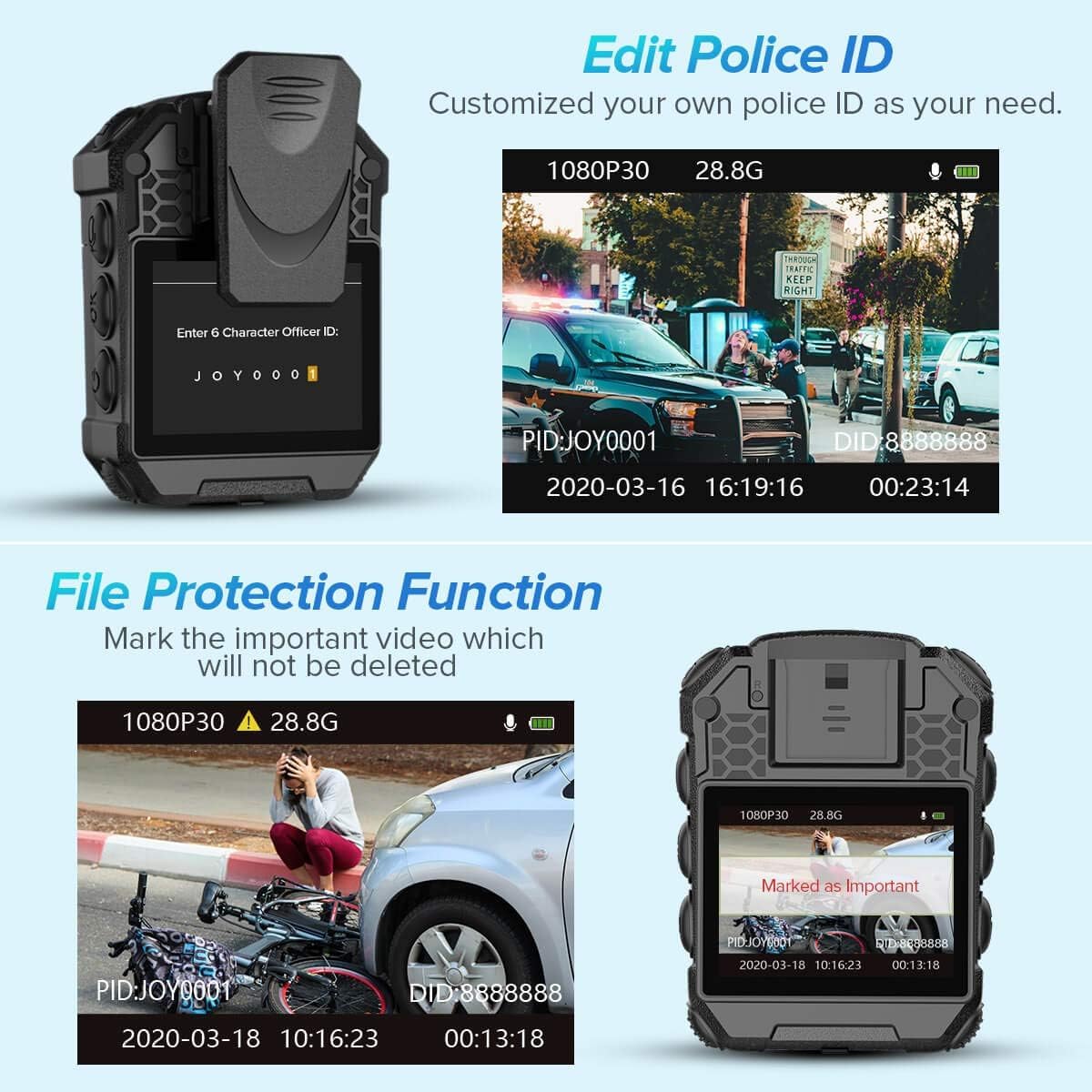
- File সুরক্ষা: Mark important videos to prevent accidental deletion.
- Customizable Police ID: Edit the Police ID directly on the camera menu.
বাক্সে কি আছে
- 1x BOBLOV T5 Body Camera
- 1x চার্জিং ডক
- 2x Batteries (One pre-installed in camera)
- 1x ব্যবহারকারী ম্যানুয়াল
- 1x USB কেবল
- 1x 360 Degree Short Clip
- 1x 180 Degree Long Clip


2. সেটআপ
2.1 ব্যাটারি চার্জ করা
Before initial use, fully charge the camera's battery. The BOBLOV T5 comes with two 1800mAh Li-polymer batteries, one of which is typically pre-installed. Use the provided charging dock for convenient charging.
- Insert a battery into the charging dock.
- Connect the charging dock to a power source using the supplied USB cable.
- The indicator light on the dock will show charging status. Ensure the battery is fully charged before use.

2.2 পাওয়ারিং অন/অফ
- পাওয়ার অন করতে: ডিভাইসটি ভাইব্রেট না হওয়া এবং স্ক্রিন চালু না হওয়া পর্যন্ত পাওয়ার বোতাম টিপুন এবং ধরে রাখুন।
- পাওয়ার অফ করতে: Press and hold the Power button until the device prompts you to shut down, then confirm.
২.২ অভ্যন্তরীণ মেমোরি
The BOBLOV T5 features a built-in 256GB internal memory. There is no external card slot under the battery. The available memory capacity will be displayed on the screen.
3. অপারেশন
৫.১ মৌলিক রেকর্ডিং
- ভিডিও রেকর্ডিং: In standby mode, press the Video button to start recording. Press again to stop.
- অডিও রেকর্ডিং: In standby mode, press the Audio button to start audio-only recording. Press again to stop.
- ছবি তোলা: In standby mode, press the Photo button to take a still image.
3.2 মেনু নেভিগেশন
- মেনুতে প্রবেশ করুন: Long press the "OK" button to access the menu settings.
- নেভিগেট করুন: Use the navigation buttons (Up/Down) to scroll through options.
- নির্বাচন করুন: Press the "OK" button to select an option.
- প্রত্যাবর্তন: Short press the "Audio" button to go back to the previous screen or standby mode.
3.3 Resolution Switch (PTT Function)
The PTT (Push-To-Talk) function on the BOBLOV T5 is used to switch between video resolutions. Available resolutions include 720P, 1080P, 1296P, and 1440P.
3.4 Stealth Mode
Stealth Mode disables all indicators, sounds, and visible lights (red light positioning, white light) during recording, ensuring discreet operation.
- To activate/deactivate Stealth Mode, navigate to the menu settings and select the "Stealth Mode" option.

3.5 File সুরক্ষা ফাংশন
This feature allows you to mark important video files to prevent them from being accidentally deleted or overwritten.
- During playback or in the file management menu, select the desired file and choose the "Protect" option.
3.6 Editing Police ID
You can customize the Police ID directly on the camera's menu.
- Access the menu settings and locate the "Officer ID" option to input or modify the ID.
3.7 নাইট ভিশন
The camera features automatic and manual infrared (IR) night vision for clear recording in low-light conditions.
- অটো নাইট ভিশন: The camera will automatically switch to night vision when light levels are low.
- Manual Night Vision: You can manually enable or disable night vision through the menu settings.

4. রক্ষণাবেক্ষণ
4.1 ডিভাইস পরিষ্কার করা
- ক্যামেরার বডি পরিষ্কার করার জন্য একটি নরম, শুকনো কাপড় ব্যবহার করুন।
- লেন্সের জন্য, স্ক্র্যাচ এড়াতে একটি বিশেষ লেন্স পরিষ্কারের কাপড় এবং দ্রবণ ব্যবহার করুন।
- কঠোর রাসায়নিক বা ঘষিয়া তুলিয়া ফেলিতে সক্ষম উপকরণ ব্যবহার করবেন না.
4.2 ডেটা স্থানান্তর
রেকর্ড করা হস্তান্তর করতে fileএকটি কম্পিউটারে s:
- প্রদত্ত USB কেবল ব্যবহার করে ক্যামেরাটিকে আপনার কম্পিউটারে সংযুক্ত করুন৷
- The camera will appear as a removable disk drive.
- Access the camera's internal storage to copy files.
4.3 স্টোরেজ
Store the camera in a cool, dry place away from direct sunlight and extreme temperatures. Ensure the battery is partially charged if storing for extended periods.
5. সমস্যা সমাধান
৬.১ ক্যামেরা চালু হচ্ছে না
- Ensure the battery is fully charged. Connect the camera to the charging dock and verify the charging indicator.
- Try using the second battery if available.
- জোর করে রিস্টার্ট করার চেষ্টা করার জন্য কমপক্ষে ১০ সেকেন্ডের জন্য পাওয়ার বোতাম টিপুন এবং ধরে রাখুন।
৬.২ রেকর্ডিং সমস্যা
- অভ্যন্তরীণ মেমরি পূর্ণ কিনা তা পরীক্ষা করুন। স্থানান্তর করুন fileজায়গা খালি করার জন্য কম্পিউটারে s।
- Ensure the camera is not in Stealth Mode if you expect audio or visible indicators.
- Verify that the correct recording mode (video/audio/photo) is selected.
5.3 Night Vision Not Working
- Check the IR Filter setting in the menu. Ensure it is set to "Auto" or "Manual" and enabled.
- Ensure there are no obstructions blocking the IR LEDs.
5.4 Computer Not Recognizing Camera
- নিশ্চিত করুন যে USB কেবলটি ক্যামেরা এবং কম্পিউটার উভয়ের সাথেই নিরাপদে সংযুক্ত আছে।
- আপনার কম্পিউটারে একটি ভিন্ন USB পোর্টের সাথে সংযোগ করার চেষ্টা করুন৷
- ক্যামেরা এবং কম্পিউটার উভয়ই পুনরায় চালু করুন।
- Ensure the camera is powered on when connected to the computer.
6. স্পেসিফিকেশন
| বৈশিষ্ট্য | স্পেসিফিকেশন |
|---|---|
| ব্র্যান্ডের নাম | BOBLOV |
| আইটেম ওজন | 12.3 আউন্স |
| প্যাকেজের মাত্রা | 5.59 x 3.82 x 2.83 ইঞ্চি |
| আইটেম মডেল নম্বর | 02US-T5-256GB |
| ব্যাটারি | 1 লিথিয়াম পলিমার ব্যাটারি প্রয়োজন (অন্তর্ভুক্ত) |
| রঙের নাম | কালো |
| বিশেষ বৈশিষ্ট্য | 1440P Body Camera, Built-in 256GB Memory Card, Camcorder with Two Batteries with Dock, For Law Enforcement, Obtain Evidence |
| ফটো সেন্সর প্রযুক্তি | CMOS |
| ভিডিও ক্যাপচার রেজোলিউশন | 1440p |
| সর্বোচ্চ ফোকাল দৈর্ঘ্য | 100 মিলিমিটার |
| ফ্ল্যাশ মেমরি টাইপ | Micro SD (Internal) |
| ভিডিও ক্যাপচার ফরম্যাট | MOV |
| সমর্থিত অডিও ফরম্যাট | এএসি |
| পর্দার আকার | 2 ইঞ্চি |
| সংযোগ প্রযুক্তি | ইউএসবি |
7. ওয়্যারেন্টি এবং সমর্থন
BOBLOV provides product coverage for 24 months. For technical assistance or warranty claims, please contact BOBLOV customer support. They offer quick response within 24 hours and lifetime technical support.
For more information, visit the official BOBLOV Store: অ্যামাজনে ববলভ স্টোর


