1. ভূমিকা
The Gustard N18 PRO is a high-performance network switch specifically engineered for HiFi audio streaming applications. It is designed to enhance the integrity of network signals, thereby contributing to a cleaner and more accurate audio reproduction. This manual provides essential information for the proper setup, operation, and maintenance of your N18 PRO device.
2. পণ্য শেষview এবং বৈশিষ্ট্য
The Gustard N18 PRO incorporates advanced design principles to deliver optimal performance in audio networks. Key features include:
- Ethernet Port Interface: Equipped with one SFP (Small Form-Factor Pluggable) port and five 10/100/1000M adaptive Ethernet interfaces, providing versatile connectivity options for various audio components.
- External 10MHz Clock Support: The N18 PRO supports an external 10MHz clock input, which can significantly improve sound clarity and introduce a more analog characteristic to the audio output.
- Built-in Linear Power Supply: Features an audio-specific transformer and multi-stage filtering to ensure a lower ripple and cleaner power delivery, crucial for high-fidelity audio. It also includes a high current low voltage drop rectifier bridge.
- Multi-way Power Supply: Designed with multiple power supply paths to minimize internal interference and ensure stable operation. Multi-stage ভলিউমtage regulators further contribute to cleaner power.
- Optoelectronic Isolation: Supports SFP fiber modules and includes a pluggable SFP opto-electronic converter module to effectively isolate network ripple, preventing digital noise from affecting the audio signal.

This image displays the Gustard N18 PRO network switch from both the front and rear perspectives. The front panel is minimalist with the Gustard logo, while the rear panel shows all input and output ports, including Ethernet, SFP, 10MHz clock input, and power.

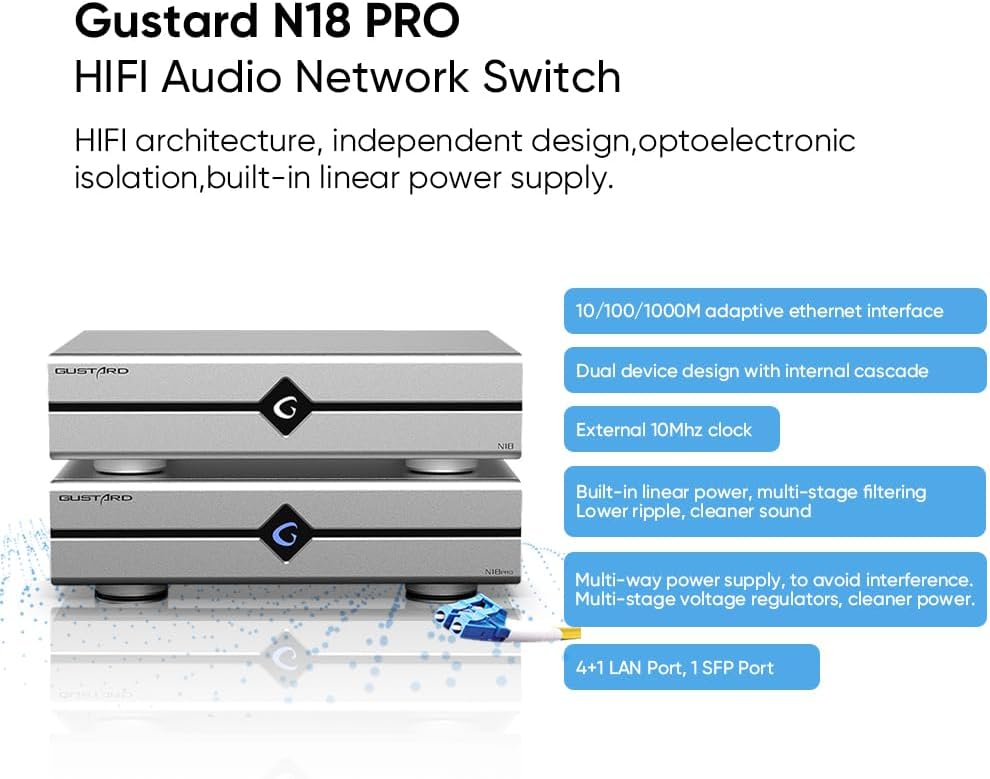
A graphic highlighting the main features of the Gustard N18 PRO, including its HiFi architecture, independent design, optoelectronic isolation, built-in linear power supply, adaptive Ethernet interfaces, dual device design, external 10MHz clock support, multi-stage filtering, multi-way power supply, and port configuration (4+1 LAN, 1 SFP).
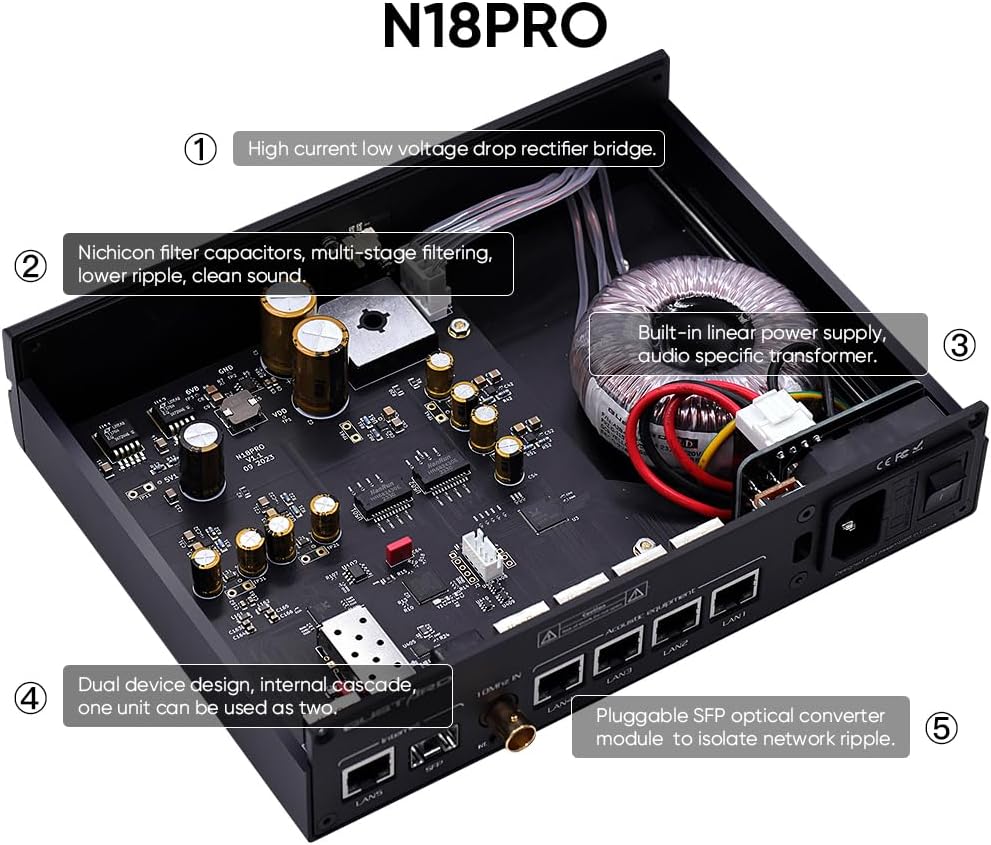
একটি অভ্যন্তরীণ view of the N18 PRO, showing key components such as the high current low voltage drop rectifier bridge, Nichicon filter capacitors, multi-stage filtering, built-in linear power supply with audio-specific transformer, dual device design, and the pluggable SFP optical converter module.
3. সেটআপ
Follow these steps to set up your Gustard N18 PRO network switch:
- আনপ্যাকিং: Carefully remove the N18 PRO from its packaging. Ensure all accessories are present.
- বসানো: Place the N18 PRO on a stable, flat surface with adequate ventilation. Avoid placing it near heat sources or in direct sunlight.
- পাওয়ার সংযোগ: Connect the provided power cable to the AC power input on the rear panel of the N18 PRO. Ensure the voltage selection switch (if present and adjustable) matches your local power supply (e.g., 115V or 230V).
- নেটওয়ার্ক সংযোগ:
- Connect your internet router or main network switch to the 'Internet' Ethernet port (LAN5) or the SFP port using an appropriate Ethernet cable or SFP module with fiber optic cable.
- Connect your audio streaming devices (e.g., network streamers, DACs with network input) to the 'Acoustic equipment' Ethernet ports (LAN1-LAN4).
- If using an external 10MHz clock, connect it to the '10MHz IN' BNC connector. Ensure the clock selection switch is set to 'EXT' for external clock usage.
- পাওয়ার চালু: Flip the power switch on the rear panel to the 'ON' position. The device will power on.
This image provides a clear diagram of the rear panel ports of the N18 PRO, labeling the Ethernet ports, SFP port, 10MHz clock input, clock selection switch, AC power input, fuse, voltage selection, and power switch.

This image illustrates how the Gustard N18 PRO achieves optical isolation using an SFP module and LC-LC fiber cables. It shows the network switch connected via fiber, emphasizing the separation of network ripple for cleaner audio.

একটি বিস্তারিত view of the rear panel focusing on the 10MHz clock input, highlighting its importance for enhanced sound quality and analog characteristics.
সংযোগ বিকল্প
The Gustard N18 PRO can be integrated into various network configurations. Below are common setup diagrams:

Option 1: N18 + N18 PRO (Recommended)
This diagram illustrates a recommended connectivity option where the Gustard N18 and N18 PRO are used together. It shows how a router, NAS, and PC connect to the N18, which then connects to the N18 PRO, distributing signals to various audio equipment like DACs and streamers.

Option 5: N18 PRO Standalone
This diagram shows a connectivity option where only the Gustard N18 PRO is used. It details how a router, NAS, and PC connect directly to the N18 PRO, which then routes signals to various audio components.
4. অপারেটিং নির্দেশাবলী
The Gustard N18 PRO is designed for straightforward operation:
- Once all connections are made and the device is powered on, the N18 PRO will automatically begin functioning as a network switch.
- No specific software or configuration is typically required for basic network switching functionality.
- Ensure that all connected audio devices are properly configured to receive network signals from the N18 PRO.
- If an external 10MHz clock is connected, verify that the 'Clock selection' switch on the rear panel is set to 'EXT' to utilize the external clock source. For internal clock, set it to 'INT'.
5. রক্ষণাবেক্ষণ
To ensure the longevity and optimal performance of your Gustard N18 PRO, observe the following maintenance guidelines:
- পরিষ্কার করা: Use a soft, dry cloth to clean the exterior of the device. Avoid using liquid cleaners, aerosols, or abrasive materials, as they may damage the finish or internal components.
- বায়ুচলাচল: নিশ্চিত করুন যে বায়ুচলাচলের খোলা অংশগুলি বন্ধ না থাকে। অতিরিক্ত গরম হওয়া রোধ করার জন্য সঠিক বায়ুপ্রবাহ অপরিহার্য।
- পরিবেশ: Keep the device in a dry environment, away from excessive dust, humidity, and extreme temperatures.
- যন্ত্র বন্ধ: If the device will not be used for an extended period, it is recommended to power it off and disconnect it from the mains power supply.
6. সমস্যা সমাধান
If you encounter issues with your Gustard N18 PRO, refer to the following common troubleshooting steps:
- ক্ষমতা নেই:
- Check if the power cable is securely connected to both the N18 PRO and the wall outlet.
- Ensure the power switch on the rear panel is in the 'ON' position.
- অন্য ডিভাইসে প্লাগ ইন করে ওয়াল আউটলেট সঠিকভাবে কাজ করছে কিনা তা যাচাই করুন।
- Check the fuse on the rear panel. If blown, replace it with a fuse of the same type and rating.
- কোন নেটওয়ার্ক সংযোগ নেই:
- Ensure all Ethernet cables are securely plugged into their respective ports on the N18 PRO and connected devices.
- Verify that your router or upstream network device is functioning correctly.
- If using the SFP port, ensure the SFP module is correctly inserted and the fiber optic cable is not damaged.
- Check the network status indicators on the N18 PRO and connected devices.
- খারাপ অডিও কোয়ালিটি / শব্দ:
- Ensure all audio components are properly connected and functioning.
- If using an external clock, verify its connection and ensure the 'Clock selection' switch is set to 'EXT'.
- Check for any ground loops or electrical interference in your audio system.
- Ensure the N18 PRO is placed away from other electronic devices that might cause interference.
এই ধাপগুলি অনুসরণ করার পরেও যদি সমস্যাটি থেকে যায়, তাহলে আরও সহায়তার জন্য অনুগ্রহ করে গ্রাহক সহায়তার সাথে যোগাযোগ করুন।
7. স্পেসিফিকেশন
Detailed technical specifications for the Gustard N18 PRO HiFi Audio Network Switch:

A diagram showing the physical dimensions of the Gustard N18 PRO, including its length (220mm), width (170mm), and height (50mm).
| বৈশিষ্ট্য | স্পেসিফিকেশন |
|---|---|
| প্ল্যাটফর্ম | মেশিন স্পেসিফিক নয় |
| ভলিউমtage | 230 Volts (AC 115V/230V 50/60Hz) |
| ইন্টারফেসের ধরন | RJ45, SFP, BNC |
| ডাটা ট্রান্সফার রেট | 10/100/1000 Megabits Per Second (adaptive) |
| প্রস্তুতকারক | গোস্টার্ড |
| পণ্যের মাত্রা (L x W x H) | 8.66 x 6.69 x 1.97 inches (220mm x 170mm x 50mm excluding protruding parts) |
| আইটেম ওজন | 3.3 পাউন্ড (1.5 কিলোগ্রাম) |
| বন্দরের সংখ্যা | 5 (1 SFP, 4 LAN) |
| রঙ | কালো |
| শক্তি খরচ | <10W |
| 10M BNC Input | Input impedance 50 Ohm, 0dBm-20dBm |
8. ওয়্যারেন্টি এবং সমর্থন
ওয়ারেন্টি সম্পর্কিত তথ্য এবং প্রযুক্তিগত সহায়তার জন্য, অনুগ্রহ করে আপনার ক্রয়ের সাথে প্রদত্ত ডকুমেন্টেশন দেখুন অথবা সরাসরি বিক্রেতার সাথে যোগাযোগ করুন। যেকোনো ওয়ারেন্টি দাবির জন্য আপনার ক্রয়ের প্রমাণপত্র রাখুন।


