1. ভূমিকা
Thank you for choosing the Mecer 23.8 Inch Full HD LED Monitor. This manual provides essential information for setting up, operating, and maintaining your monitor. Please read it thoroughly before use to ensure proper functionality and longevity of your device.
This monitor features a 23.8-inch Full HD (1920 x 1080) display, offering crisp and clear visuals. It incorporates TFT LED panel technology for energy efficiency and vibrant colors, with a 16:9 aspect ratio suitable for widescreen viewing. Connectivity options include VGA and HDMI, making it compatible with various devices. Built-in speakers provide basic audio, and wide 178° viewing angles ensure comfortable use. With a 2ms response time, it is suitable for general computing and multimedia consumption.
2. নিরাপত্তা তথ্য
- শক্তি উৎস: শুধুমাত্র মনিটরের সাথে সরবরাহ করা পাওয়ার অ্যাডাপ্টার ব্যবহার করুন। নিশ্চিত করুন যে পাওয়ার আউটলেটটি সঠিকভাবে গ্রাউন্ডেড আছে।
- বায়ুচলাচল: বায়ুচলাচলের খোলা অংশ বন্ধ করবেন না। অতিরিক্ত গরম হওয়া রোধ করতে মনিটরের চারপাশে পর্যাপ্ত জায়গা রাখুন যাতে সঠিক বায়ুপ্রবাহ থাকে।
- বসানো: Place the monitor on a stable, flat surface. Avoid placing it in direct sunlight, near heat sources, or in environments with excessive dust or humidity.
- পরিষ্কার করা: Disconnect the power cord before cleaning. Use a soft, dry cloth for the screen and a slightly damp cloth for the casinছ. ঘষিয়া তুলিয়া ফেলিতে সক্ষম ক্লিনার বা দ্রাবক ব্যবহার করা এড়িয়ে চলুন।
- তরল এক্সপোজার: Keep liquids away from the monitor. If liquid enters the monitor, disconnect power immediately and contact qualified service personnel.
- disassembly: মনিটরটি নিজে খুলে ফেলা বা মেরামত করার চেষ্টা করবেন না। সমস্ত সার্ভিসিং যোগ্য পরিষেবা কর্মীদের কাছে পাঠান।
3. প্যাকেজ বিষয়বস্তু
প্যাকেজের বিষয়বস্তু পরীক্ষা করে নিশ্চিত করুন যে সমস্ত আইটেম উপস্থিত আছে:
- Mecer 23.8 Inch LED Monitor
- মনিটর স্ট্যান্ড (বেস এবং নেক)
- পাওয়ার অ্যাডাপ্টার এবং তার
- HDMI কেবল
- ভিজিএ কেবল
- ব্যবহারকারী ম্যানুয়াল (এই দস্তাবেজ)
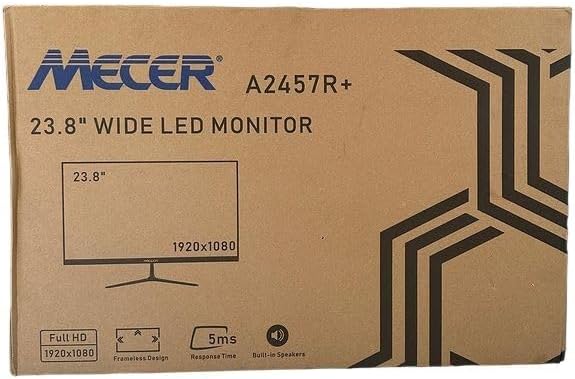
ছবি 3.1: The monitor packaging box, indicating the model A2457R+ and key features like 23.8" display, Full HD 1920x1080 resolution, frameless design, 5ms response time, and built-in speakers.
4. সেটআপ
৫.১. মনিটর স্ট্যান্ড একত্রিত করা
- প্যাকেজিং থেকে মনিটর এবং স্ট্যান্ডের উপাদানগুলি সাবধানে সরিয়ে ফেলুন।
- ট্যাবগুলিকে সারিবদ্ধ করে এবং শক্তভাবে ঠেলে মনিটর প্যানেলের সাথে স্ট্যান্ড নেক সংযুক্ত করুন যতক্ষণ না এটি জায়গায় ক্লিক করে।
- Attach the stand base to the stand neck, securing it with the provided screw (usually hand-tightened).
- একত্রিত মনিটরটি একটি স্থিতিশীল, সমতল পৃষ্ঠে রাখুন।

ছবি 4.1: সামনে view of the Mecer 23.8 Inch LED Monitor with its stand assembled, ready for connection.
4.2। একটি কম্পিউটারের সাথে সংযোগ করা হচ্ছে
মনিটরটি HDMI এবং VGA উভয় সংযোগই সমর্থন করে। আপনার কম্পিউটারের জন্য উপযুক্ত কেবলটি বেছে নিন।
- HDMI সংযোগ: Connect one end of the HDMI cable to the HDMI port on your computer's graphics card and the other end to the HDMI port on the monitor. HDMI transmits both video and audio signals.
- ভিজিএ সংযোগ: Connect one end of the VGA cable to the VGA port on your computer's graphics card and the other end to the VGA port on the monitor. VGA transmits only video signals.

ছবি 4.2: রিয়ার view of the Mecer 23.8 Inch LED Monitor, showing the input ports including HDMI and VGA, as well as the power input.
4.3. পাওয়ার সংযোগ
- Connect the power adapter cable to the DC IN port on the back of the monitor.
- পাওয়ার অ্যাডাপ্টারটিকে একটি ওয়াল আউটলেটে প্লাগ করুন।
5. অপারেটিং নির্দেশাবলী
5.1. পাওয়ার চালু/বন্ধ
Press the power button, typically located on the bottom right side or rear of the monitor, to turn the monitor on or off. The power indicator light will illuminate when the monitor is on.
5.2. ইনপুট উৎস নির্বাচন
If you have multiple devices connected, you may need to manually select the input source. Use the monitor's control buttons (usually located near the power button) to navigate to the input selection menu and choose between HDMI or VGA.
5.3. অন-স্ক্রিন ডিসপ্লে (OSD) মেনু
The OSD menu allows you to adjust various display settings. Use the monitor's control buttons to:
- ওএসডি মেনু অ্যাক্সেস করুন।
- Navigate through menu options (e.g., Brightness, Contrast, Color Settings, Input Source).
- Adjust values or select options.
- OSD মেনু থেকে প্রস্থান করুন।
সাধারণ সামঞ্জস্যযোগ্য সেটিংসের মধ্যে রয়েছে:
- ঔজ্জ্বল্য ও বৈপরীত্য: সামগ্রিক আলোকসজ্জা এবং আলো এবং অন্ধকার এলাকার মধ্যে পার্থক্য সামঞ্জস্য করুন।
- রঙের সেটিংস: Adjust color temperature, RGB values, or select preset color modes.
- আকৃতির অনুপাত: Change between 16:9, 4:3, or other available options.
- অডিও: Adjust volume for the built-in speakers.
5.4. অন্তর্নির্মিত স্পিকার
The monitor includes built-in speakers for basic audio output. If using an HDMI connection, audio will be transmitted automatically. For VGA connections, ensure your computer's audio output is configured correctly. Adjust the volume through the OSD menu or your computer's operating system.
6. রক্ষণাবেক্ষণ
১. মনিটর পরিষ্কার করা
- পরিষ্কার করার আগে সর্বদা পাওয়ার আউটলেট থেকে মনিটরটি আনপ্লাগ করুন।
- পর্দা: নরম, লিন্ট-মুক্ত কাপড় দিয়ে আলতো করে পর্দাটি মুছুন। একগুঁয়ে দাগের জন্য, হালকাভাবে ঘষুন।ampen the cloth with water or a specialized screen cleaner (ensure it's alcohol-free and ammonia-free) and wipe carefully. Do not spray liquid directly onto the screen.
- Casing: মনিটরটি মুছতে একটি নরম, শুকনো কাপড় ব্যবহার করুন।asinছ. প্রয়োজনে, সামান্যamp কাপড় ব্যবহার করা যেতে পারে, তারপর একটি শুকনো কাপড় ব্যবহার করা যেতে পারে।
6.2. স্টোরেজ
যদি মনিটরটি দীর্ঘ সময়ের জন্য সংরক্ষণ করা হয়, তাহলে সমস্ত তারের সংযোগ বিচ্ছিন্ন করুন, এটিকে তার আসল প্যাকেজিংয়ে (যদি পাওয়া যায়) প্যাক করুন এবং সরাসরি সূর্যালোক এবং চরম তাপমাত্রা থেকে দূরে একটি শীতল, শুষ্ক জায়গায় সংরক্ষণ করুন।
7. সমস্যা সমাধান
আপনার মনিটরে যদি কোনও সমস্যা দেখা দেয়, তাহলে নিম্নলিখিত সাধারণ সমস্যা এবং সমাধানগুলি দেখুন:
- ক্ষমতা নেই:
- নিশ্চিত করুন যে পাওয়ার কেবলটি মনিটর এবং ওয়াল আউটলেটের সাথে নিরাপদে সংযুক্ত আছে।
- অন্য ডিভাইস প্লাগ ইন করে পাওয়ার আউটলেটটি কাজ করছে কিনা তা যাচাই করুন।
- পাওয়ার অ্যাডাপ্টারটি সঠিকভাবে কাজ করছে কিনা তা পরীক্ষা করুন।
- কোন সংকেত নেই:
- Ensure the video cable (HDMI or VGA) is securely connected to both the monitor and the computer.
- Verify that the correct input source is selected on the monitor (via the OSD menu).
- Check if your computer is powered on and outputting a video signal.
- যদি পাওয়া যায় তাহলে অন্য একটি ভিডিও কেবল ব্যবহার করে দেখুন।
- ছবিটি ঝাপসা বা বিকৃত:
- আপনার কম্পিউটারের ডিসপ্লে সেটিংসে মনিটরের রেজোলিউশনটি তার নেটিভ রেজোলিউশনে (১৯২০ x ১০৮০) সেট করা আছে কিনা তা নিশ্চিত করুন।
- Adjust the monitor's OSD settings for brightness, contrast, and sharpness.
- For VGA connections, use the 'Auto Adjust' function in the OSD menu if available.
- No Audio from Built-in Speakers:
- নিশ্চিত করুন যে মনিটরের ভলিউম OSD মেনুতে নিঃশব্দ বা খুব কম সেট করা নেই।
- আপনার কম্পিউটারের অডিও আউটপুট সেটিংস পরীক্ষা করে দেখুন যে মনিটরটি প্লেব্যাক ডিভাইস হিসেবে নির্বাচিত হয়েছে কিনা।
- If using VGA, ensure your computer's audio is routed to an external speaker system, as VGA does not carry audio.
8. স্পেসিফিকেশন
| বৈশিষ্ট্য | স্পেসিফিকেশন |
|---|---|
| ব্র্যান্ড | Mecer |
| মডেল নম্বর | A2457R+ |
| ডিসপ্লে সাইজ | 23.8 ইঞ্চি |
| রেজোলিউশন | 1920 x 1080 পিক্সেল (ফুল এইচডি) |
| প্রদর্শনের ধরন | LED (TFT LED Panel) |
| আকৃতির অনুপাত | 16:9 |
| প্রতিক্রিয়া সময় | 2 মিলিসেকেন্ড |
| রিফ্রেশ হার | 75 Hz |
| Viewকোণ | ৩৫০° অনুভূমিক / ১৮০° উল্লম্ব |
| সংযোগ | 1x HDMI, 1x VGA |
| অন্তর্নির্মিত স্পিকার | হ্যাঁ |
| রঙ | কালো |
| পণ্যের মাত্রা (D x W x H) | 560D x 42W x 410H millimetres |
| বিশেষ বৈশিষ্ট্য | High performance intelligent multi-frequency scanning, Micro Computer digital technology control, no radiation, no glare, Comply with VESA DPMS international power saving regulation, Support DDC 1/2B and Windows PNP Plug and Play |
9. ওয়্যারেন্টি এবং সমর্থন
This Mecer monitor comes with a 1 বছরের সীমিত ওয়ারেন্টি ক্রয়ের তারিখ থেকে। ওয়ারেন্টি দাবির জন্য অনুগ্রহ করে আপনার ক্রয়ের প্রমাণ সংরক্ষণ করুন।
For technical support, service, or warranty inquiries, please contact your retailer or the authorized Mecer service center in your region. Do not attempt to repair the product yourself, as this may void your warranty.


