ভূমিকা
Thank you for choosing the Luxor Multipurpose Storage Utility Cart. This durable, 3-shelf cart is designed for versatile use in various environments, including schools, offices, warehouses, shops, garages, and cafes. Its robust construction ensures long-lasting performance and easy mobility.
This manual provides essential information for the proper assembly, operation, and maintenance of your new utility cart. Please read all instructions carefully before beginning assembly or use to ensure safe and efficient operation.

Figure 1: Luxor Multipurpose Storage Utility Cart (Black)
নিরাপত্তা তথ্য
- Always ensure the cart is on a stable, level surface before loading items.
- Do not exceed the maximum weight capacity of 400 pounds (evenly distributed).
- Engage the locking brakes on the casters when the cart needs to remain stationary.
- Keep hands and fingers clear of moving parts, especially during assembly and when adjusting the cart.
- Use appropriate tools for assembly as specified in the instructions. A rubber mallet is highly recommended.
- Do not allow children to play on or around the cart.
- Avoid placing hot items directly on the plastic shelves without adequate protection.
প্যাকেজ বিষয়বস্তু
অ্যাসেম্বলি শুরু করার আগে, যাচাই করুন যে সমস্ত উপাদান উপস্থিত এবং অক্ষত আছে। যদি কোনও অংশ অনুপস্থিত বা ক্ষতিগ্রস্ত হয়, তাহলে অনুগ্রহ করে গ্রাহক সহায়তার সাথে যোগাযোগ করুন।
- 3 x Structural Foam Plastic Shelves (including top shelf with integrated push handle)
- 8 x Plastic Legs/Poles
- 4 x 4-inch Swivel Casters (2 with locking brakes)

Figure 2: Key Components of the Utility Cart
সমাবেশ নির্দেশাবলী
Assembly of the Luxor Utility Cart is straightforward and typically takes about 10 minutes. A rubber mallet is highly recommended for easier assembly. Some users find that applying a small amount of lubricant (like silicone spray or 3-in-1 oil) to the leg ends can facilitate insertion into the shelves.
- Attach Casters to Bottom Shelf: Insert the four casters into the designated holes on the underside of the bottom shelf. Ensure the two locking casters are placed on the same side for convenient access. Press firmly until they click into place.
- Attach First Set of Legs: Insert four plastic legs into the corner holes of the bottom shelf. Use a rubber mallet to gently tap them into place until they are fully seated and secure.
- Attach Middle Shelf: Align the middle shelf over the top of the four legs. Carefully lower the shelf, ensuring each leg aligns with its corresponding hole. Use a rubber mallet to tap the shelf down evenly on all four corners until it is securely in place.
- Attach Second Set of Legs: Insert the remaining four plastic legs into the corner holes of the middle shelf. Tap them into place with a rubber mallet.
- উপরের তাক সংযুক্ত করুন: Align the top shelf (with the integrated push handle) over the second set of legs. Carefully lower the shelf, ensuring each leg aligns with its corresponding hole. Use a rubber mallet to tap the shelf down evenly on all four corners until it is securely in place.
- স্থিতিশীলতা যাচাই করুন: Once assembled, gently push down on each corner of the top shelf to ensure all connections are tight and the cart is stable.
ভিডিও ১: পণ্য শেষview of the Luxor Utility Cart. This video demonstrates the assembled cart and highlights its features, providing a visual reference for the final product.
বৈশিষ্ট্য
- Three Shelf Design: প্রদান করে ample storage and transport space.
- Integral Safety Push Handle: Molded into the top shelf for comfortable and secure maneuvering.
- টেকসই নির্মাণ: Legs and shelves are made from injection-molded thermoplastic resin, ensuring they will not scratch, dent, or rust.
- উদার মাত্রা: Measures 24"W x 18"D x 34"H, with a 12" shelf clearance for accommodating various items.
- মোবাইল ডিজাইন: Equipped with 4" swivel casters, two of which include locking brakes for stability.
- উচ্চ ওজন ক্ষমতা: Supports up to 400 lbs. (evenly distributed).
- মার্কিন যুক্তরাষ্ট্রে তৈরি: Ensures quality manufacturing standards.

Figure 3: Utility Cart in Use
স্পেসিফিকেশন
| বৈশিষ্ট্য | বিস্তারিত |
|---|---|
| পণ্যের মাত্রা | 18"D x 24"W x 34"H |
| উপাদান | উচ্চ ঘনত্ব পলিথিন (HDPE) |
| রঙ | কালো |
| তাক সংখ্যা | 3 |
| Shelf Clearance | 12 ইঞ্চি |
| কাস্টার টাইপ | 4" swiveling casters (2 locking) |
| ওজন সীমা | ৫০০ পাউন্ড (সমানভাবে বন্টিত) |
| আইটেম ওজন | 20 পাউন্ড |
| সমাবেশ প্রয়োজন | হ্যাঁ |
| মডেল নম্বর | HE34-B সম্পর্কে |
| ইউপিসি | 812552016961 |
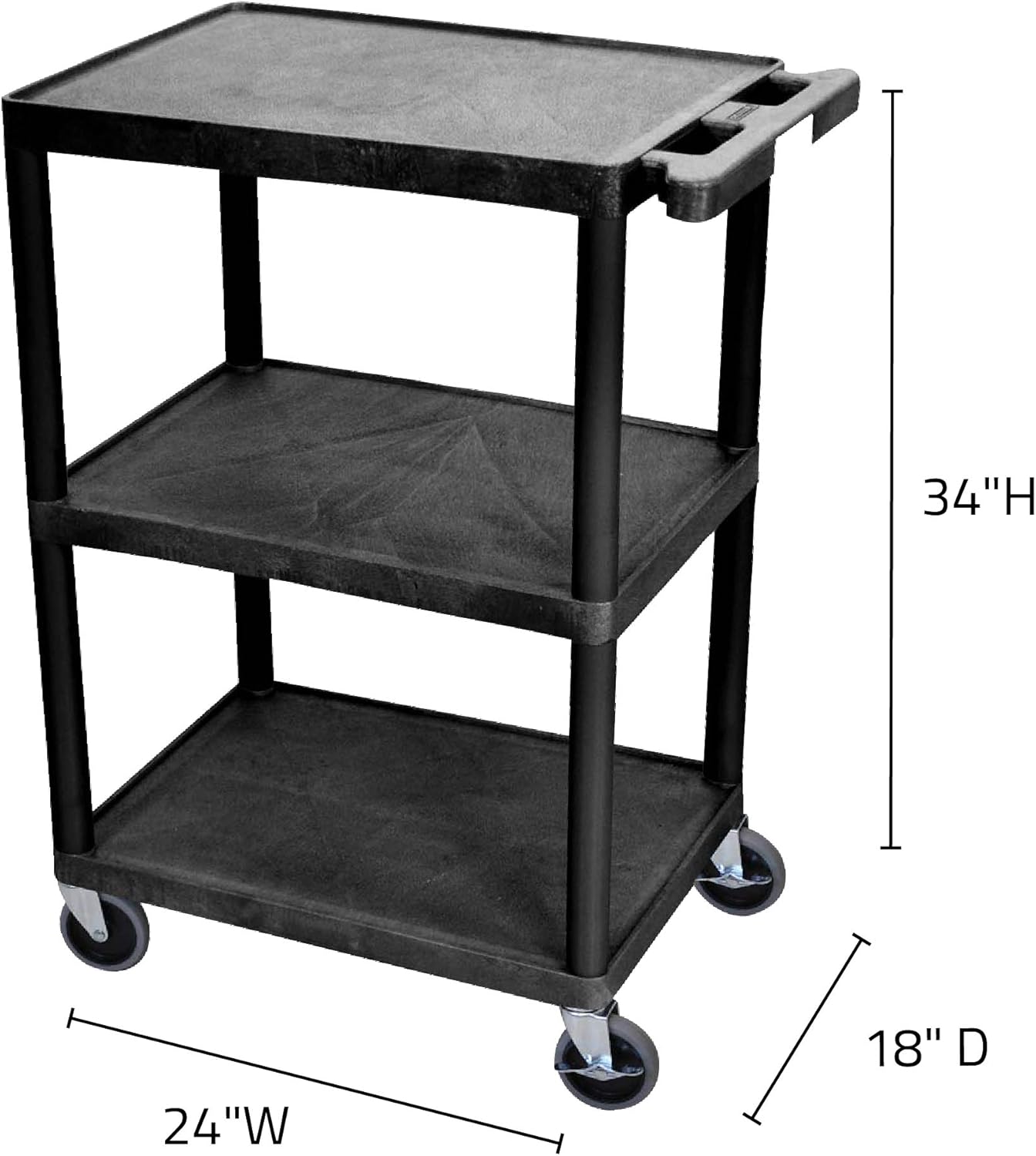
Figure 4: Cart Dimensions
অপারেটিং নির্দেশাবলী
- কার্ট সরানো: To move the cart, disengage the locking brakes on the casters. Use the integrated push handle on the top shelf to guide the cart to your desired location.
- কার্ট সুরক্ষিত করা: Once the cart is in position, engage the locking brakes on the two designated casters to prevent unintended movement.
- আইটেম লোড হচ্ছে: Place items evenly across the shelves to maintain balance and prevent tipping. The shelves feature a .25" retaining lip to help secure items during transport.
- Unloading Items: Ensure the cart is secured with the brakes engaged before removing items.
রক্ষণাবেক্ষণ
- পরিষ্কার করা: The thermoplastic resin shelves and legs can be easily cleaned with a damp cloth and mild soap. Avoid abrasive cleaners that may damage the surface.
- ক্যাস্টার কেয়ার: Periodically check the casters for any debris (e.g., hair, lint) that may impede their movement. Clean as necessary. Lubricate the swivel mechanisms if they become stiff.
- কাঠামোগত অখণ্ডতা: Regularly inspect all connections to ensure they remain secure. If any part appears loose, gently tap it back into place with a rubber mallet.
সমস্যা সমাধান
| সমস্যা | সম্ভাব্য কারণ | সমাধান |
|---|---|---|
| Difficulty during assembly (legs not fitting into shelves) | Tight fit by design for stability. | Use a rubber mallet to firmly tap components into place. Applying a small amount of silicone spray or 3-in-1 oil to the leg ends can also help. |
| Cart is unstable or wobbly | Components not fully seated. | Ensure all legs are fully inserted into the shelves. Use a rubber mallet to secure any loose connections. |
| কাস্টারগুলি মসৃণভাবে গড়িয়ে পড়ছে না | Debris in caster mechanism or lack of lubrication. | Clean any debris from the caster wheels and swivel mechanisms. Apply a silicone-based lubricant if necessary. |
| Shelves appear to bow or sag | Overloading or uneven weight distribution. | Ensure weight does not exceed the 400 lb. capacity and is distributed evenly across the shelves. |
ওয়্যারেন্টি এবং সমর্থন
The Luxor Multipurpose Storage Utility Cart comes with a আজীবন ওয়ারেন্টি, দীর্ঘমেয়াদী নির্ভরযোগ্যতা এবং মানসিক শান্তি নিশ্চিত করে। এই ওয়ারেন্টিটি স্বাভাবিক ব্যবহারের অধীনে উপকরণ এবং কারিগরি ত্রুটিগুলিকে কভার করে।
For warranty claims, technical support, or any questions regarding your product, please contact Luxor customer service. You can typically find contact information on the manufacturer's official webসাইট অথবা আপনার ক্রয় কেন্দ্রের মাধ্যমে।
For more information, visit the official Luxor webসাইট: www.luxorworkspaces.com


