ভূমিকা
This manual provides essential information for setting up, operating, maintaining, and troubleshooting your HP Envy 17 Laptop. This high-performance laptop features a 17.3" FHD Touchscreen Display, Intel i7-1355U Processor, 32GB RAM, 1TB SSD, and NVIDIA GeForce RTX 3050 graphics, designed for a versatile computing experience.
পণ্য ওভারview
The HP Envy 17 is a powerful and versatile laptop designed for productivity and entertainment. Its large touchscreen display and robust internal components make it suitable for various tasks, from content creation to everyday computing.

ছবি: সামনের দিকে view of the HP Envy 17 Laptop, highlighting its key features on the screen.
সেটআপ
প্রাথমিক পাওয়ার-অন
- Unpack the laptop and power adapter.
- পাওয়ার অ্যাডাপ্টারটি ল্যাপটপ এবং একটি পাওয়ার আউটলেটের সাথে সংযুক্ত করুন।
- ল্যাপটপের ঢাকনা খুলে পাওয়ার বোতাম টিপুন।
- Windows 11 হোম সেটআপ সম্পূর্ণ করতে অন-স্ক্রিন নির্দেশাবলী অনুসরণ করুন।
পেরিফেরাল সংযোগ
The laptop offers various ports for connecting external devices.
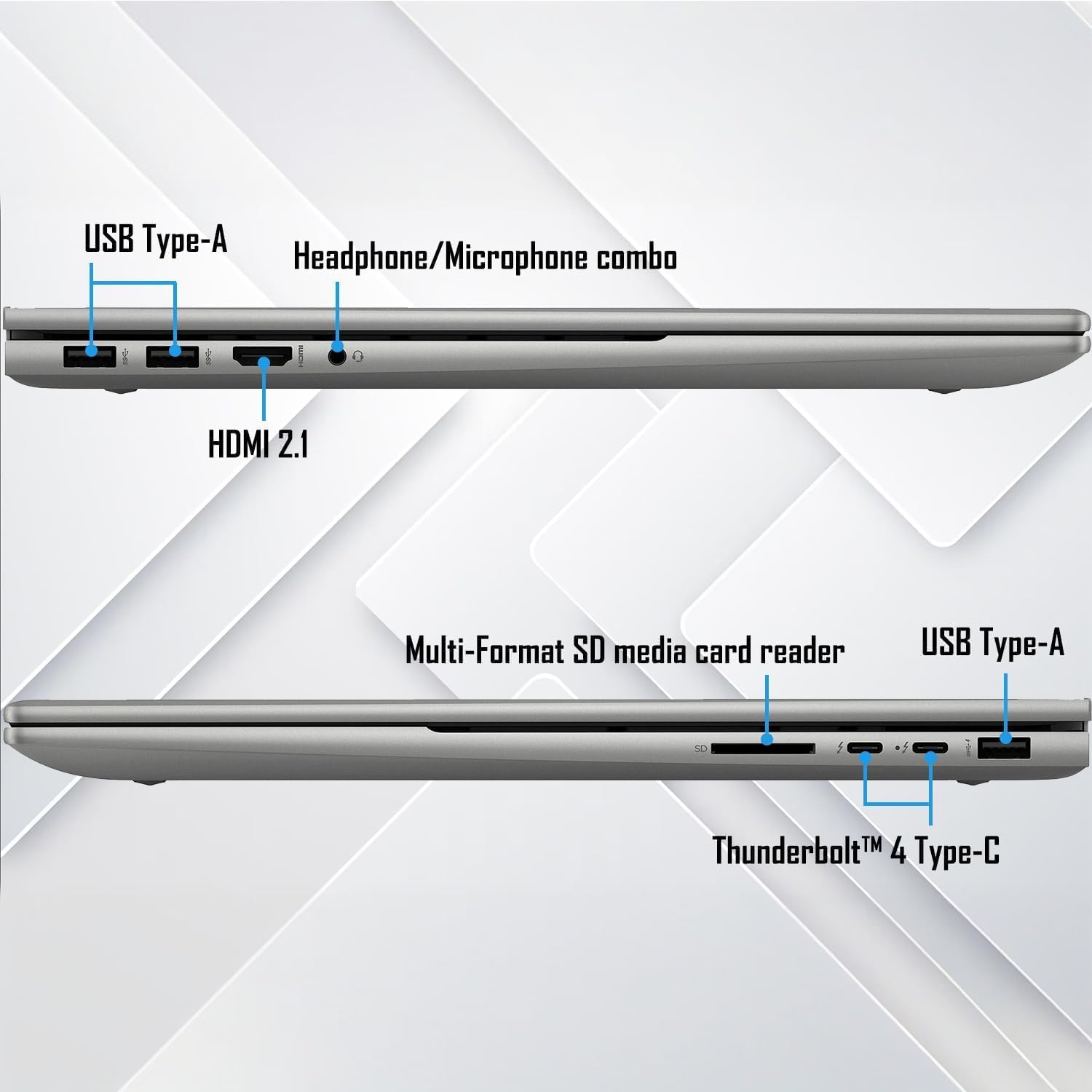
ছবি: বিস্তারিত view of the laptop's connectivity ports on both sides.
- ইউএসবি টাইপ-এ: মাউস, কীবোর্ড এবং এক্সটার্নাল ড্রাইভের মতো স্ট্যান্ডার্ড ইউএসবি ডিভাইসের জন্য।
- Thunderbolt 4 Type-C: Supports USB Power Delivery, DisplayPort 1.4, and HP Sleep and Charge for high-speed data transfer and display output.
- এইচডিএমআই এক্সএনএমএক্স: বাহ্যিক ডিসপ্লে বা প্রজেক্টরের সাথে সংযোগ করুন।
- হেডফোন/মাইক্রোফোন কম্বিনেশন জ্যাক: অডিও ইনপুট/আউটপুটের জন্য।
- মাল্টি-ফরম্যাট এসডি মিডিয়া কার্ড রিডার: এসডি কার্ড পড়ার জন্য।
অপারেটিং নির্দেশাবলী
টাচস্ক্রিন কার্যকারিতা
The 17.3" FHD touchscreen display allows for intuitive interaction with Windows 11. Use gestures like tap, swipe, pinch-to-zoom, and scroll directly on the screen.
কীবোর্ড এবং টাচপ্যাড
The full-size backlit keyboard with a numeric keypad provides a comfortable typing experience. The integrated touchpad supports multi-touch gestures for navigation.
Wi-Fi এবং ব্লুটুথ সংযোগ
The laptop supports Wi-Fi 6E (2x2/160) Gig+ and Bluetooth 5.3 for high-speed wireless connections to networks and peripherals.

Image: Visual representation of the laptop's advanced Wi-Fi 6E and Thunderbolt 4 connectivity.
অডিও সিস্টেম
Experience rich audio with Bang & Olufsen dual speakers. Adjust volume and sound settings through the Windows sound control panel.

Image: The laptop showcasing its Bang & Olufsen audio system with visual sound effects.
গ্রাফিক্স পারফরম্যান্স
The NVIDIA GeForce RTX 3050 with 4GB dedicated memory provides excellent graphics performance for demanding applications, gaming, and content creation.

Image: The laptop highlighting its NVIDIA GeForce RTX 3050 graphics for creative and gaming tasks.
রক্ষণাবেক্ষণ
সফ্টওয়্যার আপডেট
Regularly update Windows 11 and HP drivers to ensure optimal performance and security. Access Windows Update through Settings > Windows Update.
ল্যাপটপ পরিষ্কার করা
- Use a soft, lint-free cloth to clean the screen and chassis.
- For the screen, use a screen cleaner specifically designed for electronics.
- কঠোর রাসায়নিক বা ঘষিয়া তুলিয়া ফেলিতে সক্ষম পদার্থ এড়িয়ে চলুন।
ব্যাটারি যত্ন
To prolong battery life, avoid extreme temperatures and frequent full discharges. It is recommended to keep the battery charge between 20% and 80% for optimal longevity.
সমস্যা সমাধান
সাধারণ সমস্যা এবং সমাধান
- ক্ষমতা নেই: পাওয়ার অ্যাডাপ্টারটি নিরাপদে সংযুক্ত আছে এবং পাওয়ার আউটলেটটি কার্যকর আছে কিনা তা নিশ্চিত করুন। অন্য একটি আউটলেট চেষ্টা করুন।
- Screen Not Displaying: Check external display connections if applicable. Restart the laptop. If the issue persists, perform a hard reset by holding the power button for 15 seconds.
- ধীর কর্মক্ষমতা: Close unnecessary applications, check for background processes, and ensure sufficient free storage space. Run a disk cleanup and check for malware.
- Wi-Fi সংযোগ বিচ্ছিন্ন: Restart your router and the laptop. Check Wi-Fi settings and update network drivers.
সমর্থন যোগাযোগ
If issues persist, refer to the official HP support webসাইট (support.hp.com) or contact customer service for further assistance. Have your product serial number ready.
স্পেসিফিকেশন
| বৈশিষ্ট্য | বিস্তারিত |
|---|---|
| প্রদর্শন | 17.3" FHD (1920 x 1080) Touchscreen Micro-Edge IPS, 300-Nits |
| প্রসেসর | 13th Gen Intel Core i7-1355U (up to 5 GHz, 10-Cores, 12-Threads) |
| গ্রাফিক্স | NVIDIA GeForce RTX 3050, 4GB |
| RAM | 32GB DDR4-3200MHz |
| স্টোরেজ | ১ টেরাবাইট PCIe NVMe M.2 সলিড স্টেট ড্রাইভ |
| অপারেটিং সিস্টেম | উইন্ডোজ 11 হোম (64-বিট) |
| কীবোর্ড | নিউমেরিক কীপ্যাড সহ পূর্ণ-আকারের ব্যাকলিট কীবোর্ড |
| বেতার প্রযুক্তি | Wi-Fi 6E (2x2/160) Gig+, Bluetooth 5.3 |
| অডিও | দ্বৈত স্পিকারের সাথে ব্যাং ও অলুফসেন |
| ক্যামেরা | HP True Vision 5MP IR Camera with Shutter |
| বন্দর | 2x Thunderbolt 4 Type-C, 1x USB Type-A (HP Sleep and Charge), 2x USB Type-A, 1x HDMI 2.1, 1x Headphone/Microphone Combo, 1x Multi-format SD Media Card Reader |
| ব্যাটারি | 4-Cell 55Wh Li-Ion Polymer |
| ওজন | 5.50 পাউন্ড |
| মাত্রা (WxLxH) | ৮২" x ৬০" x ৪৭" |
দ্রষ্টব্য: নির্দিষ্টকরণগুলি বিজ্ঞপ্তি ছাড়াই পরিবর্তন সাপেক্ষে।
ওয়্যারেন্টি এবং সমর্থন
বিস্তারিত ওয়ারেন্টি তথ্য এবং প্রযুক্তিগত সহায়তার জন্য, অনুগ্রহ করে অফিসিয়াল HP সাপোর্ট দেখুন। website or contact your retailer. Keep your purchase receipt and product serial number handy for faster service.