1. ভূমিকা
This manual provides detailed instructions for the setup, operation, and maintenance of your Dierya M1 Wireless Gaming Mouse. Please read this manual thoroughly before using the product to ensure proper functionality and to maximize your user experience.

Figure 1: Dierya M1 Wireless Gaming Mouse and 2.4G USB Receiver.
2. পণ্য বৈশিষ্ট্য
- ৪৮০০ ডিপিআই অপটিক্যাল সেন্সর: Adjustable DPI range from 200 to 24,000, with 6 preset levels (400-6400 DPI). Features a 125-1000 Hz polling rate, 300 IPS tracking speed, and 35G acceleration.
- ট্রাই-মোড সংযোগ: Supports ultra-fast 2.4 GHz wireless (1000 Hz polling rate), energy-efficient Bluetooth 5.2 (125 Hz polling rate), and stable USB-C wired connection (1000 Hz polling rate).
- বর্ধিত ব্যাটারি জীবন: Equipped with a 1000 mAh battery, providing up to 180 hours of use in ECO mode or 48 hours with RGB lighting enabled. Fully recharges in approximately 1 hour via USB-C. Includes an automatic power-saving mode after 1-5 minutes of inactivity.
- হালকা ও আর্গোনমিক ডিজাইন: Weighs 90g with a breathable honeycomb shell. Symmetrical design (125x63x41 mm) suitable for various grip styles.
- টেকসই উপাদান: Features Huano switches rated for 20 million clicks and 100% PTFE feet for smooth gliding.
- প্রোগ্রামেবল বোতাম: Six customizable buttons for macros and reassignments.
- গতিশীল আরজিবি আলো: 13 integrated dynamic RGB lighting effects with 16.8 million customizable colors.
- সিস্টেম সামঞ্জস্যতা: Compatible with Windows, macOS, Linux, and Chrome OS.
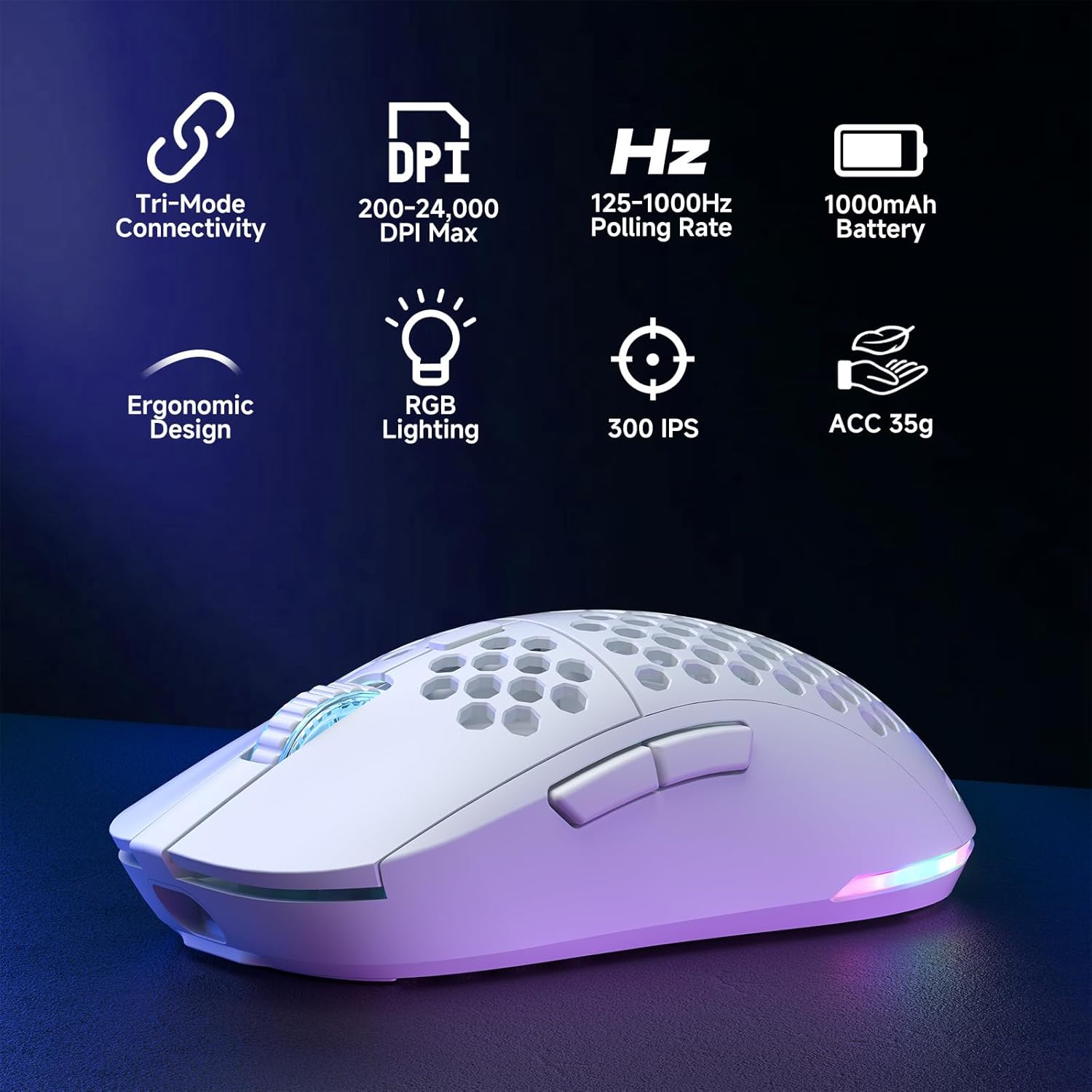
Figure 2: Key features of the Dierya M1 Wireless Gaming Mouse.
৪. পণ্যের চিত্র এবং উপাদান
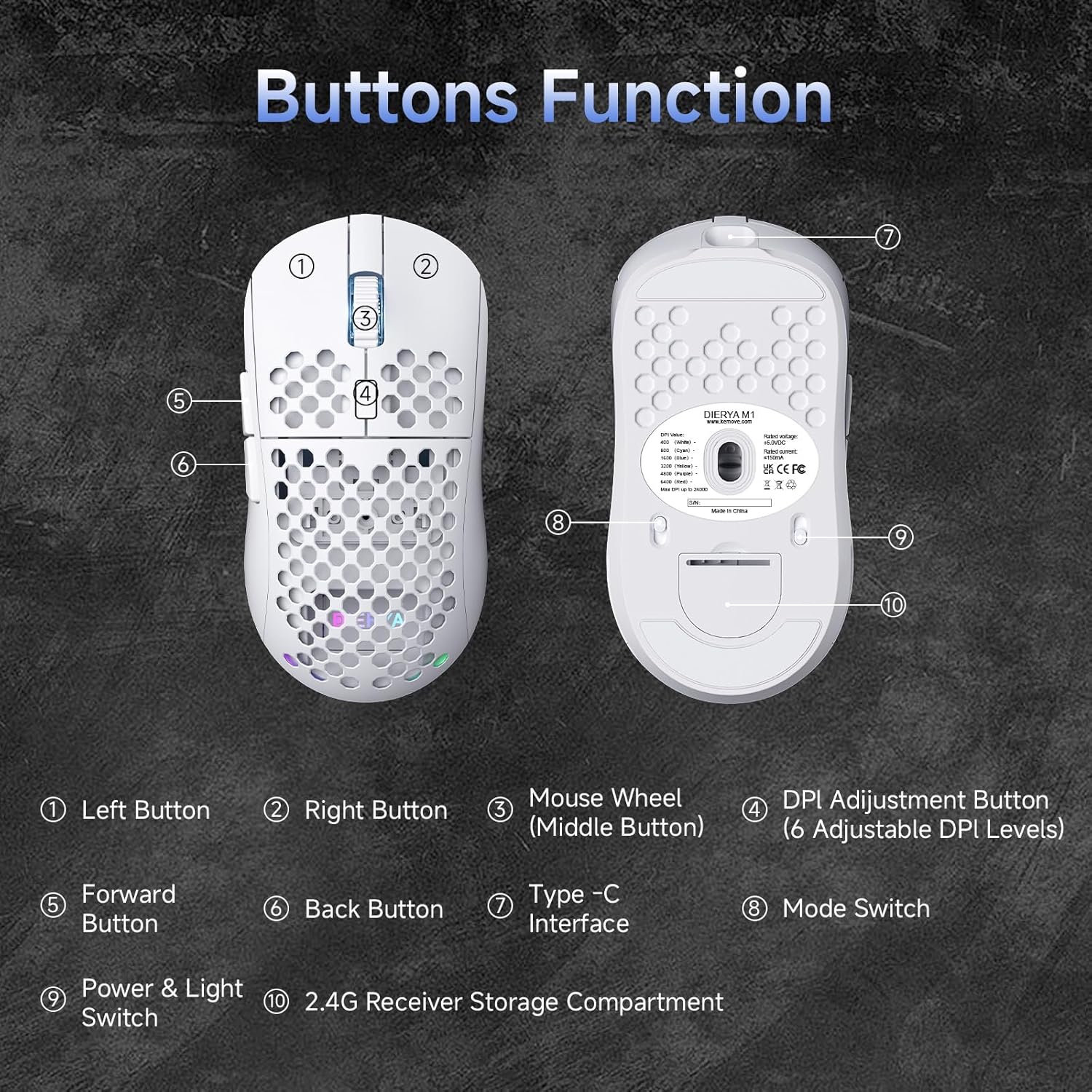
চিত্র 3: উপরে এবং নীচে view of the Dierya M1 mouse with labeled components.
- বাম বোতাম
- ডান বোতাম
- Mouse Wheel (Middle Button)
- DPI Adjustment Button (6 Adjustable DPI Levels)
- ফরোয়ার্ড বোতাম
- পিছনের বোতাম
- টাইপ-সি ইন্টারফেস
- Mode Switch (2.4G / Bluetooth / Wired)
- Power & Light Switch
- 2.4G Receiver Storage Compartment
4. সেটআপ এবং সংযোগ
The Dierya M1 mouse offers three connection modes: 2.4 GHz Wireless, Bluetooth 5.2, and USB-C Wired.

চিত্র 4: ওভারview of the three connection modes.
4.1. 2.4 GHz Wireless Connection
- Locate the 2.4G USB receiver in the storage compartment on the bottom of the mouse.
- আপনার কম্পিউটারে একটি উপলব্ধ USB পোর্টে USB রিসিভার প্লাগ করুন৷
- Set the mode switch on the bottom of the mouse to the '2.4G' position.
- মাউসটি স্বয়ংক্রিয়ভাবে সংযুক্ত হওয়া উচিত।
২.২.২। ব্লুটুথ ৫.১ সংযোগ
- Set the mode switch on the bottom of the mouse to the 'Bluetooth' position.
- আপনার কম্পিউটার বা ডিভাইসে, ব্লুটুথ সেটিংস খুলুন।
- জন্য অনুসন্ধান করুন new devices and select 'Dierya M1' from the list.
- পেয়ারিং প্রক্রিয়া সম্পূর্ণ করতে পর্দার যেকোনো প্রম্পট অনুসরণ করুন।
১. ইউএসবি-সি তারযুক্ত সংযোগ
- Connect the provided USB-C cable to the Type-C interface on the front of the mouse.
- USB-C কেবলের অন্য প্রান্তটি আপনার কম্পিউটারে উপলব্ধ একটি USB পোর্টের সাথে সংযুক্ত করুন।
- Set the mode switch on the bottom of the mouse to the 'Wired' position.
- মাউসটি তারযুক্ত মাউস হিসেবে কাজ করবে এবং একই সাথে চার্জ করবে।
5. অপারেটিং নির্দেশাবলী
5.1. ডিপিআই সমন্বয়
The DPI Adjustment Button (4) on the top of the mouse allows you to cycle through preset DPI levels. Each DPI level is indicated by a specific color on the scroll wheel LED for a few seconds after adjustment.
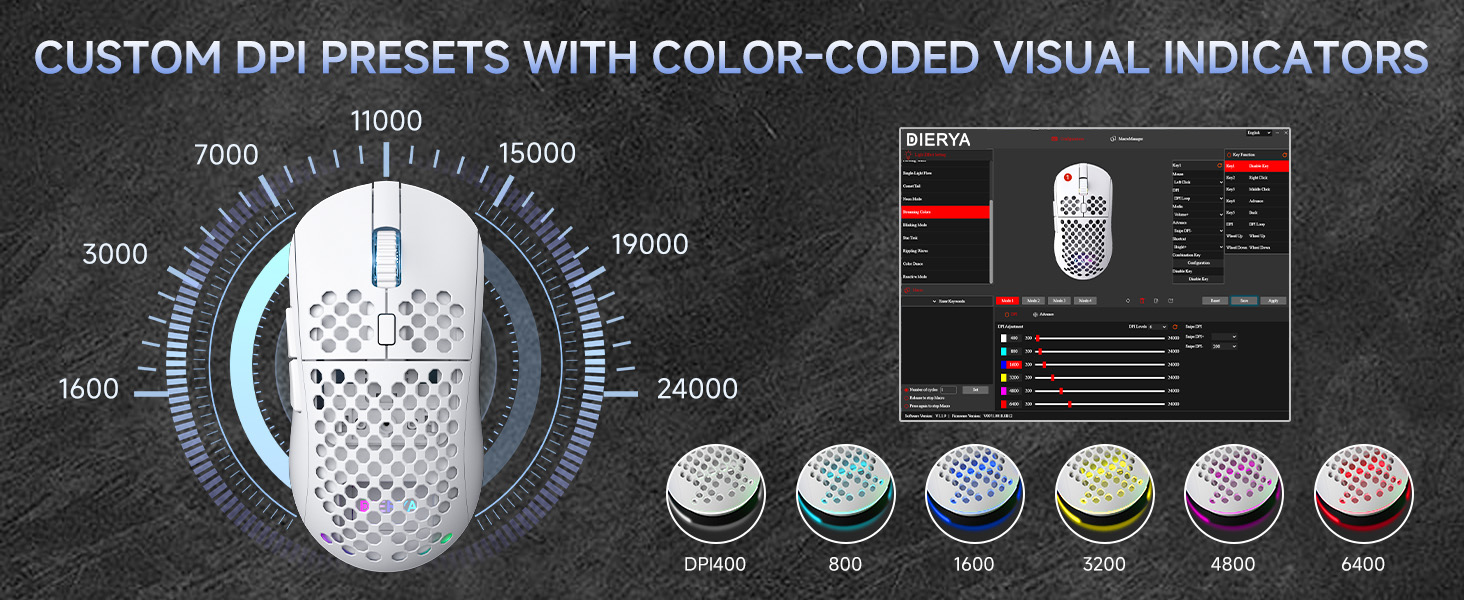
Figure 5: DPI levels and their corresponding scroll wheel LED colors.
- Press the DPI button to switch between 6 preset DPI levels.
- Default presets: 400 DPI (Red), 800 DPI (Green), 1600 DPI (Blue), 3200 DPI (Yellow), 4800 DPI (Purple), 6400 DPI (Cyan).
- For custom DPI settings and a wider range (200-24,000 DPI), use the M1 Driver Software (Windows only).
৭. আরজিবি লাইটিং কন্ট্রোল
The mouse features 13 dynamic RGB lighting effects. You can control the lighting directly on the mouse or customize it further with the software.
- To cycle through RGB effects: Press and hold the DPI Adjustment Button (4) for 3 seconds.
- To turn RGB lighting On/Off: Use the Power & Light Switch (9) on the bottom of the mouse.
- For advanced customization of colors and effects, use the M1 Driver Software (Windows only).
৪. প্রোগ্রামেবল বোতাম
The Dierya M1 has 6 programmable buttons (Left, Right, Middle, DPI, Forward, Back). These buttons can be customized for various functions, macros, or key reassignments using the M1 Driver Software.
6. Charging and Battery Management
The Dierya M1 mouse is equipped with a 1000 mAh rechargeable battery.

Figure 6: Charging the Dierya M1 mouse and battery life indicators.
- চার্জিং: Connect the mouse to your computer using the provided USB-C cable. The mouse will charge while in wired mode or when connected to a power source. A full charge takes approximately 1 hour.
- ব্যাটারি লাইফ: Expect up to 180 hours of use in ECO mode (RGB off) and up to 48 hours with RGB lighting enabled.
- শক্তি সঞ্চয়: The mouse automatically enters a power-saving sleep mode after 1-5 minutes of inactivity. This duration can be adjusted via the M1 Driver Software.
- কম ব্যাটারি সূচক: The RGB lighting or a specific LED will indicate when the battery is low. Charge the mouse promptly to avoid interruption.
7. M1 Driver Software (Windows Only)
The M1 Driver Software allows for advanced customization of your mouse settings. This software is currently available for Windows operating systems only.

Figure 7: M1 Driver Software interface.
7.1. সফ্টওয়্যার বৈশিষ্ট্য
- কী অ্যাসাইনমেন্ট: Customize the function of all 6 buttons.
- ম্যাক্রো সম্পাদক: Create and assign complex macros.
- DPI সমন্বয়: Fine-tune DPI settings from 200 to 24,000 in increments.
- ভোটের হার: Adjust the polling rate (125-1000 Hz).
- আরজিবি কাস্টমাইজেশন: Personalize lighting effects, colors, and brightness.
- ঘুমের সময়: Configure the automatic power-saving sleep mode duration.
- প্রোfile ব্যবস্থাপনা: বিভিন্ন প্রো সংরক্ষণ এবং লোড করুনfileবিভিন্ন অ্যাপ্লিকেশন বা গেমের জন্য।
7.2. ইনস্টলেশন
Download the latest M1 Driver Software from the official Dierya website. Follow the on-screen instructions to install the software on your Windows computer.
8. রক্ষণাবেক্ষণ
- পরিষ্কার করা: মাউস পরিষ্কার করার জন্য একটি নরম, শুকনো কাপড় ব্যবহার করুন। একগুঁয়ে ময়লার জন্য, সামান্য ডিamp cloth can be used, ensuring no liquid enters the mouse.
- সঞ্চয়স্থান: মাউসটিকে সরাসরি সূর্যালোক এবং চরম তাপমাত্রা থেকে দূরে একটি শীতল, শুষ্ক জায়গায় সংরক্ষণ করুন।
- ব্যাটারি যত্ন: Avoid fully discharging the battery frequently. For long-term storage, charge the mouse to about 50% and store it in a cool, dry place.
9. সমস্যা সমাধান
- মাউস সাড়া দিচ্ছে না:
- মাউস চালু আছে তা নিশ্চিত করুন।
- Check the connection mode switch (2.4G, Bluetooth, Wired) is set correctly.
- 2.4G এর জন্য, নিশ্চিত করুন যে USB রিসিভারটি নিরাপদে প্লাগ ইন করা আছে।
- ব্লুটুথের জন্য, ডিভাইসটি পুনরায় যুক্ত করুন।
- Try connecting via USB-C cable to check if it works in wired mode.
- Charge the mouse; the battery might be depleted.
- ল্যাগ বা বিরতিহীন সংযোগ:
- Ensure the mouse is within range of the receiver/device (for wireless connections).
- অন্যান্য ওয়্যারলেস ডিভাইস থেকে হস্তক্ষেপ কম করুন।
- ব্যাটারি যথেষ্ট চার্জ করা হয়েছে তা নিশ্চিত করুন।
- Update mouse drivers if available (Windows only).
- আরজিবি লাইটিং কাজ করছে না:
- Check the Power & Light Switch (9) on the bottom of the mouse.
- Ensure the mouse is not in ECO mode or a low-power state.
- If using the software, verify RGB settings.
- DPI adjustment not working:
- Ensure you are pressing the correct DPI Adjustment Button (4).
- If using custom settings, check the M1 Driver Software.
10. স্পেসিফিকেশন
| বৈশিষ্ট্য | স্পেসিফিকেশন |
|---|---|
| ব্র্যান্ড | Dierya |
| মডেলের নাম | M1 |
| রঙ | সাদা |
| সংযোগ প্রযুক্তি | ২.৪GHz ওয়্যারলেস, ব্লুটুথ ৫.২, USB-C তারযুক্ত |
| সেন্সর প্রযুক্তি | অপটিক্যাল |
| ডিপিআই রেঞ্জ | ২০০ - ২৪,০০০ ডিপিআই |
| ভোটের হার | 125-1000 Hz |
| ট্র্যাকিং গতি | 300 আইপিএস |
| ত্বরণ | 35G |
| বোতামের সংখ্যা | ৯ (প্রোগ্রামেবল) |
| সুইচ | Huano (20 Million Clicks) |
| পায়ের উপাদান | 100% PTFE |
| ব্যাটারির ক্ষমতা | ৪৭০ এমএএইচ (লিথিয়াম-আয়ন) |
| Battery Life (ECO Mode) | 180 ঘন্টা পর্যন্ত |
| Battery Life (RGB Mode) | 48 ঘন্টা পর্যন্ত |
| চার্জ করার সময় | প্রায় 1 ঘন্টা |
| ওজন | 90 গ্রাম |
| মাত্রা | 125 x 63 x 41 মিমি |
| অপারেটিং সিস্টেম সামঞ্জস্য | উইন্ডোজ, ম্যাকোস, লিনাক্স, ক্রোম ওএস |
11. ওয়্যারেন্টি এবং সমর্থন
The Dierya M1 Wireless Gaming Mouse comes with a 1 বছরের প্রস্তুতকারকের ওয়ারেন্টি। এই ওয়ারেন্টিটি সাধারণ ব্যবহারের সময় উপকরণ এবং কারিগরি ত্রুটিগুলিকে কভার করে।
For warranty claims, technical support, or further inquiries, please contact Dierya customer service through the official website or your point of purchase. Please have your product model number (M1) and proof of purchase ready when contacting support.


