1. ভূমিকা
This manual provides essential information for the setup, operation, maintenance, and troubleshooting of your new Samsung QN43QN90FAFXZA 43-inch Neo QLED 4K Smart TV and the accompanying Austere 5S-4KHD2-2.5M V-Series 2.5m Premium 4K HDR HDMI Braided Cable. Please read this manual thoroughly to ensure proper use and to maximize your viewঅভিজ্ঞতা।
2. নিরাপত্তা তথ্য
Always follow basic safety precautions when using electrical appliances to reduce the risk of fire, electric shock, and injury. Keep the TV away from water and moisture. Do not block ventilation openings. Use only specified attachments/accessories. Refer all servicing to qualified service personnel.
3. সেটআপ
২.১ আনবক্সিং এবং কম্পোনেন্ট সনাক্তকরণ
প্যাকেজিং থেকে সমস্ত উপাদান সাবধানে সরিয়ে ফেলুন। নিম্নলিখিত জিনিসপত্রগুলি উপস্থিত রয়েছে তা নিশ্চিত করুন:
- Samsung QN43QN90FAFXZA 43-inch Neo QLED 4K Smart TV
- Remote Control (BT SolarCell Remote)
- পাওয়ার ক্যাবল
- টিভি স্ট্যান্ডের উপাদান (যদি প্রযোজ্য হয়)
- Austere 5S-4KHD2-2.5M V-Series 2.5m Premium 4K HDR HDMI Braided Cable
- ডকুমেন্টেশন (এই ম্যানুয়াল, ওয়ারেন্টি কার্ড)
3.2 টিভি প্লেসমেন্ট
Place the TV on a stable, level surface or mount it on a wall using a VESA 200mm x 200mm compatible wall mount (sold separately). Ensure adequate ventilation around the TV.

Figure 3.2.1: Samsung QN43QN90FAFXZA 43-inch Neo QLED 4K Smart TV with Austere HDMI cable.

চিত্র 3.2.2: সামনে view of the Samsung QN43QN90FAFXZA 43-inch Neo QLED 4K Smart TV.

চিত্র 3.2.3: পার্শ্ব view of the Samsung QN43QN90FAFXZA 43-inch Neo QLED 4K Smart TV.
3.3 Connecting the Austere HDMI Cable
The Austere 5S-4KHD2-2.5M V-Series HDMI cable is designed for optimal 4K HDR performance. Connect one end of the HDMI cable to an HDMI port on your TV and the other end to your external device (e.g., Blu-ray player, gaming console, soundbar). This cable supports HDMI ARC technology for enhanced audio return.

Figure 3.3.1: Austere 5S-4KHD2-2.5M V-Series 2.5m Premium 4K HDR HDMI Braided Cable.

Figure 3.3.2: Austere HDMI cable connected to a media device, demonstrating 18Gbps bandwidth for 4K60.

Figure 3.3.3: Austere HDMI cable connected to a receiver, highlighting High Quality Audio with ARC Technology.
১.৪ প্রাথমিক পাওয়ার-অন এবং সেটআপ উইজার্ড
Connect the power cable to the TV and a wall outlet. Press the power button on the remote control. The TV will guide you through the initial setup process, including network connection (Wi-Fi 5), channel scanning, and smart feature configuration.
4. আপনার টিভি অপারেটিং
4.1 রিমোট কন্ট্রোল ফাংশন
Your BT SolarCell Remote allows for intuitive control of your TV. Use it to navigate menus, adjust volume, change channels, and access smart features. The remote can be charged via solar power or USB-C.
৫.২ স্মার্ট বৈশিষ্ট্য (টিজেন ওএস)
The TV runs on Samsung's Tizen Smart TV platform, providing access to various streaming services like Netflix, Prime Video, Disney+, Hulu, Apple TV, YouTube, HBO Max, Peacock, Sling, and more. Multiple Voice Assistant compatibility is also included.
৪.১ ছবির মান বৃদ্ধি
Your Neo QLED TV features advanced technologies for superior picture quality:
- NQ4 AI Gen3 প্রসেসর: Utilizes AI to deliver incredible 4K picture and dynamic sound.
- 4K AI আপস্কেলিং প্রো: Content is upscaled to impressive 4K, improving viewing experience regardless of original resolution.
- ঝলক মুক্ত: Minimizes reflections, allowing clear viewing even in bright rooms.
- নিও কোয়ান্টাম এইচডিআর: Provides expanded contrast and powerful brightness for nuanced details in 4K clarity.
- AI Motion Enhancer Pro: Enhances motion clarity for fast-paced scenes.
- রিয়েল ডেপথ এনহ্যান্সার প্রো: Adds depth to images for a more immersive experience.
Video 4.3.1: Samsung QN90F Series TV Product Review. This video highlights key features and performance aspects of the QN90F series.

Figure 4.3.1: 4K AI Upscaling Pro in action, transforming content to a sharp, smooth 4K experience.
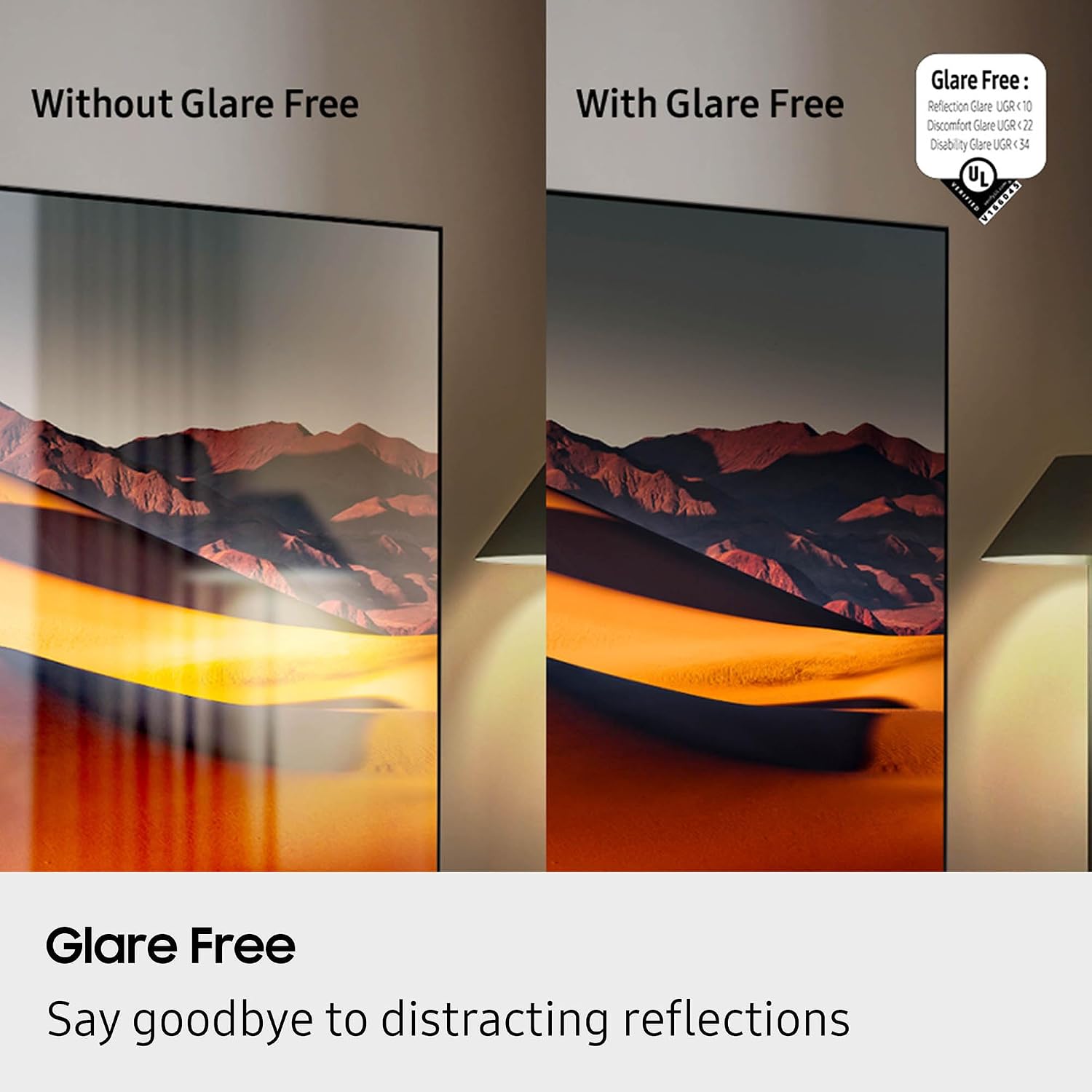
Figure 4.3.2: Glare Free technology reducing reflections for a clearer view.

Figure 4.3.3: The NQ4 AI Gen3 Processor, the core of the TV's intelligent performance.
৫.৩ শব্দ মানের বৈশিষ্ট্য
Experience immersive audio with:
- ডলবি অ্যাটমোস: আপনার চারপাশে ঘোরাফেরা করে এমন বহুমাত্রিক শব্দ সরবরাহ করে।
- ওটিএস লাইট (অবজেক্ট ট্র্যাকিং সাউন্ড লাইট): Sound follows the action on screen for a more dynamic audio experience.
- Q-Symphony Pro: আরও সমৃদ্ধ শব্দের জন্য টিভি স্পিকারগুলিকে সামঞ্জস্যপূর্ণ Samsung সাউন্ডবারের সাথে সিঙ্ক্রোনাইজ করেtage.
- ব্লুটুথ অডিও: ওয়্যারলেস হেডফোন বা স্পিকার সংযুক্ত করুন।
৫.৬ গেমিং বৈশিষ্ট্য
The TV offers a 120Hz (up to 165Hz) refresh rate and Motion Xcelerator 165Hz for smooth, responsive gaming.
4.6 Art Store
Transform your TV into a personal art gallery with the Art Store feature, displaying a vast collection of artwork when the TV is not in active use.
5. রক্ষণাবেক্ষণ
5.1 Cleaning the TV Screen and Body
নরম, শুকনো মাইক্রোফাইবার কাপড় দিয়ে আলতো করে স্ক্রিনটি মুছুন। একগুঁয়ে দাগের জন্য, হালকাভাবে ঘষুন।ampen the cloth with water or a screen-cleaning solution. Avoid harsh chemicals. Clean the TV body with a soft, dry cloth.
5.2 সফ্টওয়্যার আপডেট
Ensure your TV's software is up-to-date for optimal performance and security. You can usually find the update option in the TV's settings menu under 'Support' or 'Software Update'.
5.3 Austere HDMI Cable Care
Handle the HDMI cable by its connectors, not the cable itself, to prevent damage. Avoid sharp bends or kinks. Store the cable neatly when not in use.
Video 5.3.1: Austere 5 Series HDMI Product Video. This video showcases the design and features of the Austere 5 Series HDMI cable.
6. সমস্যা সমাধান
6.1 ক্ষমতা নেই
- পাওয়ার কেবলটি টিভি এবং ওয়াল আউটলেটের সাথে নিরাপদে সংযুক্ত কিনা তা পরীক্ষা করুন।
- অন্য ডিভাইস প্লাগ ইন করে ওয়াল আউটলেটটি কাজ করছে কিনা তা নিশ্চিত করুন।
- একটি ভিন্ন পাওয়ার আউটলেট চেষ্টা করুন.
৫.২ ছবি নেই অথবা বিকৃত ছবি নেই
- টিভিতে সঠিক ইনপুট উৎস নির্বাচন করা হয়েছে কিনা তা যাচাই করুন।
- Check the HDMI cable connection between the TV and the external device. Try re-seating the cable or using a different HDMI port.
- Ensure the external device is powered on and functioning correctly.
- If using an antenna, check the antenna connection and perform a channel scan.
৫.৩ কোন শব্দ নেই অথবা বিকৃত শব্দ নেই
- Check the TV's volume level and ensure it is not muted.
- If using external audio devices (soundbar, receiver), ensure they are powered on and connected correctly via HDMI ARC or optical cable.
- Check audio settings on both the TV and the external audio device.
৭.৩ রিমোট কন্ট্রোল কাজ করছে না
- রিমোট এবং টিভির মধ্যে কোনও বাধা নেই তা নিশ্চিত করুন।
- Charge the BT SolarCell Remote using solar power or a USB-C cable.
- If the issue persists, try re-pairing the remote with the TV (refer to the TV's on-screen guide for specific instructions).
৫.২ নেটওয়ার্ক সংযোগ সমস্যা
- আপনার ওয়াই-ফাই রাউটার এবং মডেম চালু আছে এবং কাজ করছে কিনা তা পরীক্ষা করে দেখুন।
- আপনার রাউটার এবং মডেম পুনরায় চালু করুন।
- টিভির নেটওয়ার্ক সেটিংসে যান এবং আপনার ওয়াই-ফাই নেটওয়ার্কে পুনরায় সংযোগ করার চেষ্টা করুন।
- যদি তারযুক্ত সংযোগ ব্যবহার করেন, তাহলে নিশ্চিত করুন যে ইথারনেট কেবলটি নিরাপদে সংযুক্ত আছে।
7. স্পেসিফিকেশন
| বৈশিষ্ট্য | স্পেসিফিকেশন |
|---|---|
| ব্র্যান্ড | স্যামসাং |
| মডেলের নাম | QN43QN90FAXZA সম্পর্কে |
| পর্দার আকার | 43 ইঞ্চি |
| প্রদর্শন প্রযুক্তি | নিও QLED |
| রেজোলিউশন | 4K |
| রিফ্রেশ হার | 120 Hz (Up to 165Hz) |
| প্রসেসর | NQ4 AI Gen3 প্রসেসর |
| বিশেষ বৈশিষ্ট্য | AI Motion Enhancer Pro, Glare Free, Auto HDR Remastering Pro, Wide Viewing Angle, Ultimate UHD Dimming, Real Depth Enhancer Pro, Motion Xcelerator 165Hz, Film Mode, 4K AI Upscaling Pro, Color Booster Pro, Dolby Atmos, OTS Lite, Q-Symphony Pro, Bluetooth Audio, 360 Audio, Tizen Smart TV, Multiple Voice Assistant Compatible, Samsung Health, Eco Sensor, Auto Power Saving/Off, BT SolarCell Remote |
| সমর্থিত ইন্টারনেট পরিষেবা | Netflix, Prime Video, Disney+, Hulu, Apple TV, YouTube, HBO Max, Peacock, Sling, and More |
| পণ্যের মাত্রা | 8.7"D x 37.8"W x 24.4"H |
| আইটেম ওজন | 29.5 পাউন্ড |
| রঙ | টাইটান ব্ল্যাক |
| VESA সামঞ্জস্য | 200 মিমি x 200 মিমি |
| HDMI পোর্ট | 4 |
| ইউএসবি-এ পোর্ট | 2 |
| ওয়াই-ফাই | ওয়াই-ফাই 5 |
| HDMI Cable Model | Austere 5S-4KHD2-2.5M |
| এইচডিএমআই কেবল দৈর্ঘ্য | 2.5 মি |
| HDMI Cable Features | Premium 4K HDR, Braided, HDMI ARC Technology, Silver-plated conductors |
8. ওয়্যারেন্টি এবং সমর্থন
For warranty information regarding your Samsung TV, please refer to the warranty card included in your product packaging or visit the official Samsung support website. For support with your Austere HDMI cable, please refer to Austere's official documentation or webসাইট ওয়ারেন্টি দাবির জন্য আপনার ক্রয়ের রসিদ রাখুন।


