1. ভূমিকা
This manual provides essential information for the safe operation, assembly, maintenance, and troubleshooting of your Varstrom VS10 Electric Scooter. Please read this manual thoroughly before first use to ensure proper function and to prevent injury or damage.
2. নিরাপত্তা নির্দেশিকা
Operating an electric scooter carries inherent risks. Adhere to the following safety guidelines:
- Always wear a helmet and appropriate protective gear (knee pads, elbow pads).
- সমস্ত স্থানীয় ট্রাফিক আইন এবং প্রবিধান পালন করুন.
- ভেজা আবহাওয়ায়, ভারী বৃষ্টিতে, অথবা পিচ্ছিল পৃষ্ঠে বাইক চালাবেন না।
- Avoid riding at night or in low visibility conditions. If unavoidable, ensure all lights are functional and wear reflective clothing.
- অন্যান্য যানবাহন এবং পথচারীদের থেকে নিরাপদ গতি এবং দূরত্ব বজায় রাখুন।
- স্টান্ট বা হঠাৎ কৌশল ব্যবহার করবেন না।
- প্রতিটি যাত্রার আগে নিশ্চিত করুন যে স্কুটারটি সম্পূর্ণ চার্জ করা আছে এবং সমস্ত যন্ত্রাংশ সুরক্ষিত আছে।
- Maximum load capacity is 120 kg. Do not exceed this limit.
- এই স্কুটারটি শুধুমাত্র প্রাপ্তবয়স্কদের ব্যবহারের জন্য তৈরি।
3. প্যাকেজ বিষয়বস্তু
প্যাকেজে সমস্ত আইটেম উপস্থিত আছে কিনা তা যাচাই করুন:
- Varstrom VS10 Electric Scooter
- চার্জার
- ব্যবহারকারী ম্যানুয়াল (এই দস্তাবেজ)
4. পণ্য শেষview
Familiarize yourself with the main components of your Varstrom VS10 Electric Scooter.

ছবি: সাইড view of the Varstrom VS10 Electric Scooter, showcasinএর সামগ্রিক নকশা এবং উপাদানগুলি।
মূল বৈশিষ্ট্য:
- মোটর: 500W Brushless DC Motor for efficient power delivery.
- ব্যাটারি: 48V 15.6Ah Lithium-ion battery for extended range.
- টায়ার: 10-inch puncture-proof solid tires.
- সাসপেনশন: Front dual suspension and rear dual suspension for ride comfort.
- আলো: Integrated headlight, bright rear brake light, and dual handlebar turn signals.
- প্রদর্শন: Intelligent LED screen showing speed, battery level, and riding mode.
- নিয়ন্ত্রণ: App control via smartphone for various settings.
- বহনযোগ্যতা: Quick folding mechanism for easy storage and transport.
5. সমাবেশ এবং সেটআপ
৪.১ স্কুটারটি খোলা
The scooter is shipped in a folded state. Follow these steps to unfold it:
- স্কুটারটিকে একটি সমতল পৃষ্ঠে রাখুন।
- Locate the folding mechanism latch near the base of the steering column.
- Release the latch and carefully lift the steering column until it locks into the upright position. Ensure the locking mechanism is fully engaged.
- Raise the handlebars and secure them if they are folded down.

Image: Illustration showing the folded and unfolded dimensions of the Varstrom VS10 Electric Scooter, demonstrating its compact storage capability.
5.2 প্রাথমিক চার্জিং
আপনার প্রথম যাত্রার আগে, স্কুটারের ব্যাটারি সম্পূর্ণ চার্জ করুন।
- স্কুটার বন্ধ আছে তা নিশ্চিত করুন।
- Locate the charging port, typically on the side of the deck.
- চার্জারটিকে চার্জিং পোর্টের সাথে সংযুক্ত করুন, তারপর চার্জারটিকে একটি স্ট্যান্ডার্ড ওয়াল আউটলেটে প্লাগ করুন।
- চার্জারের চার্জিং ইন্ডিকেটরটি সাধারণত চার্জ করার সময় লাল দেখাবে এবং সম্পূর্ণ চার্জ করার সময় সবুজ হয়ে যাবে।
- চার্জিং সময় প্রায় ৬-৮ ঘন্টা। অতিরিক্ত চার্জ করবেন না।

ছবি: বিস্তারিত view of the scooter's battery compartment and charging specifications, highlighting the 48V 15.6Ah battery and 6-7 hour charging time.
6. অপারেশন
6.1 পাওয়ার অন/অফ
- To power on: Press and hold the power button on the LED display until the screen illuminates.
- পাওয়ার অফ করতে: স্ক্রিন বন্ধ না হওয়া পর্যন্ত পাওয়ার বোতাম টিপুন এবং ধরে রাখুন।
6.2 LED Display and Controls
The integrated LED display provides real-time information and control options.

Image: Close-up of the scooter's intelligent LED screen, displaying current speed, selected gear (riding mode), and battery level.
- গতি প্রদর্শন: বর্তমান রাইডিং গতি দেখায়।
- ব্যাটারি প্রদর্শন: অবশিষ্ট ব্যাটারি চার্জ নির্দেশ করে।
- Gear Shift (Riding Modes): Press the 'Set/Switch' button to cycle through Eco, Drive, and Sport modes.
৫.২ রাইডিং মোড
- ইকো মোড: Lowest speed, maximum range, suitable for beginners or crowded areas.
- ড্রাইভ মোড: Medium speed, balanced performance for daily commuting.
- খেলাধুলার মোড: Highest speed, maximum power, for experienced riders on open roads.
6.4 ক্রুজ নিয়ন্ত্রণ
To activate cruise control, maintain a consistent speed for a few seconds. The scooter will beep, and cruise control will engage. To disengage, press the brake lever or accelerate.
6.5 আলোর ব্যবস্থা
The scooter is equipped with a comprehensive lighting system for visibility and safety.
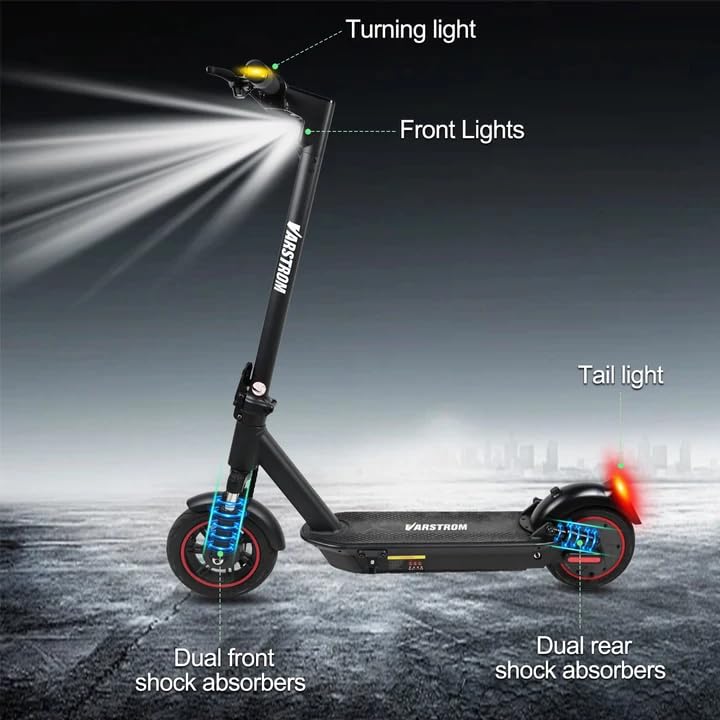
Image: Diagram illustrating the scooter's front lights, turning lights on the handlebars, tail light, and the dual front and rear shock absorbers.
- হেডলাইট: Turn on/off via the app or dedicated button (if available).
- টেইল লাইট/ব্রেক লাইট: The rear light illuminates when the scooter is powered on and brightens when the brake is applied.
- টার্ন সিগন্যাল: Activate turn signals using the controls on the handlebars to indicate your turning direction.
6.6 ব্রেকিং
The scooter features front braking. Apply the brake lever gently to slow down. For emergency stops, apply firm and even pressure to the brake lever. Avoid sudden braking at high speeds.
৪.২ টুয়া স্মার্ট অ্যাপ কন্ট্রোল
Enhance your riding experience by connecting your scooter to the Tuya Smart app.

Image: Screenshot of the Tuya Smart App interface, showing options to unlock the scooter, control cruise, turn on/off headlights, switch riding modes, and set speed limits.
- Download the 'Tuya Smart' app from your smartphone's app store.
- নিশ্চিত করুন যে আপনার স্কুটারটি চালু আছে এবং আপনার ফোনে ব্লুটুথ চালু আছে।
- Open the app and follow the instructions to add a new device. You may need to hold the brake and power button simultaneously to activate Bluetooth pairing mode.
- অ্যাপটির মাধ্যমে, আপনি করতে পারেন:
- Unlock/Lock the scooter remotely.
- Adjust lights.
- রাইডিং মোড পরিবর্তন করুন।
- Set cruise control.
- Toggle units (km/mph).
- View real-time ride data.
- Enable/disable zero start (safety feature).
7. রক্ষণাবেক্ষণ
7.1 ব্যাটারি যত্ন
- ব্যাটারির স্বাস্থ্য বজায় রাখার জন্য, ব্যবহার না করলেও, নিয়মিত চার্জ করুন।
- সম্পূর্ণরূপে ব্যাটারি নিষ্কাশন এড়িয়ে চলুন.
- স্কুটারটি সরাসরি সূর্যালোক এবং চরম তাপমাত্রা থেকে দূরে একটি শীতল, শুষ্ক জায়গায় সংরক্ষণ করুন।
- শুধুমাত্র প্রদত্ত চার্জার ব্যবহার করুন।
7.2 পরিষ্কার করা
বিজ্ঞাপন দিয়ে স্কুটারটি মুছুনamp cloth. Do not use high-pressure water jets or immerse the scooter in water, as this can damage electrical components.
7.3 Tire Inspection
Although the tires are puncture-proof solid tires, regularly inspect them for any signs of damage, cracks, or embedded debris.
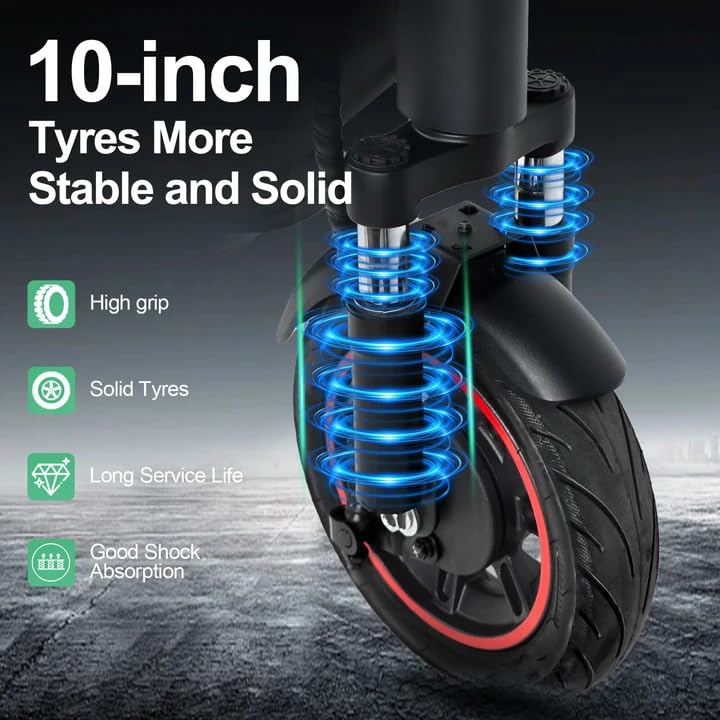
Image: Close-up of the scooter's 10-inch solid tires and dual suspension system, emphasizing stability and shock absorption.
8. সমস্যা সমাধান
| সমস্যা | সম্ভাব্য কারণ | সমাধান |
|---|---|---|
| স্কুটার চালু হচ্ছে না | ব্যাটারি কম; সংযোগ আলগা; পাওয়ার বোতামের ত্রুটি | Charge the battery; Check all visible connections; Contact support if issue persists. |
| হ্রাসকৃত পরিসর বা শক্তি | Low battery; Overload; Cold weather; Tire damage | Fully charge battery; Ensure load is within limits; Battery performance decreases in cold; Inspect tires. |
| অ্যাপ কানেক্ট হচ্ছে না | Bluetooth off; Scooter not in pairing mode; App issue | Ensure phone Bluetooth is on; Activate scooter's Bluetooth pairing mode (brake + power button); Restart app/phone. |
| ব্রেকগুলি সাড়া দিচ্ছে না | Brake cable loose or damaged | Inspect brake cable and lever; Seek professional service if necessary. |
9. স্পেসিফিকেশন
| প্যারামিটার | মান |
|---|---|
| মোটর | 500W Brushless (50N·m torque) |
| ব্যাটারি | 48V 15.6Ah লিথিয়াম |
| সর্বোচ্চ পরিসীমা | Up to 60 km per charge |
| সর্বোচ্চ গতি | 25 কিমি/ঘন্টা |
| চার্জ করার সময় | 6-7 ঘন্টা |
| টায়ার | 10-inch Puncture-Proof Solid Tires |
| সাসপেনশন | Front Dual Suspension + Rear Dual Suspension |
| সর্বোচ্চ লোড | 120 কেজি |
| ক্লাইম্বিং অ্যাঙ্গেল | 15° |
| Unfolding Size (LWH) | 117 x 53 x 120 সেমি |
| Folding Size (LWH) | 117 x 53 x 56 সেমি |
| ওজন | 19.6 কেজি |
| বিশেষ বৈশিষ্ট্য | Digital Display, Foldable, Rechargeable, App Control, Cruise Control, Turning Indicator Light |

ছবি: কাটওয়ে view illustrating the 500W brushless DC motor, highlighting its power and efficiency, alongside key performance metrics.
10. ওয়্যারেন্টি এবং সমর্থন
For warranty information, technical support, or service inquiries, please refer to the purchase documentation or contact your retailer. Keep your proof of purchase for warranty claims.


