


Dongguan X9 Wireless Game Controller
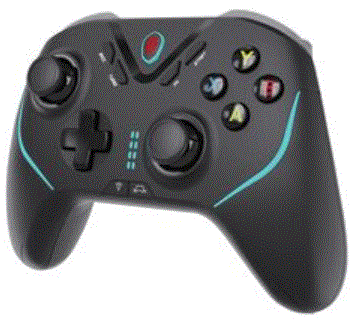
ফাংশন ডায়াগ্রাম


প্রযোজ্য নির্দেশাবলী
- এই পণ্য ergonomic নকশা গ্রহণ করে এবং আরামদায়ক বোধ.
- এটি ব্লুটুথ 5.0 edr/ble সংযোগ গ্রহণ করে এবং কন্ট্রোলারটি ব্লুটুথের মাধ্যমে NS এবং অন্যান্য হোস্টের সাথে সংযুক্ত থাকে।
- This handle is applicable to switch, ps3/ps4, Android, iOS mfi/apple arcade, PC Steam and other platforms.
- এটি শুটিং প্লাস V3 অ্যাপ সমর্থন করে, যা বিভিন্ন মোবাইল অ্যাপ্লিকেশন বাজারের মাধ্যমে ডাউনলোড করা যেতে পারে।
- Support Android and Hongmeng hid standard mode, and you can play all kinds of game hall games that support HID standard mode.
- Support mfi/apple arcade games in iOS 13.0 and above systems, and MFI games can also be found in Shanwan MFI app download.
- ব্লুটুথ সংযোগের মাধ্যমে গেম খেলতে PS3 / ps4 / সুইচ গেম কনসোল সমর্থন করুন।
- উইন্ডোজ 10 সিস্টেম ল্যাপটপের ব্লুটুথ সংযোগ সমর্থন করুন এবং এক্স-ইনপুট গেম খেলুন।
- It supports USB cable and can play PC/PS3/Switch games.
- মোবাইল ফোন সিস্টেমের সমস্যার কারণে, কিছু মোবাইল ফোন এই ডিভাইসটি সমর্থন নাও করতে পারে।
- Our company is not responsible for the inability of some games to connect with this product due to irresistible factors such as software upgrade or source code change of he official game platform. Our company reserves the right of final interpretation
বৈদ্যুতিক পরামিতি
- কাজ ভলিউমtage: DC3.7V
- সময়কাল: >20H The magic lights don’t work
- চার্জিং ভলিউমtage/currentDC5V/400mA
- বর্তমান কাজ when the light is on: <110mA
- কাজ করছে current<25mA The magic lights don’t work
- বর্তমান ঘুম: <0uA
- ব্লুটুথ সংক্রমণ দূরত্ব =8M
- স্ট্যান্ডবাই সময়: 30 days on full charge
- ব্যাটারি ক্ষমতা: 800mAh
পণ্য নির্দেশাবলী
সুইচ মোড
- On the SWITCH host, select Controllers-> Change Grip/order, Enter into the SWITCH host pairing mode interface Press L+R on the controller.
- চাপুন
 button at the same time for 2 seconds to enter SWITCH mode pairing, the LED light of the handle will flash green quickly, and the corresponding LED light will be green and long-lighted for successful pairing.
 - If you have successfully connected, you can directly press the
 button, the LED light will flash green slowly and connect back automatically.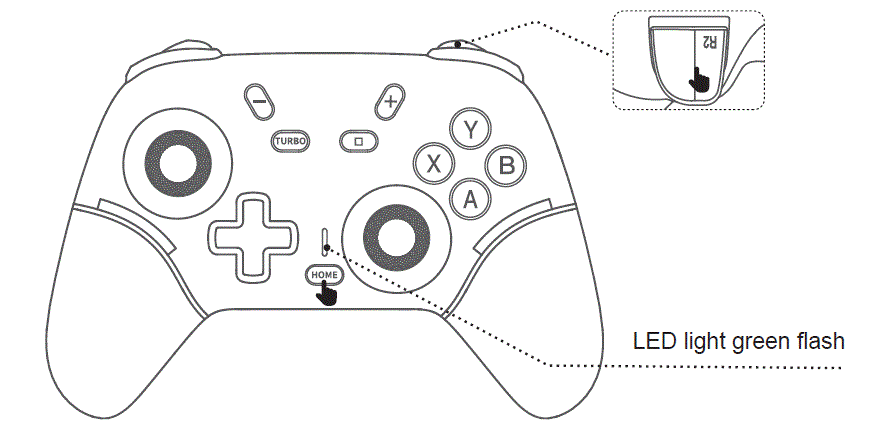
PS3/PS4 মোড:
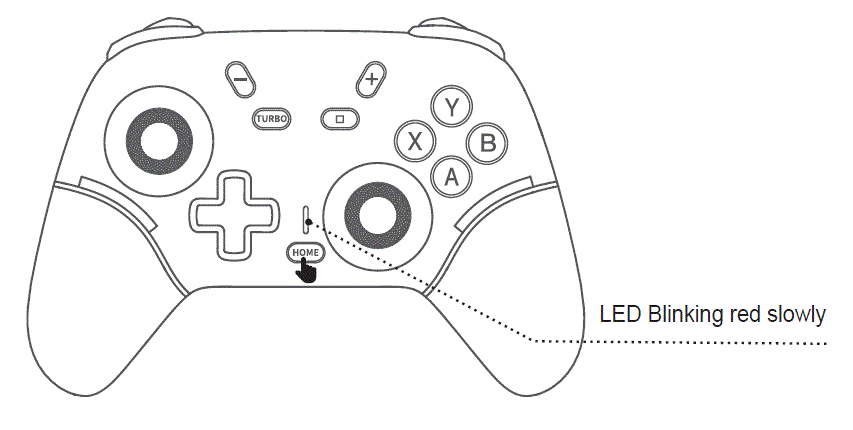
- Connect the controller directly to the PS3/PS4 host with the USB data cable, press button for code alignment, and the LED indicator blinks red slowly after code alignment is successful.
- Has been successfully connected, you can directly press, LED light red long bright, automatic back connection.
অ্যান্ড্রয়েড শুটিংপ্লাস ভি৩ মোড (হংমেং সিস্টেমটি অ্যান্ড্রয়েড শুটিংপ্লাস ভি৩ মোডের মতোই):
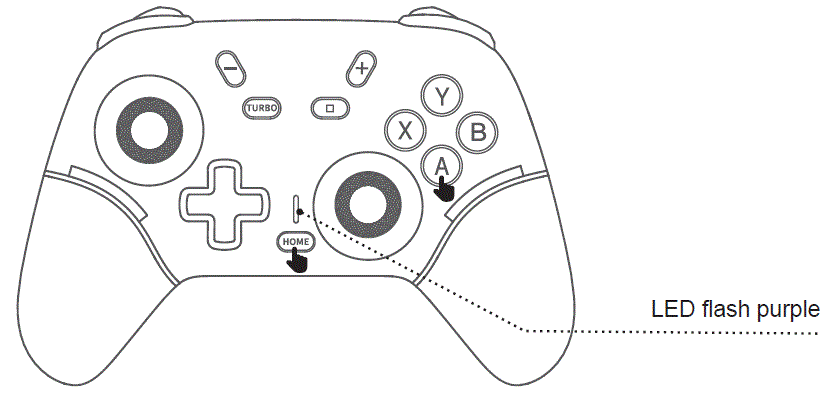
- একই সময়ে, A + টিপুন for 2 seconds to enter the V3 Android mode. The LED light of the controller blinks purple quickly. When the Android phone searches for “Gamepad”, select Connect. After the connection is successful, the LED light of the handle will brighten in purple.
- Have successfully connected, you can directly presskey, LED light purple light slowly flashing, automatic back connection.
 iOS ShootingPlus V3 মোড
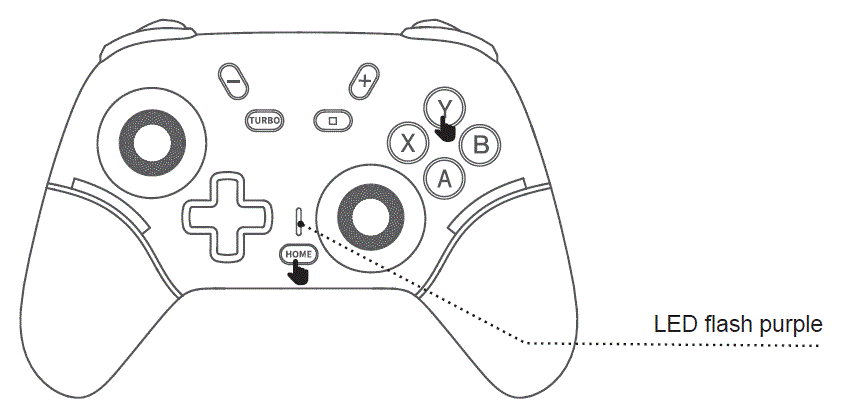
- একই সময়ে, Y + টিপুন for 2 seconds to enter the V3 iOS mode. The LED light of the controller blinks purple quickly. When the iPhone searches for Gamepad, select Connect. After the connection is successful, the LED light of the handle will brighten inpurple.
- Have successfully connected, you can directly press key, LED light purple slow flash, automatic back connection.
অ্যান্ড্রয়েড স্ট্যান্ডার্ড মোড
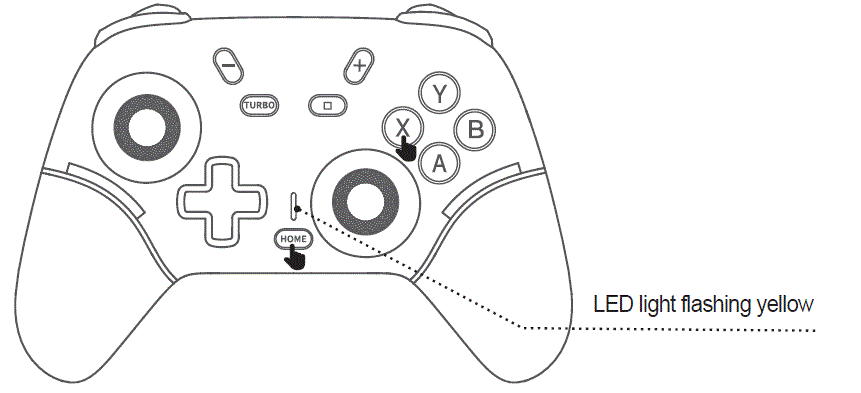
- একই সময়ে, চাপুন
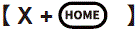 key to enter the standard Android mode, and the LED light of the handle flashes yellow quickly, when the Android/Hongmon When the device name Gamepad is found, select Connect. After the connection is successful, the LED light of the handle will be bright yellow. Have successfully connected, you can directly press key, LED light yellow slow flash, automatic back connection.
 - অ্যান্ড্রয়েড/হংমেং স্ট্যান্ডার্ড মোড গেম ডাউনলোড, আপনি বিভিন্ন গেম হল ডাউনলোড করতে পারেন, প্রয়োজনীয় গেম ডাউনলোড করতে প্ল্যাটফর্মে প্রবেশ করুন।
iOS MFi / Apple Arcade mode (iOS 13.0 or later):
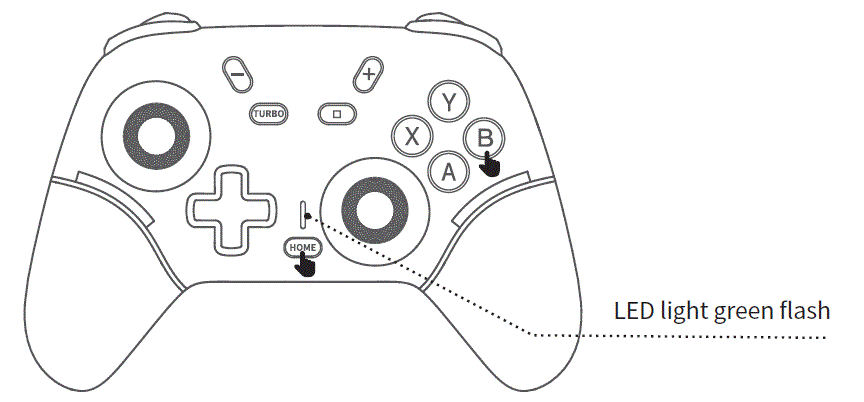
- একই সাথে চাপুন
 key for 2 seconds to enter iOS MFi mode, and the LED light on the controller will flash green. When the Apple phone searches for the device name “DUALSHOCK 4 Wireless Controller”, select Connect. After successful connection, the LED light on the handle will remain green for a long time.
 - Successfully connected, you can directly press thekey, the LED light will flash slowly in green, and it will automatically reconnect.
- MFi games can also be downloaded from the ShanWan MFi app.
PCX-ইনপুট ব্লুটুথ মোড
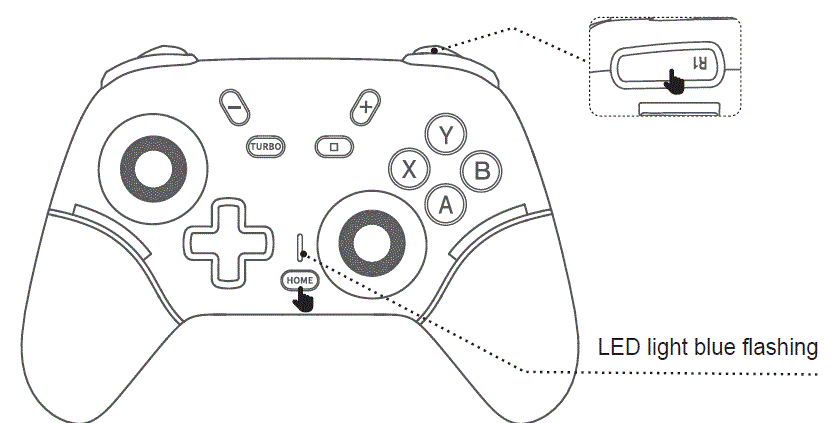
- একই সাথে চাপুন
 key for 2 seconds to enter X-input Bluetooth mode. The LED light on the controller will flash blue. When the PC searches for the device name “Xbox Wireless Controller”, select Connect. After successful connection, the LED light on the handle will remain on in blue.
 - Successfully connected, you can directly press th key, the LED light will slowly flash blue and automatically reconnect.
প্রোগ্রামিং
- যখন গেমপ্যাড সক্রিয় থাকে, তখন ডিফল্ট প্রোগ্রামিং কী PL/PR শূন্য থাকে।
- "M" বোতাম এবং প্রোগ্রামিং বোতাম (PL/PR) টিপুন এবং ধরে রাখুন, যা একই সময়ে সেট করতে হবে, এবং তারপর LED সূচকটি জোড়া লাগান। আলো ধীরে ধীরে জ্বলে, মোটরটি একটি ইঙ্গিত দেয় এবং প্রোগ্রামিং মোডে প্রবেশ করার জন্য কীটি ছেড়ে দেওয়া হয়।
- কপি করার জন্য এক বা একাধিক নিয়মিত ফাংশন কী টিপুন (উদাহরণস্বরূপample, “A/B/X/Y /R1 /R2 / L 1/ L2 / L3 / R3 এবং তীর কী এবং বাম এবং ডান জয়স্টিক [জয়স্টিকগুলিকে আটটি কী হিসাবে গণনা করা হয়] টিপুন”, যখন আপনি কপি কী টিপবেন, তখন LED জ্বলবে [একই কী এর পরপর দুটি বা ততোধিক এন্ট্রি চিনতে এবং রেকর্ড করতে পারে, উদাহরণস্বরূপample, ইনপুট চলাকালীন A কীটি একটানা দুবার টিপলে, এবং আউটপুট চলাকালীন A কীটিও একটানা দুবার টিপলে], নিশ্চিত করতে এবং স্বয়ংক্রিয়ভাবে প্রস্থান করতে সংশ্লিষ্ট প্রোগ্রামিং "PL/PR" বোতামটি আবার টিপুন [যদি আপনি স্বয়ংক্রিয়ভাবে প্রস্থান সংরক্ষণ করতে 60 সেকেন্ডের জন্য M কী টিপবেন না], এবং প্রস্থান করার সময় মোটরটি কম্পিত হয়। প্রোগ্রামিং সেটিং সম্পূর্ণ হলে, মোড সূচকটি সেটিং এর আগে ডিসপ্লে অবস্থায় ফিরে আসে।
- Cancel the programming function: After entering the programming setting mode,directly press the PL/PR Key to exit, without setting any Key [This PL/PR Key is empty without any key value].
2.4G mode (optional)
PC device / smart TV / TV box [PS3 host 2.4G wireless connection operation method
- পিসি ডিভাইস/স্মার্ট টিভি/টিভি বক্সের USB পোর্টে 2.4G ওয়্যারলেস রিসিভারটি ঢোকান।
- চাপার পর
 বোতামটি একই সময়ে, কন্ট্রোলারটি ওয়্যারলেস পেয়ারিং মোডে প্রবেশ করে এবং LED আলো সাদা রঙে জ্বলজ্বল করে।
 - ওয়্যারলেস সংযোগ ঠিক হয়ে যাওয়ার পরে, LED আলো দীর্ঘ সময় ধরে সাদা থাকবে।
- গেম ডাউনলোড এবং ইনস্টল করার জন্য আপনি পিসি ডিভাইস/স্মার্ট টিভি/টিভি বক্স/পিএস৩ কনসোল ব্যবহার শুরু করতে পারেন।
Controller charge / sleep / wake-up function
- When the controller is charged in the off state (press the【 】Button to turn on / off), the corresponding mode indicator flashes slowly and remains on after full charge. When charging in the Bluetooth connection state, the corresponding mode indicator light flashes slowly and stays on after being fully charged.
- Sleep/wake function: The game controller will enter sleep mode if not used within 5 minutes. Pairing and Connecting In state: If the controller cannot be connected for 1 minute, it will enter sleep mode. When it needs to be reused, press Press the 【 】 key to wake up and reconnect.
- যখন ব্যাটারি কম থাকে, তখন সংশ্লিষ্ট মোড সূচকটি জ্বলে ওঠে।
- তারযুক্ত মোডে, সংশ্লিষ্ট মোড চার্জিংয়ের নির্দেশাবলী দেয় না।
Wired USB mode operation method and precautions
- Insert the USB cable, and the controller will automatically recognize the currently inserted device (there is no need to press the【 】Button to power on in wired mode);
- The LED in Xinput mode lights up blue, while the LED in D input mode lights up red.
মনোযোগ প্রয়োজন বিষয়
- বিজ্ঞাপনে এই পণ্য সংরক্ষণ করবেন না দয়া করেamp বা গরম জায়গা।
- পণ্যটির অপ্রয়োজনীয় ক্ষতি এড়াতে, এই পণ্যটিকে ধাক্কা দেবেন না, মারবেন না, লাঠি দেবেন না, খোঁচা দেবেন না বা আলাদা করার চেষ্টা করবেন না।
- পণ্যের অন্তর্নির্মিত ব্যাটারি আবর্জনার সাথে ফেলে দেওয়া উচিত নয়।
- আগুন বা অন্যান্য তাপ উত্সের কাছাকাছি হ্যান্ডেল চার্জ করবেন না।
- অ-পেশাদারদের এই পণ্যটি বিচ্ছিন্ন করার অনুমতি নেই, অন্যথায় এটি বিক্রয়োত্তর ওয়ারেন্টি পরিষেবাতে অন্তর্ভুক্ত করা হবে না।
অপারেশন মোড
ব্লুটুথ প্রোfile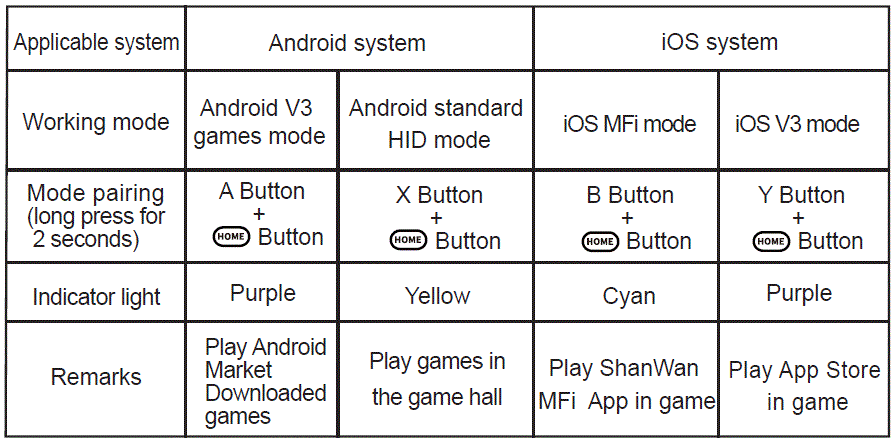
অন্যান্য ব্লুটুথ প্রোfiles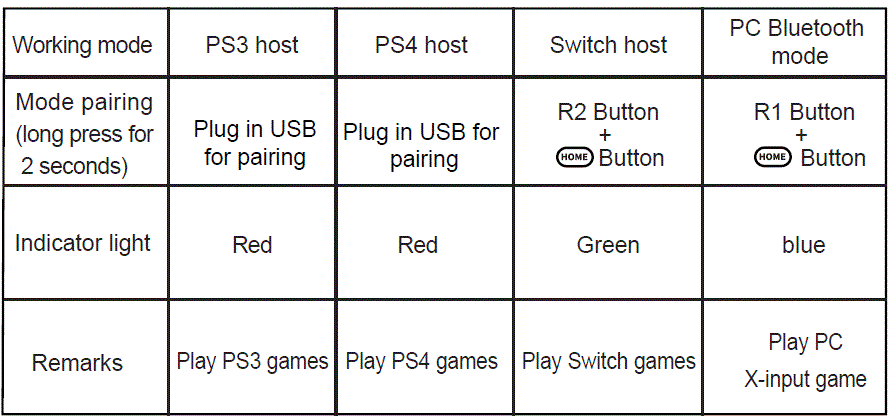
অ্যান্ড্রয়েড ভার্সনে PS4 ব্লুটুথ মোডের কোনও কার্যকারিতা নেই
2.4G মোড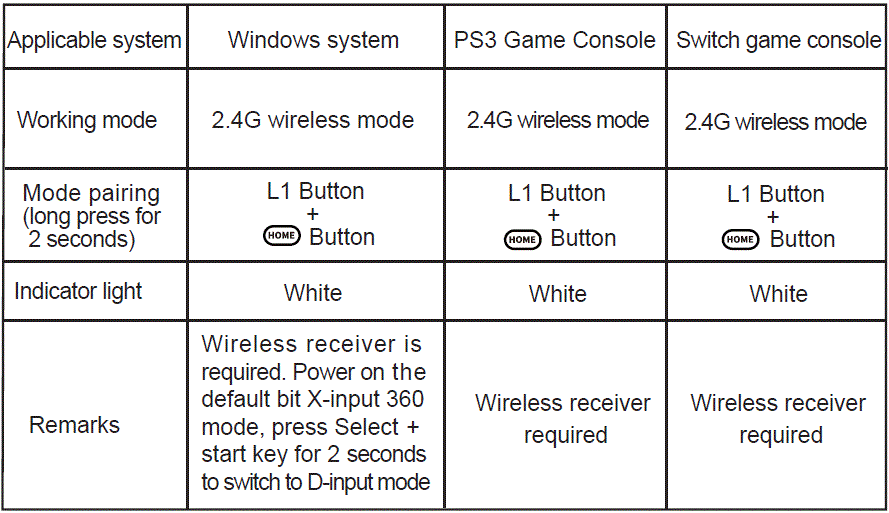
তারযুক্ত মোড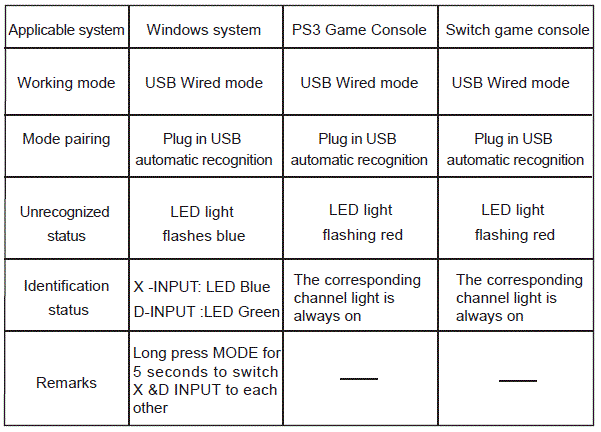
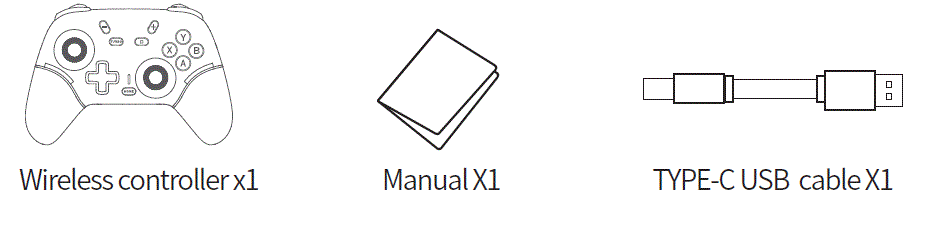
পণ্যের তালিকা
 FCC সতর্কতা
এই সরঞ্জামগুলি পরীক্ষা করা হয়েছে এবং FCC নিয়মের 15 অংশ অনুসারে ক্লাস B ডিজিটাল ডিভাইসের সীমা মেনে চলতে পাওয়া গেছে। এই সীমাগুলি একটি আবাসিক ইনস্টলেশনে ক্ষতিকারক হস্তক্ষেপের বিরুদ্ধে যুক্তিসঙ্গত সুরক্ষা প্রদানের জন্য ডিজাইন করা হয়েছে৷ এই সরঞ্জামগুলি রেডিও ফ্রিকোয়েন্সি শক্তি উৎপন্ন করে, ব্যবহার করে এবং বিকিরণ করতে পারে এবং যদি নির্দেশাবলী অনুসারে ইনস্টল না করা হয় এবং ব্যবহার করা না হয়, তাহলে রেডিও যোগাযোগে ক্ষতিকারক হস্তক্ষেপ হতে পারে। যাইহোক, কোন গ্যারান্টি নেই যে একটি নির্দিষ্ট ইনস্টলেশনে হস্তক্ষেপ ঘটবে না। যদি এই সরঞ্জামটি রেডিও বা টেলিভিশন অভ্যর্থনায় ক্ষতিকারক হস্তক্ষেপের কারণ হয়, যা সরঞ্জাম বন্ধ এবং চালু করে নির্ধারণ করা যেতে পারে, ব্যবহারকারীকে নিম্নলিখিত এক বা একাধিক ব্যবস্থা দ্বারা হস্তক্ষেপ সংশোধন করার চেষ্টা করার জন্য উত্সাহিত করা হয়:
- রিসিভিং অ্যান্টেনাকে রিওরিয়েন্ট বা স্থানান্তরিত করুন।
- সরঞ্জাম এবং রিসিভার মধ্যে বিচ্ছেদ বৃদ্ধি.
- রিসিভার সংযুক্ত সার্কিটের থেকে আলাদা একটি আউটলেটে সরঞ্জামগুলিকে সংযুক্ত করুন৷
- সাহায্যের জন্য ডিলার বা একজন অভিজ্ঞ রেডিও/টিভি টেকনিশিয়ানের সাথে পরামর্শ করুন।
সতর্কতা: নির্মাতার দ্বারা স্পষ্টভাবে অনুমোদিত নয় এই ডিভাইসের কোনো পরিবর্তন বা পরিবর্তন এই সরঞ্জাম পরিচালনা করার জন্য আপনার কর্তৃত্ব বাতিল করতে পারে।
এই ডিভাইসটি FCC নিয়মের 15 অংশ মেনে চলে। অপারেশন নিম্নলিখিত দুটি শর্ত সাপেক্ষে:
- এই ডিভাইসটি ক্ষতিকারক হস্তক্ষেপের কারণ নাও হতে পারে, এবং
- এই ডিভাইসটি অবশ্যই প্রাপ্ত যেকোনো হস্তক্ষেপ গ্রহণ করবে, যার মধ্যে হস্তক্ষেপ সহ অনাকাঙ্ক্ষিত অপারেশন হতে পারে।
এই সরঞ্জামগুলি একটি অনিয়ন্ত্রিত পরিবেশের জন্য নির্ধারিত FCC বিকিরণ এক্সপোজার সীমা মেনে চলে। এই সরঞ্জামটি রেডিয়েটর এবং আপনার শরীরের মধ্যে ন্যূনতম 0 সেমি দূরত্ব রেখে ইনস্টল এবং পরিচালনা করা উচিত।
প্রায়শই জিজ্ঞাসিত প্রশ্নাবলী
- প্রশ্নঃ কাজের ভলিউম কি?tage of the X9 Wireless game controller?
- A: কাজের ভলিউমtage হল DC3.7V।
- Q: How far is the Bluetooth transmission distance of the controller?
- উত্তর: ব্লুটুথ ট্রান্সমিশন দূরত্ব ৫ মিটার।
- Q: Can I connect the controller to Windows 10 laptops for gaming?
- A: Yes, the controller supports Bluetooth connection with Windows 10 laptops for playing X-input games.
দলিল/সম্পদ
 |
Dongguan X9 Wireless Game Controller [পিডিএফ] ব্যবহারকারী ম্যানুয়াল X9, X9 Wireless Game Controller, Wireless Game Controller, Game Controller, Controller |